If you have more than one NDS server on your network, you can keep multiple replicas (copies) of the NDS Directory. That way, if one server or a network link to it should fail, users can still log in and use the remaining network resources.
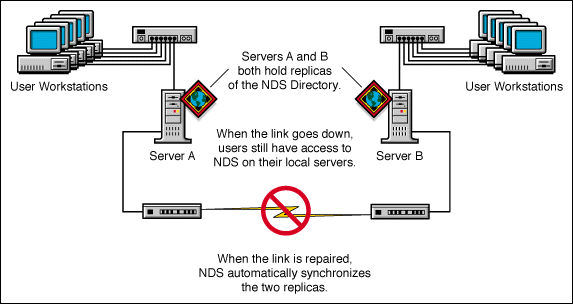
We recommend that you keep three replicas for fault-tolerance of NDS (assuming you have three NDS servers to store them on). A single server can hold replicas of multiple partitions.
NOTE: NDS replication does not provide fault tolerance for the file system. Only information about NDS objects is replicated. You can get fault tolerance for file systems by using the Transaction Tracking System* (TTS*), disk mirroring/duplexing, RAID, or Novell Replication Services* (NRS).
For servers before NetWare 5 that provide bindery services, a master or read/write replica is required.
If users regularly access NDS information across a WAN link, you can decrease access time and WAN traffic by placing a replica containing the needed information on a server that users can access locally.
The same is true to a lesser extent on a LAN. Distributing replicas among servers on the network means information is usually retrieved from the nearest available server.
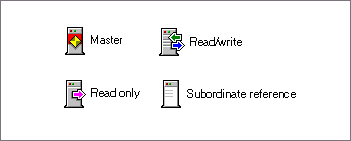
Four types of replicas are available, as shown below with their corresponding icons.
By default, the first NDS server on your network holds the master replica. There is only one master replica for each partition at a time. If other replicas are created, they are read/write replicas by default. For more information on partitions, see Partitions: Helping NDS Perform Well.
If you're going to bring down the server holding a master replica for longer than a day or two, you can make one of the read/write replicas the master. The original master replica automatically becomes read/write.
A master replica must be available on the network for NDS to perform operations such as creating a new replica or creating a new partition.
NDS can access and change object information in a read/write replica as well as the master replica. All changes are then automatically propagated to all replicas.
If NDS responds slowly to users because of delays in the network infrastructure (such as slow WAN links or busy routers), you can create a read/write replica closer to the users who need it. You can have as many read/write replicas as you have servers to hold them, although more replicas cause more traffic to keep them synchronized with each other.
The read-only replica has been devised for future implementations of NDS. Read-only replicas receive synchronization updates from master and read/write replicas but don't receive changes directly from clients.
Subordinate reference replicas are special system-generated replicas that don't contain all the object data of a master or a read/write replica. Subordinate reference replicas therefore don't provide fault tolerance. They only contain enough information for NDS to resolve names across partition boundaries.
You can't delete a subordinate reference replica; NDS deletes it automatically when it is not needed. Subordinate reference replicas are only created on servers that hold a replica of a parent partition but no replicas of its child partitions.
If a replica of the child partition is copied to a server holding the replica of the parent, the subordinate reference replica is automatically deleted.