A Directory Map object is a pointer to a path in the NetWare file system. It allows you to make simpler references to directories.
If your network has no NetWare volumes, you cannot create Directory Map objects.
A Directory Map object represents a directory on a NetWare volume. (An Alias, on the other hand, represents an NDS object.)
Create a Directory Map object to make drive mapping simpler, particularly in login scripts. Using a Directory Map object allows you to reduce complex file system paths to a single name.
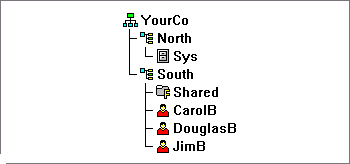
Also, when you change the location of a file, you don't need to change login scripts and batch files to reference the new location. You only need to edit the Directory Map object. For example, suppose you were editing the login script for the container South, shown below.
A command mapping drives to the SHARED directory on volume SYS would look like the following:
MAP N:=SYS.North.:Shared
If you created the Shared Directory Map object, the map command would be much simpler:
MAP N:=Shared
The Directory Map object has Name, Volume, and Path properties.
The Name property identifies the object in the Directory (for example, Shared), and is used in MAP commands.
The Volume property contains the name of the Volume object that the Directory Map object references, such as Sys.North.YourCo.
The Path property specifies the directory as a path from the root of the volume, such as PUBLIC\WIN95\NLS\ENGLISH.