Using Server Statistics
Understanding Server Statistics
You can view statistics from the View Server Statistics form (from the News Server interface, click Reports > View Server Statistics) about replication, all articles posted to the server, user connections, user posts, and user reads.
Replication Statistics
You can view the following information about incoming and outgoing discussion groups:
- Hostnames
- The number of articles offered, accepted, refused, and rejected by your server
An article is refused usually because it is a duplicate of another article on your server. An article is rejected because there is something wrong with the article and therefore it cannot be posted.
- The average number of articles per second sent from or received by your server
All Articles Posted to the Server
All Articles Posted to the Server refers to articles posted to your server by users and by discussion group replication. Article size is measured in bytes.
You can view the following information about articles and discussion groups on your server:
- The total number and size of articles received by your server.
- The number of posts to your server that were not received by your server. (Your server did not include the post in the article spool.)
- A list of the highest-posting discussion groups and hosts on your server.
- The total number of articles posted to your server that failed and the reason for the failure (for example, duplicate)
- A list of the top hosts sending articles to discussion groups not supported by your server, determined by the total number of articles sent to the unsupported discussion group by each host
- A list of the top hosts posting unapproved articles to moderated discussion groups on your server, determined by the total number of unapproved articles sent by each host
- A list of the top unsupported discussion groups being fed to your server, determined by the number of articles in each discussion group
- A list of the top moderated discussion groups on your server receiving unapproved articles, determined by the number of unapproved articles received by each discussion group
Understanding Posts and Cross-Posts
If an article is posted simultaneously to multiple discussion groups, only one copy of the article is stored in the spool.
For example, an article is posted to ROYAL.PETS.SNAKES, ROYAL.PETS.LIZARDS, and ROYAL.PETS.TURTLES. One copy of the article is stored in the spool for ROYAL.PETS.SNAKES. The copies for the other discussion groups are links to the article stored in ROYAL.PETS.SNAKES. The post is the article stored in ROYAL.PETS.SNAKES and the cross-posts are the copies in ROYAL.PETS.LIZARDS and ROYAL.PETS.TURTLES.
The following illustration shows one post in the origin server and two cross-posts in the target servers.
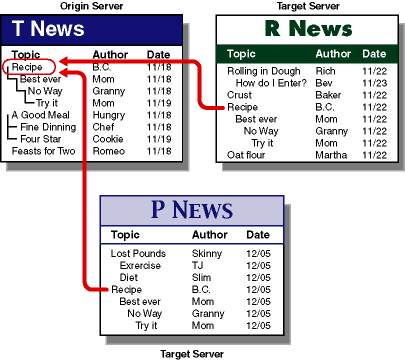

Cross-posts are not considered when determining statistics about the size of articles received by your server.
User Connections
A user connection is a connection by a user, not by a server. Connection time is measured in seconds.
You can view information about each user connection and the reason for each disconnection.
User Posts
A user post is a post to your server from a user, not a replication from another server.
You can view the following information about user posts:
- Article statistics
- The number of posts to your server that failed
- A list of the highest-posting discussion groups, hosts, and users on your server
User Reads
A read is when a user reads an article on your server.
You can view the following information about user reads:
- Read statistics
- A list of the top discussion groups, hosts, and users on your server, determined by the number of articles read in each entity
Viewing Server Statistics
-
From the General Administration page, click the News Server server name button > Reports > View Server Statistics.
-
Click one of the following options:
- Get Statistics For drop-down list > select the time period
- Get Statistics From > type the appropriate information in the associated fields
- Get All Available Statistics
-
Click one of the following options:
- Get Statistics Summary
- Get Statistics for Users Matching > type the users in the associated field
- Get Statistics for Hosts Matching > type the hosts in the associated field
- Get Statistics for Discussion Groups Matching > type the discussion groups in the associated field
You can use wildcard characters in your search string.
-
Select the number of entries you want to view.
-
Click OK.
Interpreting Server Statistics
The following statistic tools are used to gather server information.
Discussion Replication
You can use the discussion replication statistics to determine if your discussion group replications are operating correctly. You can determine if you are
- Receiving articles from the expected hosts
- Sending articles to the expected hosts
- Not offering articles to an expected host, indicating you are not sending to the host at all
- Offering articles to another host, but too many of your articles are being rejected by the host, indicating a problem with the replication setup to the host
All Articles Posted to the Server
You can use the All Articles Posted to the Server statistics to determine
- If you meet necessary disk storage requirements
- Which discussion groups you no longer want to support because they are consuming too much disk space and are not critical to your business
- Problems with the moderation policy on your server or on servers that are sending to your server
- Broken software at other sites sending malformed articles
User Connections
You can use the user connection statistics to determine
- Appropriate reader limits
- Server load and size
- Total usage
You can use the user disconnection statistics to determine
- Network troubles
- Client software problems
- Appropriate reader limits
User Posts
You can use the user posts statistics to determine
- Overall server usage
- Specific post problems to your server
- Traffic in local discussion groups that might not otherwise show in the All Articles Posted to Your Server section due to relatively low volume.
User Reads
You can use the user reads statistics to determine local discussion group usage.
Previous | Next