

| |
Although some optimization techniques are best suited for either permanent or on-demand connections, the following techniques are applicable to either type:
This topic contains the following sections:
Novell Internet Access Server 4.1 routing software provides two types of compression: PPP data compression and PPP header compression.
PPP data compression allows data to be transmitted in a more compact form. Enabling data compression reduces the amount of data transferred over a communications link by replacing previously observed data sequences with more compact sequences. This data compression causes the apparent speed (bandwidth) of the link to increase---at the cost of some additional router CPU overload---and allows for a more effective use of a PPP link when packets are being routed between remote LANs.
Header compression allows fields in the header of each data packet to be compressed and is used to reduce Data-Link-layer or Network-layer header overhead. Data-link header compression reduces the size of a header at the Data-Link layer. Network-layer header compression, available for the IPX and TCP/IP protocols, reduces the size of the header at the Network layer. Although enabling header compression reduces network overhead, PPP data compression provides much greater performance improvement.
NOTE: PPP header compression and PPP data compression cannot be enabled at the same time. Because data compression provides greater performance improvement than header compression, use data compression when you are connecting NetWare Link/PPPTM systems.
Novell Internet Access Server 4.1 uses software-based data compression based on the STAC LZS and Novell's Pattern Predictor algorithm that enables you to compress data over a wide range of interface speeds from 1200 bps to T1/E1.
Although data compression provides some benefit at speeds up to E1, the performance improvement is greater on links with speeds of 56 Kbps or less. The reason is that as link speed increases, the percentage of throughput improvement decreases as a result of the additional CPU execution time required in the compression process.
Transmitting data in a more compact form provides several benefits. Because it reduces the amount of data transferred over a communications link, data compression increases the apparent speed (bandwidth) of the link, at the cost of some additional router CPU overload. Data compression also enables more effective use of a PPP link when packets are routed between remote LANs.
NOTE: When data compression is enabled, it is used only if both the local and remote peers support a common compression technique for the link speed.
NetWare Link/PPP data compression works best when a constant supply of transmitted data is available at the interface. This constant supply of data maximizes the replacement of data sequences with more compact sequences. Therefore, when using IPX with NetWare Link/PPP data compression, you need to also use the IPX Packet Burst protocol and the LIP protocol.
You can optimize the performance of the link by configuring the parameters in the Timeouts and Retries window. The default PPP configuration parameter values conform to the values recommended by the Internet PPP specification; it should not be necessary to change them.
The default timeout and retry values are appropriate for most dedicated and switched circuits. If you are using satellite circuits that introduce significant increases in propagation delay, you might need to increase the LAPB timeout values to enable the data links to operate properly. LAPB retry parameters control data-link error detection and recovery.
The default LAPB T1 (LAPB T1 Ack Timeout) and T4 (LAPB T4 Idle Link Timeout) parameter values of Automatic make NetWare Link/PPP calculate the appropriate T1 and T4 timeouts based on the interface speed and the Maximum Transmission Unit (MTU) size, as follows:
T1 ms = T4 ms = MTU x 8 x 1000/interface speed + overhead
If the line speed is greater than 56K, the overhead equals 1750 ms; otherwise, the overhead equals 3000 ms.
PPP echo request generation enables you to detect a remote peer that is no longer responding. When PPP data compression is working, the LAPB T1 timeout provides a similar service. Although you can disable PPP echo request generation when data compression is working, the benefits are minor.
To configure interface timeout and retry parameters, load NIASCFG and follow this path:
Select Configure NIAS > Routing and Protocols > Network Interfaces > PPP Network Interface > Timeouts and Retries
The PPP Timeouts and Retries window is displayed, from which you can configure the following parameters:
Note that responses to received LCP echo requests are always generated, regardless of the state of this option. Disable this option for a busy link.
Set this value high for a delayed link or set it low for a noisy link.
Press Esc until you return to the main NIASCFG menu; save your changes when prompted.
If you want these changes to take effect immediately, exit NIASCFG, then bring down and restart the router. If you want to configure other parameters, do so now and restart the router when you are finished.
NOTE: Refer to the online help for information about the following available timeout and retry parameters: Request Retries, NAK Retries, Terminate Retries, Response Timeout, and LAPB N2 Retransmissions.
For information about configuring PPP data compression, see Configuring Data or Header Compression.
Except for TCP/IP, Network-layer header compression supports all WAN media, including PPP, X.25, frame relay, and SNA. TCP/IP compression supports PPP only. Header compression is best for line speeds of 64 Kbps or less. As link speed increases, the percentage of throughput improvement decreases because the compression process requires additional CPU execution time.
There are two common Network-layer header compression algorithms: Van Jacobson IP Header Compression for the TCP/IP protocol, and compressed IPX for the IPX protocol.
Van Jacobson published Compressing TCP/IP Headers for Low-Speed Serial Links as a Request for Comment (RFC) 1144. This method of header compression reduces the TCP/IP header from 40 bytes to between 3 and 5 bytes. TCP/IP compression supports only PPP.
User Datagram Protocol (UDP) and other IP traffic cannot take advantage of Van Jacobson compression because the protocol does not specify a method to compress only the IP header.
For information about configuring TCP/IP header compression, see Configuring Data or Header Compression.
Telebit* Corporation extended the Van Jacobson algorithm to the IPX protocol. They published RFC 1533---Compressing Headers over WAN Media . This specification shows how to compress any IPX header. It also enables you to (optionally) compress the transport header of NetWare Core ProtocolTM (NCPTM ) type 2222 (NCP Request) and type 3333 (NCP Reply) packets.
IPX header compression reduces the header from 30 bytes to 1 byte in the best case, or to 7 bytes in the worst case. NCP header compression reduces IPX and NCP overhead from 36 bytes to 2 bytes in the best case, or to 8 bytes in the worst case.
For information about configuring IPX header compression, see Configuring Data or Header Compression.
Data-link header compression is available only for PPP because leased or switched lines used for PPP connections do not manipulate PPP packets. For header compression to be effective on X.25 and frame relay, all intermediate switches must also implement header compression. This implementation requires changes in a service provider's infrastructure on a regional, national, and global basis.
With header compression, PPP has the option of eliminating the leading byte of the protocol field in the header when it is not used, thereby reducing this field from 2 bytes to 1. The PPP specification also allows the address and control fields of the Data-Link layer to be eliminated, because the High-level Data Link Control (HDLC) fields always contain the static values of 0xFF (all stations address) and 0x03 (unnumbered information). Eliminating these fields reduces the PPP data-link header by another 2 bytes.
NOTE: The HDLC address and control fields cannot be eliminated if you are using PPP data compression because the compression control protocol uses LAPB to provide reliable delivery of compressed data. LAPB uses both the address and control fields dynamically. In addition, the PPP protocol field is always 2 bytes for a compressed frame; therefore, it cannot be compressed either.
PPP header compression can be used on either uncompressed lines or lines with hardware data compression, such as dial-up lines with modems supporting V.42 bis or Microcom* Networking Protocol (MNP*).
For information about configuring PPP header compression, see Configuring Data or Header Compression.
The Packet Burst protocol enhances IPX by allowing larger data transactions, composed of multiple IPX packets, to be transmitted as a single burst. Acknowledgments are issued for the complete burst of packets instead of for individual IPX packets. Packet Burst can be used alone or with LIP, a combination that allows large IPX packets. For best results, you can enable Packet Burst and LIP on each client and server end node system. Although LIP and Packet Burst are included with NetWare 3.12 and NetWare 4TM servers, they can be enabled separately on the clients.
With Packet Burst and LIP, you can obtain dramatic improvements in performance over a WAN. Over a WAN, adding data compression further increases performance. Some benchmark results are included in the next section, Bandwidth/Benefit Ratios of Data Compression and Packet Burst. Similar performance gains can also be obtained when Packet Burst and LIP are combined with other vendors' data compression solutions, such as modems and DSUs that offer data compression.
For more information about how Packet Burst and LIP work, see Packet Burst Update: BNETX vs. VLMTM Implementations in the November 1993 NetWare Application Notes .
Data compression alone provides some increased performance, but you can get much better improvement by combining data compression with Packet Burst and LIP. It is now possible to drive the 56-Kbps circuit at two or three times its rated capacity.
Figure 7 shows the results of tests using Perform3TM and the following test parameter values with 486/33 clients and servers: 12, 128, 4096, 1024. The server sends 4096-byte packets for 12 seconds; 3072-byte packets for 12 seconds; 2048-byte packets for 12 seconds; and finally, 1024-byte packets for 12 seconds.
Figure 7
56-Kbps Circuit---Packet Burst and Compression versus Baseline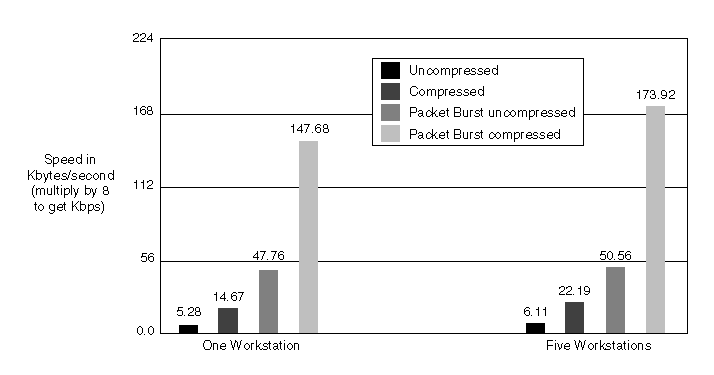
NOTE: These are benchmark results---performance gains with the NCP and Sequenced Packet ExchangeTM (SPXTM ) protocols might not be the same. NCP and SPX are both sensitive to latency, and it might be that the additional processing time of compression does not offset the gains in bandwidth reduction.
Data compression used without Packet Burst provides modest results, but compression gives exponential results when coupled with Packet Burst and LIP, as shown in Figure 8 .
Figure 8
T1 Circuit---Packet Burst and Compression versus Baseline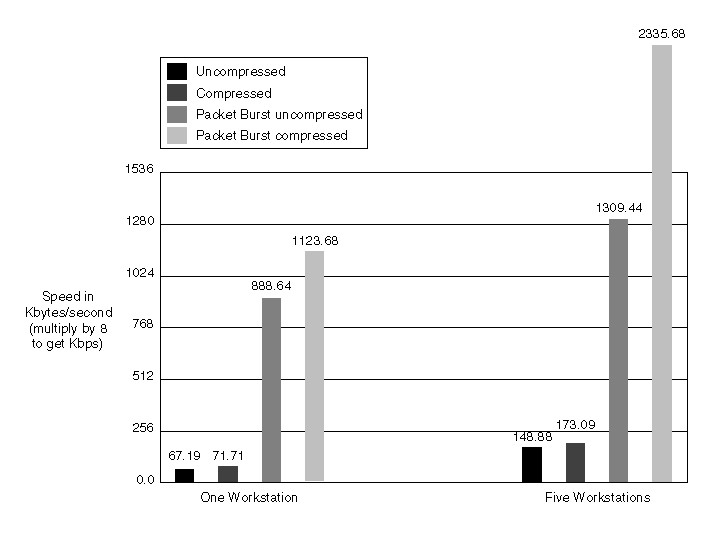
Data compression alone gives a gain of less than a 20 percent with five workstations. When given a Packet Burst stream, compression increases the result by more than 75 percent. Improvements in line efficiency with a single stream range from less than 7 percent to more than 25 percent.
NOS utilities can be a major source of the traffic that congests an on-demand connection. These utilities include login.exe, logout.exe, map.exe, and other utilities usually found on SYS:\public.
When using a slow WAN, you can reduce WAN congestion and avoid loss of client connection if you install the most frequently used NOS utilities on the client. For example, when the login.exe is found only on the server, logging in requires from 350 to 1000 small frames. When the LOGIN.EXE file is copied to the client, logging in requires only up to 250 frames.
| |