

| |
There are several ways you can set up remote access security to prevent unauthorized access. In addition to supporting NetWare® security (verifying NetWare password expiration), remote access provides port security at connection time.
Remote access security controls access to the remote access ports and services and determines the following:
You can authenticate remote access security both logically and physically. Logical authentication involves assigning usernames and passwords, and setting up restrictions. Physical authentication involves installing third-party hardware devices between the remote access ports and the modems.
Usernames provide the first level of security. In a NetWare 4TM or later environment, by default, all users in the container that you specified as having the Connect Rights Level can access the remote access server and establish a logical connection to the network. The user's access rights depend on the user's physical location in the tree and the trustee rights assigned to the CONNECT object.
Another way to restrict access by username is to use the console SET commands SET NWC CHECK CONTEXT=ON and SET NWC CHECK CONTEXT NAME=<context >. Only users with names of context are allowed access.
Before establishing a connection, remote access authenticates clients by prompting them for one of the following passwords:
NOTE: Remote access allows you to disable security and the prompt for the remote access Remote Client password.
The Remote Client password is designed so that NetWare security is not compromised by passing NetWare passwords in plain text or any other form over the wire. Remote Client passwords are used in the following cases:
Remote Client passwords are not required if you are using the default NetWare ConnectTM Authentication Protocol (NWCAP) security.
NOTE: If a Remote Client password is not assigned, the remote user using PAP or CHAP cannot gain access without a password. The remote user can gain access without a password only if the administrator enters Set PPPRNS AdmitNoConfig=ON at the server console. Set this flag to OFF to require a Remote Client password. By default, this flag is set to OFF and a Remote Client password is required.
Initially, you assign Remote Client passwords and then allow callers to choose and change their passwords. You can enhance security for Remote Client passwords by requiring the following:
If you allow callers to change their passwords, you can increase password security by requiring users to change passwords periodically. Remote access provides Windows and Macintosh tools to enable remote node users to change Remote Client passwords. Refer to the Novell Internet Access Server 4.1 remote access online help for more information about these tools. The NetWare Connect Service Selector (NWCSS) also provides an option for remote control dial-in users to change their Remote Client passwords. Passwords can contain up to 16 characters if the extended password feature is enabled.
Figure 5, Figure 6, and Figure 7 illustrate how security is implemented for each of the remote access services: PPP Remote Node Service (PPPRNS), AppleTalk Remote Access Service (ARAS), and NASITM (NetWare Asynchronous Services InterfaceTM ) Connection Service (NCS), respectively.
Figure 5
PPPRNS Security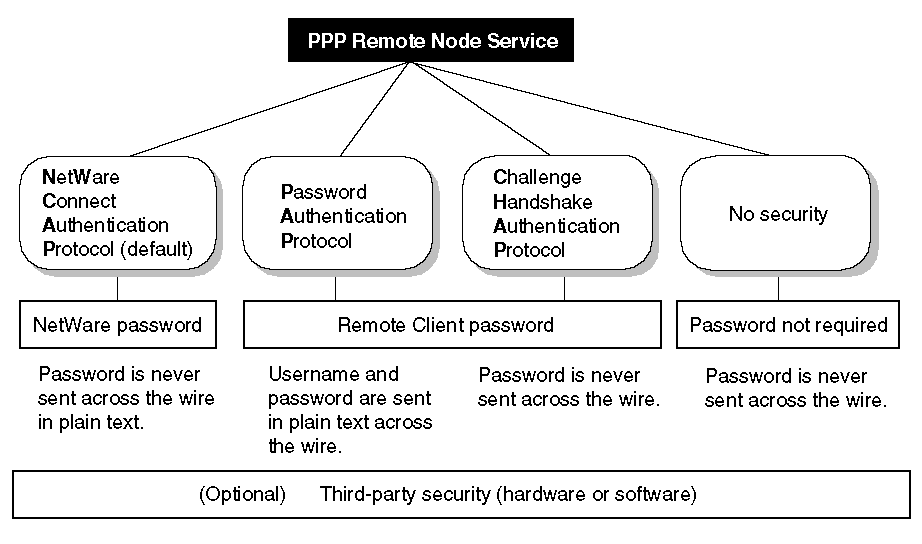
Figure 6
ARAS Security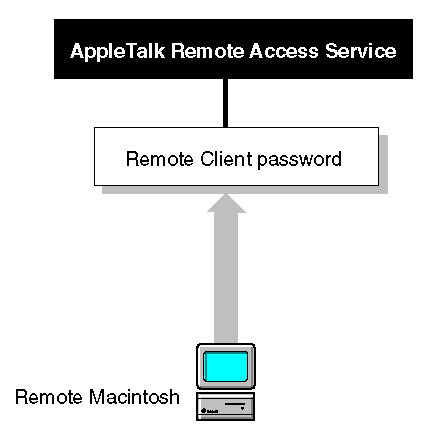
Figure 7
NCS Security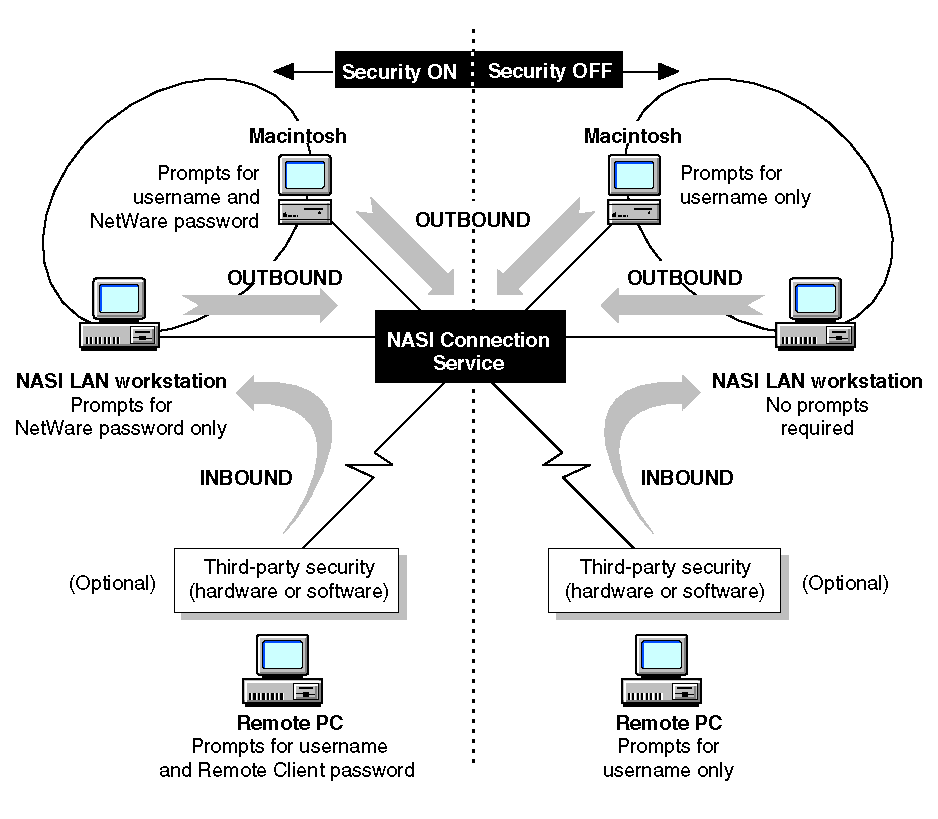
Restrictions control when and where a caller can connect, and they protect your network from unauthorized access. The following restrictions are configurable within remote access; however, after you establish a connection, NetWare security applies during login:
Port restrictions ---These restrictions limit users or services from accessing all ports.
Service restrictions ---These restrictions limit users or ports from accessing all services.
Time restrictions ---These restrictions limit the amount of time users can remain connected, disconnect a user if a connection remains idle for a set time, and limit the hours (the time of day and week) that a service can access a port.
Zone restrictions ---These restrictions limit callers from accessing specific AppleTalk zones on the network.
Dial-out restrictions ---These restrictions limit users to dialing out to authorized telephone numbers. This applies only when a modem-independent group is used; refer to Configuring NCS.
Dialback restrictions ---These restrictions enforce network security and allow the user to reverse charges by having a service call back. Dialback occurs when a remote user calls in, the call is validated, and remote access disconnects the call and dials back.
Account restrictions ---These restrictions lock a user's account when certain limits are exceeded. When an account is locked, no one can connect using that username. You specify that an account is locked automatically when the password expires and the three grace logins are used up, or when a set number of incorrect passwords is used. To unlock an account locked by intruder lockout, you can modify the user's security parameters or Remote Client password. To unlock an account locked by password expiration and running out of grace logins, modify the user's Remote Client password.
| |