

| |
This section discusses setting up remote access to be managed by ConnectView® and other SNMP management tools.
The following tasks must be performed on the remote access server to provide SNMP support:
The remote access software can be managed from any SNMP-based management console (including ConnectView) on the network. The Remote Access Management Agent (RAMA) provides access to remote access services and the AIO ports through the NCMA.NLM file. The NCMA.NLM file interfaces with other management consoles through NetWare SNMP (SNMP Agent), as shown below.
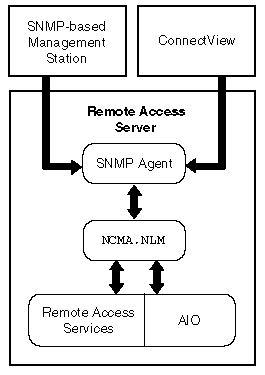

NetWare SNMP loads automatically when your server starts. However, to change the SNMP options, you can manually start NetWare SNMP with the command while NetWare SNMP is running. You can also modify the LOAD SNMP line in the AUTOEXEC.NCF file to include your preferred default options. To load NetWare SNMP, use the following command format:
load snmp [options]
The options allow you to establish the community name used in SNMP. NetWare SNMP also provides default community names for the monitor (read-only) and control (read/write) communities. NetWare SNMP uses these names for access control. The community name contained in a request message from an SNMP management station must match the name established by NetWare SNMP. By default, the control community is disabled for NetWare SNMP.
NOTE: If NetWare SNMP receives a request protocol data unit (PDU) whose community name is not authorized, NetWare SNMP does not respond to the request.
Community types can also be disabled. When a community type is disabled, no management entity can access information for that community. For example, if you disable the control community, no one can use NetWare SNMP to perform SET operations against the data NetWare SNMP manages.
The LOAD command line accepts three SNMP options:
M [onitorCommunity] = [CommunityName ]
C [ontrolCommunity] = [CommunityName ]
T [rapCommunity] = [CommunityName ]
The option parameters are not case-sensitive. In addition, when specifying option parameters, you need to enter only the first character of the option name, although complete or partial names are also accepted. For example, T, TrapCom, and Trap are all interpreted as TrapCommunity.
The Community Name is an arbitrary ASCII string of up to 32 characters. It can include any characters except space, tab, open square bracket ([), equal sign (=), colon (:), semicolon (;), and number sign (#).
NOTE: Community names are case-sensitive. Therefore, the names Public, public, and PUBLIC denote three different communities.
To enable access to a community for a single community name, enter the option parameter, followed by an equal sign (=), followed by the community name. Thereafter, the community name offered by the SNMP management station must match the specified value; otherwise NetWare SNMP denies access for the request.
If you follow the option name only by an equal sign without an argument, NetWare SNMP accepts any community name offered by an SNMP management station for that community. For example, the following command will allow read access to any community name:
load snmp monitorcommunity=
To disable access to a community, enter the associated option name without following it by an equal sign (=). For example, the following command will load SNMP and disable all read/write access:
load snmp controlcommunity
To set the read/write community to secret, use the following command:
load snmp controlcommunity=secret
To disable all read/write access, use the following command:
load snmp controlcommunity
To allow any community name to be used for read access, use the following command:
load snmp monitorcommunity=
To allow any community name to have read-only access, and to set the read/write community name to private, use the following command:
load snmp m= c=private
To set the community name for traps to AgentTrap , use the following command:
load snmp Trapcommunity= AgentTrap
To receive traps sent by NetWare SNMP, make sure your management station address is listed in the IP or IPX section of the SYS:\ETC\TRAPTARG.CFG file. Edit the file with any ASCII text editor and follow the instructions given in the file comments.
An example of the TRAPTARG.CFG file is shown in Figure 9. This file specifies all SNMP managers that are to receive SNMP trap messages generated by the SNMP Agent (SNMP.NLM).
Figure 9
Sample TRAPTARG.CFG File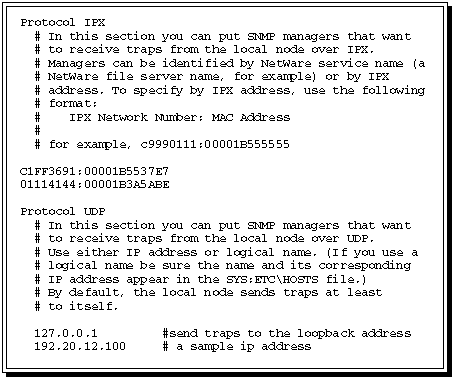
The Remote Access Management Agent is loaded when you start remote access with the nwcstart command. You can check to see whether RAMA is already loaded using the MODULES command.
To enable RAMA (if it is not loaded), load NIASCFG and follow this path:
Select Configure NIAS > Remote Access > Set Up ... > Select Remote Access Services > RAMA
After you select RAMA, the necessary load and unload commands are added to the NWCSTART.NCF and NWCSTOP.NCF files.
The server asks, Do You Want to Start This Service Now? If you select Yes, the service is started. Otherwise, the service will not be started until the next nwcstart command.
After loading, the RAMA registers the management information bases (MIBs), NCMIB and AIOMIB, with the SNMP Agent so it knows to forward requests that are designated for remote access. The RAMA then reads the remote access and AIO configuration information and registers with the Remote Access Supervisor for notification of remote access configuration changes.
NOTE: The RAMA must run on the same server as the NetWare SNMP Agent.
| |