E-mail Services on NNLS
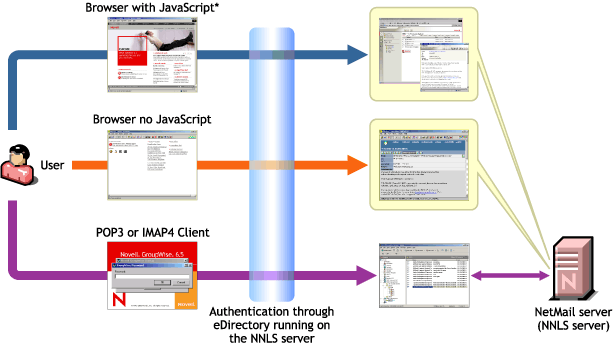
Figure 5 illustrates the e-mail services that are enabled by completing the steps in the sections that follow.
A more detailed overview of NNLS e-mail services on NNLS is found in "Novell NetMail 3.5 and the GroupWise 6.5 Collaboration Client" in the Novell Nterprise Linux Services Overview, Planning, and Implementation Guide.
Figure 5
E-mail Services on NNLS
To prepare your NNLS server for the e-mail services illustrated in Figure 5, you must complete the instructions in the following sections.
NOTE: The exercises in this guide provide only a simple demonstration of users on the same NNLS server communicating with each other.
If you want to test e-mail interaction with the Internet, you will need to use an official domain name and follow the instructions for configuring the SMTP Agent located in "SMTP Agent" in the Novell NetMail 3.5 Administration Guide.
If you want to test SMTP mail transfers between separate systems in the lab, you need to configure the agent. Using an official domain name is not required; you only need a DNS server on the LAN that the lab is running on.