1.4 Enterprise Mode - Overall Architecture
The Enterprise, or OpenVPN mode of operation is based on the open source project at http://openvpn.net/. It is targeted for enterprise users. A high degree of user experience is achieved through this mode of access. In this mode, the user must either have administrator privileges in the machine, or an administrator privileged service needs to accepted when connecting to the SSLVPN server from a non-administrator privileges account. It also works at the IP layer, versus the Kiosk mode application layer, and routing becomes a key issue as we will see later.
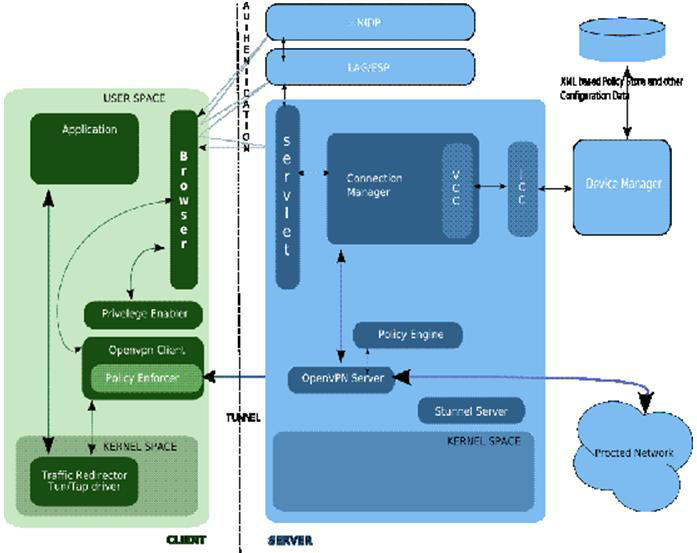
The diagram below shows the components associated with the Enterprise Mode.
Figure 1-8 Enterprise Mode Components
1.4.1 SSLVPN Enterprise Mode - Server-side Components
Servlet: The SSLVPN servlet component can be run on any tomcat or servlet engine, and it need not be installed on the actual SSLVPN server itself. If it is not installed on the SSLVPN server, administrators must modify the config.txt file in the /var/opt/novell/tomcat5/webapps/sslvpn/WEB-INF/ directory. See Configuring Load Balancing Through Servlets' under http://www.novell.com/documentation/novellaccessmanager/adminguide/index.html?page=/documentation/novellaccessmanager/adminguide/data/b6820mb.html . This servlet package name is novl-sslvpn-servlet-3.* (* depends on version.) For the most part includes the /var/opt/novell/tomcat5/webapps/sslvpn/* files required by the servlet environment. The servlet receives the authenticated users sessions specific information from the Access Gateway. The goal of the servlet is to:
-
Handle incoming HTTP requests from the Access Gateway destined for the SSLVPN login (/sslvpn/login) page.
-
Run an individual communication channel with the applet for the direct control of the client session, making sure that the session is open and valid, or closed and cleared.
-
Send/receive control messages to/from the SSLVPN connection manager. For example, this would include sending the user credentials, sending roles to the connection manager components, and processing the traffic policies coming back for that user.
Connection Manager: This is a TCP-based application running on a SLES server that listens on TCP port 2010 and communicates with the above servlet. This component, as well as the others below, are all part of the novl-sslvpn-3.* (* depends on version). The connection manager service is in /opt/novell/sslvpn/bin/connman. Its main functions include the following:
-
Managing a TCP socket to communicate with:
-
Admin Console, to synchronize the configuration changes
-
OpenVPN Server, pushing changes out
-
Monitoring and Auditing module, for interfacing into the NSure Auditing system
NOTE:In Enterprise mode, the Connection Manager communicates with OpenVPN using the TCP socket. The port number is dynamically chosen and supplied to OpenVPN through its configuration file. In OpenVPN this is known as the management port.
-
-
Dynamic connection management such as:
-
Pulling out the policies from configuration database for a particular identity.
-
Communicating the change in data for OpenVPN server.
-
Policy Engine: As with the Kiosk mode solution, there is a policy enforcer component at the server as well as on the client. Given a specific request passed to it by the OpenVPN server, this component checks against the policies saved in the policy.txt file at /etc/opt/novell/sslvpn from policy store (obtained via the Connection Manager). Depending on whether a match is found, the traffic is either allowed or denied.
Traffic Redirector: The component sits at the kernel level as a network driver. The drivers used here are tun/tap drivers. Tun/Tap drivers are already installed on Linux systems, whereas by default the drivers for Windows system are delivered during the initial connection from the SSLVPN server that includes binaries. The Tun driver simply forwards traffic from stack to a userspace client (openvpn), and the openvpn server does the actual encryption/decryption service. Although both Tun and Tap drivers exist, Access Manager uses the Tun interface with no option to use Tap. The Tun mode uses a routing method, whereas the Tap mode uses bridging. The advantages of the routing mode include:
-
Efficiency and scalability (scales well with more devices added)
-
Better tuning of MTU for efficiency (very important when working with disparate networking topologies).
The disadvantage is that routes must be set up linking each subnet.
OpenVPN Server: This component is responsible for encrypting and tunneling data destined for one of the SSLVPN protected networks, and it is done at the network stack level. This component is only used for enterprise mode access, where the user needs to have a root privilege or the user system is already deployed with a thin service (Install Enabler). If a connected user has root privileges, the Enterprise mode is performed automatically; for users that do not have root privileges, the option to use Enterprise mode still exists through the 'Priveleged enabler' client component (see below).
VCC/JCC: This is the protocol used to interface into the Access Manager configuration store. All changes to the configuration in the DeviceManager are synchronized with the SSLVPN server components via the Connection Manager.
1.4.2 SSLVPN Enterprise Mode - Client-side Components
Browser: The browser is initially required to contact the SSLVPN servlet via the Access Gateway. Once connected, keep-alive probes are continuously sent from the browser to the SSLVPN servlet to make sure that the existing session remains valid.
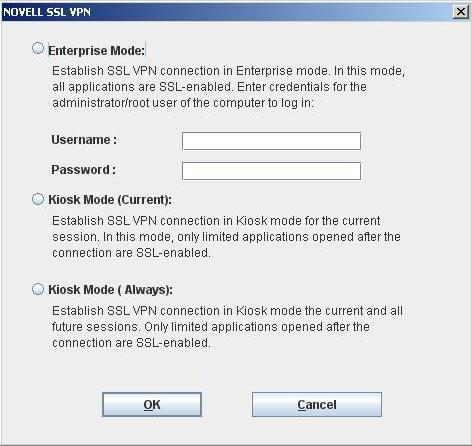
Privilege Enabler: This component is used to bypass the normal user limitations for Enterprise mode clients. When a non-privileged user connects to the SSLVPN server for the first time, that user is prompted for administrator credentials to provide the user the option of using Enterprise mode (see below). Administrator rights are required because the OpenVPN stack tunneling the data is required to redirect traffic at the network level. This service handles dynamic OpenVPN client launching and other privileged operations, which requires root privileges.
Figure 1-9 SSL VPN Admin/Root Privileges
OpenVPN Client: The OpenVPN client is a client daemon that associates itself to a Tun device and manages it. It is the primary component necessary for implementing SSL tunneling in enterprise mode access. When policies dictate that the traffic must be sent through the tunnel, the OpenVPN client sends the encrypted data out the Tap interface to go out the wire.
Policy Enforcer: When the OpevVPN client intercepts the application level request, it checks with the policy enforcer to determine whether the request needs to out out through the SSLVPN tunnel. This component checks the policies associated with this authentication and checks whether the outgoing request conforms to the policies allowed for that user. Depending on the response, it allows or denies them.
Traffic Redirector: In case of enterprise mode access, the traffic redirector sits at the kernel level as a network driver. The drivers used here are Tun/Tap drivers. Tun/Tap drivers are already installed on Linux systems, whereas the drivers for Windows systems are delivered from the SSLVPN server via the binary download. The Tun driver forwards traffic from the stack to a userspace client (OpenVPN), and this OpenVPN client does the actual encryption/decryption of application-level data.
1.4.3 Enterprise Mode Authentication Flow
The Enterprise mode authentication flow is based on the assumption that you are authenticated and have accesses to SSLVPN login page .Both Kiosk and Enterprise mode flow are almost same till step 7 and when the applet starts running, the following sequence of events start occuring in Enterprise mode from Step 8 onwards.
-
Proxy sends a request to the SSLVPN servlet (cookie and authenticated identity information are passed to the Servlet through this message).
-
The Servlet informs Connection Manager of a successful connection and awaits the user policies and client binaries.
-
At this time, Connection Manager becomes aware that a user has been successfully authenticated for SSL VPN session by an external authenticating agent (Access Gateway). The info it gets from the servlet at this stage includes the following:
-
User identity
-
Cookie for the http session between authenticating agent and browser
-
Client/browser identity (IP address and port ), which can also be the dynamic NAT’s identity.
-
Time of connection.
-
-
The Connection Manager validates such a connection request and the does the following:
-
Checks for the duplication of connection from the same client machine.
-
Builds the policy list (traffic and cic) for this particular user.
-
Sends the policies back to the servlet.
-
-
The servlet, upon receiving the above information from the connection manager
-
Generates a web page with Active-X controls or a Java Client applet (depending on whether client browser is IE or not). It includes the user policies and client binaries as a self-extractable download. The client binaries depend on the platform the client is running on (Windows, Linux, MAC) and include such things as an openssl, socks, stunnel client. The files may be found under the /var/opt/novell/tomcat5/webapps/sslvpn/ directory of SSLVPN server.
-
Sends a 200 OK HTTP response back to the browser via the Access Gateway proxy, with the contents of the above web page.
-
-
The Access Gateway proxy sends the response back to the browser.
-
The browser processes the response and runs the self- extractable image it downloaded. The Client components are installed and Java Applet or Active-X controls starts running. Assuming everything initializes correctly, the Socks client will try to communicate with the Socks server. As this is a secure path, stunnel initiates the SSL negotiation.
-
The applet evaluates the user privileges on the system being accessed. If the system has administrator privileges, or the user provides a valid user ID/password for an administrator account during the privileged enabler prompt, the applet starts the enterprise mode access.
-
The applet downloads all necessary components for enterprise mode access..
-
The applet launches the installation of the Tap driver if the driver has not already been found.
-
The applet launches the installation of a 'novell-sslvpn-service' service if such a service is not already found, or if the thin service is out of version compared to the one available in server.
-
The applet asks this novell-sslvpn-service service to launch the openvpn client binary by providing the necessary parameters. These could include the username and password received from the servlet through the browser, and a session token for the SSL negotiation.
-
The OpenVPN client then initiates an SSL negotiation for this user to the back end SSLVPN server external IP address. During this handshake, the openvpn client verifies the server certificate.
-
The OpenVPN server receives the username and password from the client and verifies it against the authentication store residing at the Connection Manager.
-
Assuming credentials are valid, the server sends a Success message to the client and then to applet.
-
The SSLVPN user interface displays a message that the connection is successful.
1.4.4 Enterprise Mode Data Transfer Flow
The Enterprise mode data transfer flow is when the application data sent to remote host. When data is sent from the client to the server, the application data is tunneled by the Enterprise mode client. Unlike the Kiosk mode client, the default transport layer protocol is UDP, as we can see below. In this example, a user on the workstation running the SSLVPN Enterprise mode client has tried to initiate an SSH session to the SSH server at 11.0.0.1, which is located on an internal network only accessible behind the SSLVPN private interface. The 147.2.92.2 is the IP address of the SSLVPN workstation where the client application is running.
Packet 163 shows the SSH data being tunneled from the workstation to the public IP address of the SSLVPN server (147.2.16.109). The default OpenVPN configuration parameters are used, so the data is being tunneled on UDP port 7777. OpenVPN uses UDP by default (benchmarks suggest that OpenVPN offers better performance when using UDP), but security policies within your organization may dictate that TCP is required (better control at the firewall with the stateful transport layer).
Figure 1-10 SSH data tunneled from the workstation to the public IP address of the SSLVPN
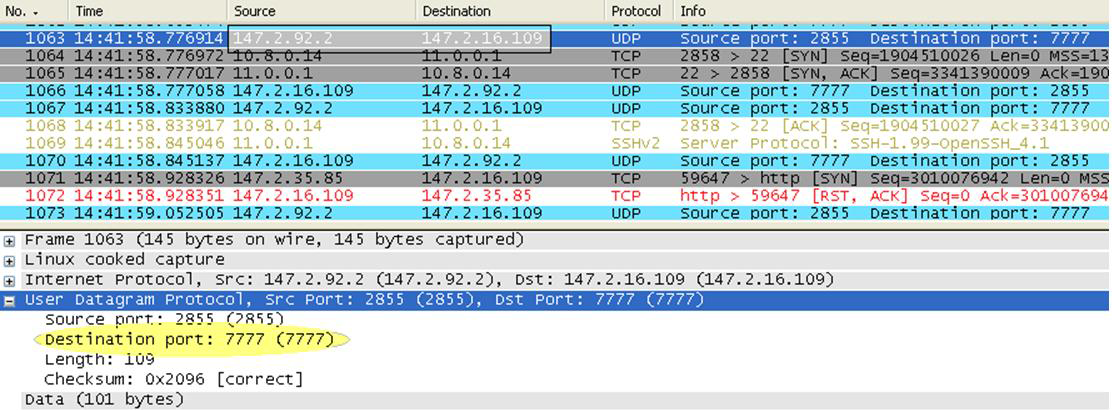
The OpenVPN server, listening out on UDP 7777 processes this incoming request, validates the SSL headers, and extracts the application data. Because it acts as a router, it forwards the original request to its destination.
In packet 1064, we see that forwarding take place. The source IP address of the outgoing request is 10.8.0.14 - the OpenVPN IP address assigned by DHCP on the SSLVPN server. This is the IP address assigned to the Tap interface on the workstation. The destination IP address is that of the SSH server itself, on the private network (11.0.0.1). Because SSH is a TCP-based application, the request is now sent to TCP port 22 on the SSH server.
Figure 1-11 Forwarding the Original Request to TCP Port 22 on the SSH Server

Packet 1065 shows the TCP response to packet 1064. The key point here is that the response has come back to the SSLVPN client IP address via the SSLVPN server! If the routing table on the SSH server did not have an entry for the OpenVPN subnet (10.8.0.0/16) pointing to the SSLVPN server as the next hop, the response might a) never reach the SSLVPN client, or b) reach the SSLVPN client but be unencrypted, at which point the TCP segment would be dropped. It is imperative that all responses from the application server going to the SSLVPN client do so via the SSLVPN server
Figure 1-12 SSLVPN Encrypted Response to the Client

This example is not very realistic, as all remote hosts on the network need to know that the route back to the OpenVPN subnet address is done through the SSLVPN server private interface. A more practical example is shown below, where we use IPTABLES to rewrite the source IP address of the outgoing requests to the remote application servers. By executing the following on the SSLVPN server:

All IP datagrams with a source IP address on the 10.8.0.0/16 subnet will get rewritten to 10.0.0.1. Because the 10.0.0.1 address is part of the internal network, all hosts should have a route back to this address.
Figure 1-13 Re-writing 10.8.0.0/16 subnet datagrams to 10.0.0.1
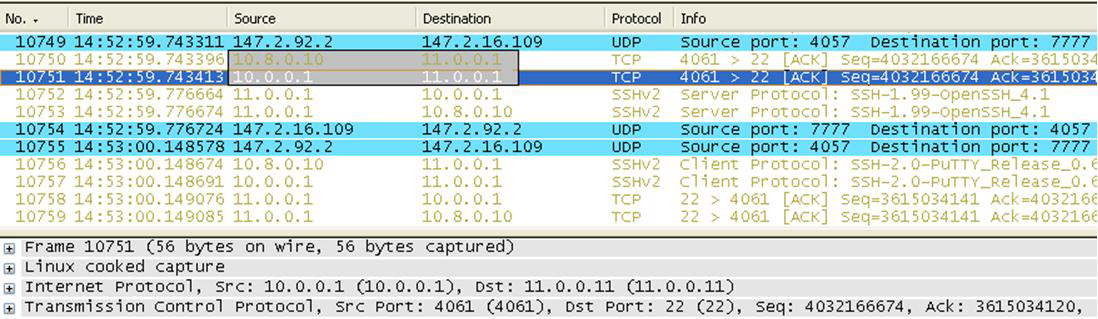
Looking at the same request this time around, we see that Packet 10749 shows the tunneled request from the SSLVPN client to the SSLVPN server external IP address.
Packet 10750 shows what we saw in earlier traces above - the OpenVPN decrypts the application request and now tries to forward to the SSH application server on 11.0.0.1. The source IP address is 10.8.0.10, and the IP address is assigned to the Tap interface.
Packet 10751 shows the result of the IPTABLES command above - the 10.8.0.10 source IP address has been rewritten to the private IP address of the SSLVPN server. For the SSH application server to respond to such a request, it will most likely not require any modifications to its routing table. This is the best approach to take.