Select Operations>Problems
Select the Problem ID
Number
The Problem Information>Summary tab appears.
View Recorded Time.
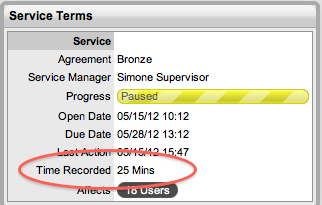
Recorded Time as displayed in the Service Terms window of a Problem uses a combination of auto-timing, when the Admin>Setup>Privileges>User > Manual Request Time option is set to No, and manual Note Time entries to measure the time spent working on a Problem.
The Auto-timer is activated when a Problem is opened in Edit mode. When the Problem is saved after any amendments have been made, the timer stops and logs the length of time the Problem has been worked on. This total is added to the sum total of any manual Note Time entries made by Technicians when they are adding Notes. See: Notes Tab.
The Recorded Time used by the system when the Contracts functionality is enabled is limited to the manually entered Note Time, as the Manual Request Time option is locked down to Yes. See: Contracts.
To access the total Problem Logged Time information:
Select Operations>Problems
Select the Problem ID
Number
The Problem Information>Summary tab appears.
View Recorded Time.