Within the ZENWorks tab the Service Desk can be configured to work seamlessly with the Configuration Management tool. In the first instance this is achieved by using ZENWorks as the OpenID Provider for authenticating Service Desk Users and Customers. On a day to day basis, the ability to use the Remote Control and Bundle Management capability for the Configuration tool within a request, increases the efficiency of Service Desk Users when managing their workload.
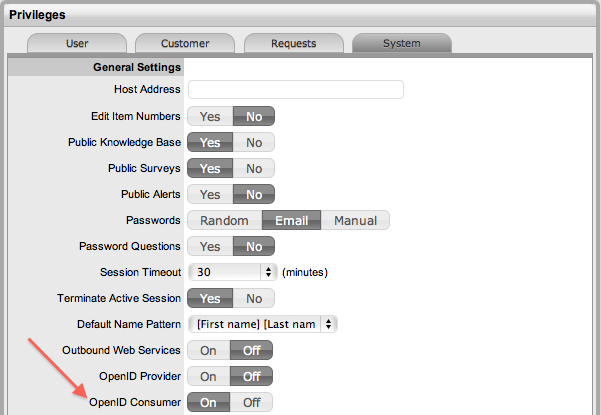
To enable authentication of Service Desk Users through ZENWorks the OpenID Consumer option within Setup>Privileges>System must first be enabled.
Once enabled, the ZENWorks location details and OpenID information is to be configured within the AMIE>ZENWorks tab.
To define the ZENWorks server information and OpenID Provider details, as an Administrator:
Select Setup > AMIE
>ZENWorks tab
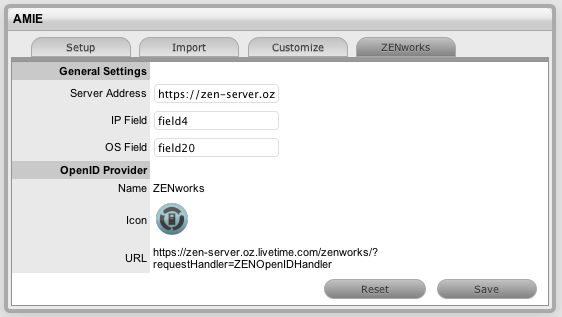
Complete all the following fields:
AMIE |
|
General Settings |
|
Server Address |
Complete the server details hosting the ZENWorks instance. |
IP Field |
By default within the AMIE mapping file, Field 4 within the Details Tab of an Item will be used for the IP address (Network Address) of a device. This can be edited, if required. |
OS Field |
By default within the AMIE mapping file, Field 20 within the the Details Tab of an Item will be used to record the OS information of a device. This can be edited if required. |
OpenID Provider |
|
Name |
Enter ZENWorks as the OpenID Provider name. |
Icon |
By default the ZENWorks icon that is to be available on the Service Desk log in page for Customers and Users accessing the Service Desk by the relevant Portals. |
URL
|
The OpenID Provider URL is automatically generated based on the Server Address details when the Save button is selected.. |
Click Save.
Select the Reset button for the system to generate a new certificate
that allows the service desk to communicate with Zenworks. When selected,
the system will display an information message providing the location
details for downloading the new certificate.
To complete the ZENWorks integration:
Import Customer and User details from the eDirectory authentication server
Import Items using the AMIE and the ZENWorks 11.
When validating account details of Users and Customers accessing the Service Desk, the system will query two locations for unique identifiers:
details in the GUID field imported from eDirectory for the Customer or User
the Customer's or User's email address.