When a User logs into the system defaults to the Home tab. This allows the User to instantly access requests that have been allotted to them, and are currently active.
Personal account information can be accessed and modified. Help Desk metrics are displayed graphically within the Dashboard option.
The Home tab gives access to the following tabs:
My Tasks - Provides the User with a list of their active requests
Alerts- With the option enabled, Users can create system Alerts
Chat- Allows the User to view and accept Customers' chat requests (Visible when the option is enabled for the system.)
Calendar - Displays an event calendar for requests and their due dates
My Account - Allows the User to edit their personal information including email preferences, password resets, if enabled, and set their time zone
Dashboard - Provides the User with real time reports on their Incident status
Feedback - Allows the User to access published surveys that are ready for completion.
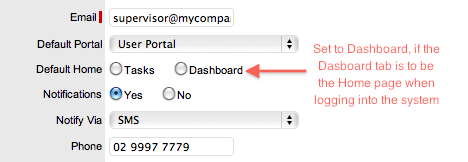
Users can set the Dashboard as their default landing page upon logging into the system, by adjusting the Default Home option within the My Account screen.
A Partner is similar to a Technician as they have the same privileges, but can only view and manage their own Customers, Customer Items and Customer requests. Users with Partner system access are associated with Partner Organizations, which allows for multiple Partner Users to be available to service Customer requests. See: Partner Organizations.
When a request is created for a Partner's Customer it is automatically allocated to the Partner.
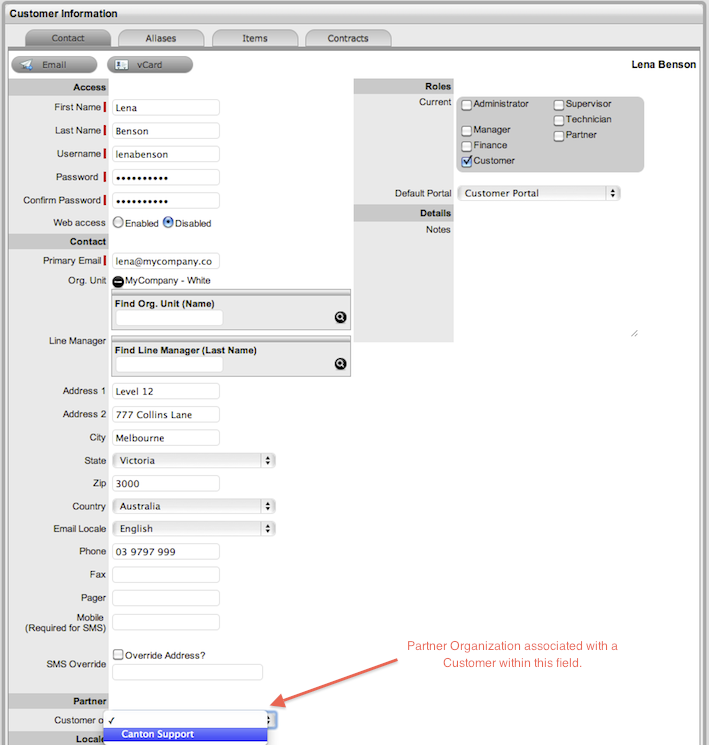
Customers can be associated with Partner Users via a Partner Organization, in one of two ways:
When a Partner logs in and creates a new Customer, the Customer is automatically assigned to that Partner, or
When
the Administrator option Edit Customer Partner is enabled, and the
Partner Organizations is assigned to the Customer within the Customer
Information screen of the User > Customers tab.