DNS Hierarchy
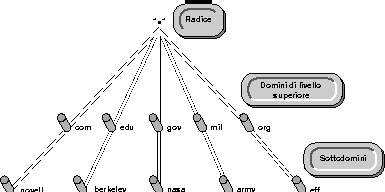
DNS uses a hierarchy to manage its distributed database system. The DNS hierarchy, also call the domain name space , is an inverted tree structure, much like the Novell Directory Services structure.
The DNS tree has a single node, or domain, at the top, called the root domain (.). Below the root domain are the top-level domains. These domains divide the DNS hierarchy organizationally into the following segments:
COM ---commercial organizations, such as Novell (novell.com)
EDU ---educational institutions, such as U.C. Berkeley (berkeley.edu)
GOV ---government agencies, such as NASA (nasa.gov)
MIL ---military organizations, such as the U.S. Army (army.mil)
ORG ---non-profit organizations, such as Electronic Frontier Foundation (eff.org)
NET ---networking entities, such as NSFNET (nsf.net)
INT ---international organizations, such as NATO (nato.int)
Additional top-level domains organize the domain name space geographically. For example, the top-level domain for France is fr.
Below the top-level domains, the domain name space is further organized into subdomains, which represent individual organizations. Figure 2-1 illustrates the DNS hierarchy.
Figure 2-1.
DNS Hierarchy
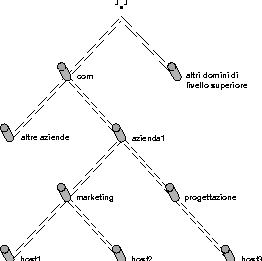
A domain is a label of the DNS tree. Each node on the DNS tree represents a domain. The domains under the top-level domains represent individual entities. These domains can be further partitioned into subdomains to facilitate the management of information about an entity's host computers. Domains at the leaves of the tree usually represent individual hosts.
For example, suppose a domain is created for company1 under the com. top-level domain. Company1 has separate LANs in its marketing and engineering divisions. Therefore, the Company1 network administrator decides to create two separate subdomains for each division, as illustrated in Figure 2-2 .
Figure 2-2.
Domains and Subdomains
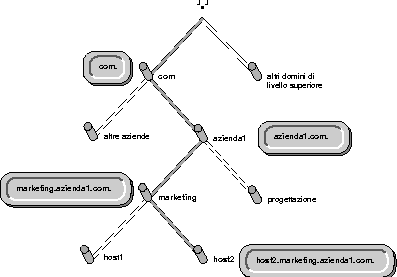
The domain naming scheme reflects the structure of the DNS hierarchy. A domain name is simply a list of all domains in the path from the local domain to the root. Each label in the domain name is delimited by a period or dot (.). For example, marketing.company1.com. is the domain name for the marketing domain in Figure 2-3 . Notice that the domain name in this example ends with a dot, which represents the root domain. Domain names that end with the dot for root are called fully qualified domain names.
Each computer that uses DNS is given a DNS hostname that reflects that computer's position in the DNS hierarchy. Thus, the DNS hostname for host2 in Figure 2-3 is host2.marketing.company1.com.
Any domain in a subtree is considered part of all domains above it. For example, the marketing.company1.com. domain is a part of the company1.com. domain, and also a part of the com. domain.
A full domain name can consist of up to 255 characters, although some systems may impose smaller limits. DNS is case-insensitive; HOST2 is the same as host2.
Figure 2-3.
DNS Domain Names and Hostnames
Domain delegation gives an organization authority for a domain. Having authority for a domain means that the administrator at the organization is responsible for maintaining the DNS database of host name and address information for that domain. The group of domains and subdomains over which an organization has authority is called a zone. All host information for a zone is maintained in a single, authoritative database.
NOTE: Throughout the industry, the terms zone and domain are used interchangeably.
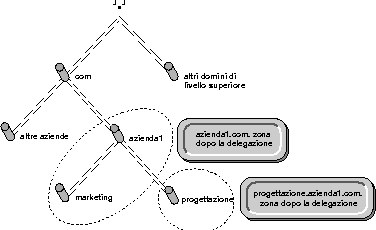
For example, the company1.com. domain is delegated to company1, creating the company1.com. zone. This zone comprises three domains:
The administrator at company1 maintains all host information for the zone in a single database. Figure 2-4 shows the company1.com. zone.
Figure 2-4.
DNS Zones
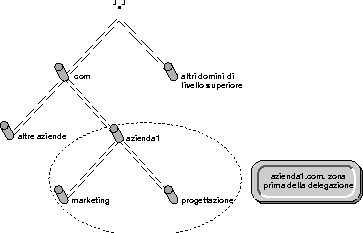
In addition to maintaining host information for a zone, the administrator also has the authority to create and delegate subdomains. For example, suppose the engineering division at company1 has its own administrator. Therefore, company1 delegates the engineering.company1.com. subdomain to the engineering division. The company1.com. zone no longer has authority over the engineering.company1.com. domain. Now the company1.com. domain comprises two zones:
Figure 2-5 illustrates this example.
Figure 2-5.
Domain Delegation