Using NetWare Web Manager
NetWare* Web Manager is the browser-based management tool you use to configure and manage the following NetWare Web services:
- NetWare Enterprise Web Server: An HTTP server used to serve up Web pages to the Internet or to an intranet.
- NetWare News Server: A news server used to manage Internet or intranet newsgroups for discussing and sharing information.
- NetWare Web Search Server: A search server used to build indexes for adding searching capabilities to your Internet or intranet Web sites and can index content located on file or Web servers.
- NetWare Multimedia Server: A multimedia server used to serve up multimedia content to Web browsers.
NetWare Web Manager also allows you to manage your users and groups using a local database, LDAP, or Novell Directory Services* (NDS*), manage one or more Web services from a single Web browser, and enable or disable Secure Sockets Layer (SSL).
When you install additional NetWare Web services, they are managed from within NetWare Web Manager. Because the forms for each Web service have a consistent look and feel, you can quickly learn to configure and manage any other service.
NetWare Web Manager is installed when you install your first NetWare Web Service. The directory where you install the servers is called the server root directory.
After installing a server and NetWare Web Manager, use your browser to navigate to NetWare Web Manager, then click its forms to configure your servers. When you submit a form, the Web Manager modifies various configuration files on your NetWare server for the server you are administering.
The URL you use to navigate to NetWare Web Manager depends on the computer hostname and the port number you choose when you install any NetWare Web Service. For example, if you installed NetWare Web Manager on port 2002, the URL might look like this:
https://myserver.novell.com:2002
or
https://137.95.65.150:2002
Before you can access NetWare Web Manager, you are prompted to type a username and password. You set up the administrator username and password when you install the first NetWare Web Service and NetWare Web Manager on your computer.
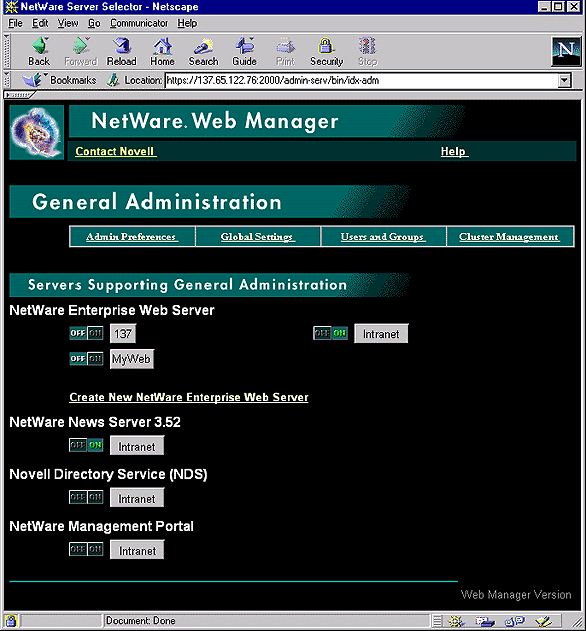
The first page you see when you access NetWare Web Manager is called the General Administration page (see The Server Administration Page). Your General Administration page might look different depending on the Web Services you have installed.
- The General Administration page contains buttons for configuring NetWare Web Manager settings, which are global settings that affect all other installed Web Services.
- Servers Supporting General Administration displays all of the Web Services installed on the computer (in the same server root directory).
Figure 2
The Server Administration Page
Using the Server Manager Forms
The collection of forms used to configure a single server is called the Server Manager. NetWare Web Manager contains a Server Manager for each Web Service installed on the computer, including one for NetWare Web Manager itself.
The Server Administration page, shown in The Server Administration Page, contains links to each Server Manager.
- To configure general server preferences, click one of the links on the NetWare Web Manager page.
- To configure a specific server, click the server name button. For help configuring a particular server, see that server's documentation or click Help in any online form.
After clicking a button, you'll see a Server Manager for the server name you clicked. A Server Manager appears as a three-framed page with buttons in the top frame and links in the left frame (see Enterprise Server's Server Manager Page).
Figure 3
Enterprise Server's Server Manager Page
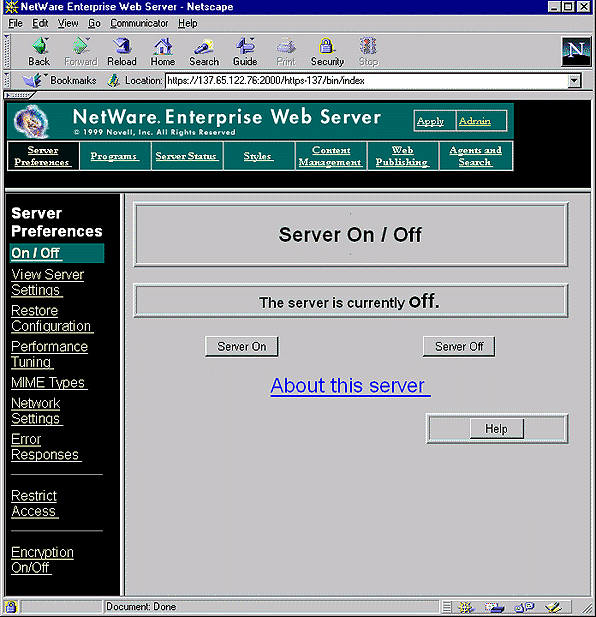
To use the Server Manager, click a category button in the top frame (for example, Server Preferences), then click a link in the left frame (for example, Network Settings). A form appears in the remaining frame where you select options and specify values that configure the server. To submit your changes in the form, click OK. Click Help in any form to get specific directions on using that form.
To return to the Server Administration page, click the Server Administration button in the top frame of the Server Manager.