Centralized, Simplified Single-Point Administration
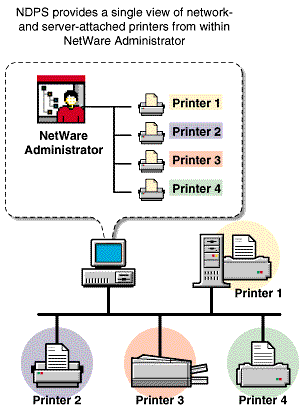
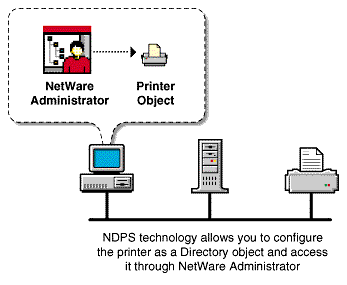
Novell Distributed Print Services takes advantage of the single network view provided by NetWare, so you can save time by managing all of your printing resources from NetWare Administrator. For example, from your workstation you can create and configure printers, and designate printers to be automatically installed on user workstations.
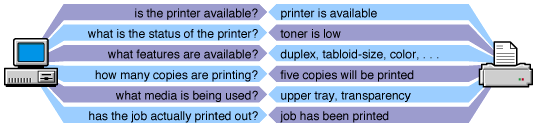
Novell Distributed Print Services lets clients and printers exchange information about printers and print jobs. For example, this interchange allows users and administrators to get real-time information about a printer such as For example, it reports such information as whether the printer needs toner or paper, whether it is online, and whether the lid is open.
For example, does it support color? Duplexing? How many pages has it printed since it was last serviced?
NDPS also lets you view information about a print job's properties and status, including
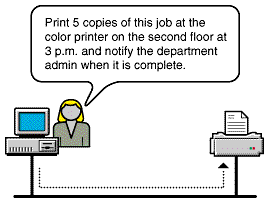
The bi-directional feedback provided by NDPS is limited only by the bi-directional capabilities of the printer itself. In many cases, NDPS actually enhances information provided about printers that do not have bi-directional capabilities. With NDPS, you can customize event notification. Event notification allows you to specify who should be notified of an event or problem, and how that person should be notified. It also allows you to identify the specific events or problems that you want notification messages sent for. For example, you can configure notification so that the owner of a print job will receive a screen pop-up message when the job has actually been printed.
You can also ensure that the printer operator is notified when a problem such as a paper jam occurs on the printer. Notification methods provided by NDPS include pop-up screen messages, e-mail (GroupWise®), and log file records, while third-parties can develop other mechanisms such as beeper notification if they wish. Novell Distributed Print Services is designed to take full advantage of NDSTM. Integration with NDS allows administrators to create a single NDS object---an NDPS Printer object---to represent each printer on the network. As a Printer object, printers become as secure as the other objects in the NDS tree, and they are just as easy to manage. In the NDS tree, printers can be conveniently grouped. For example, you can group and manage all of your printers by department, by workgroup, or by location. You can also search for printers with specific capabilities, because those capabilities are properties of the NDPS printer object.
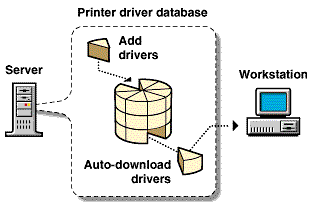
Not only does NDPS make printer management easier for network administrators, it also makes printing easier for end users. NDPS provides a database that includes drivers for most printers in common use today. From this database, you can select drivers you want to be automatically installed on client workstations when a user adds a printer. This eliminates the need for users to provide the printer driver themselves. You can add drivers to this database as they become available.
Using the Novell Printer Manager utility, which is included with the NDPS client, users can install additional printers and are not limited to using only the printers selected by the network administrator. This utility also allows users to search for printers with specific characteristics. For example, a user can search Novell Printer Manager for printer characteristics such as color, type, location, or speed to help locate the appropriate printer for the job. An NDPS client can also modify printer configurations. For example, a user can configure a printer to use a different size paper or to print a cover page. Users can change the properties of any installed printer that the administrator has not locked. Also, using NDPS, users can view the current status of any available printer to see how many print jobs are waiting to be printed before they send their jobs. These NDPS features help make end-user printing easier and more effective than the methods of the past. From this list, you can select drivers you want to be automatically downloaded and installed on client workstations running with Windows 95*, Windows NT*, or Windows* 3.x. You can add drivers to this database as they become available. The NDPS interface supports many printer options in common use today, while the open architecture of NDPS allows printer manufacturers to add their own custom interfaces for specific printers. This means that as new printer features become available, you can access them through NDPS. NDPS allows you to configure and schedule print jobs to be processed according to time of day, job size, or media availability. The entire NDPS architecture is protocol independent. NDPS can be used in an IPX-based environment, a pure TCP/IP environment, or a combination of both. The third-party gateways being developed to work with NDPS are also protocol independent. NOTE: Most printers that support TCP/IP today do not have a discovery protocol like SAP for IPX-based networks. The Service Locator Protocol (SLP) will eventually be embedded in printers and will provide a discovery protocol that can be used with NDPS.
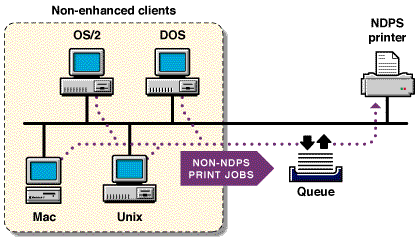
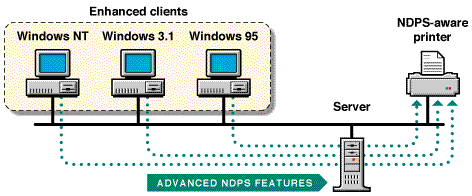
NDPS provides an enhanced client for Windows 95, Windows NT, and Windows 3.x to take advantage of all of the advanced features provided by NDPS. In the future, full NDPS functionality will be made available on additional client platforms. All clients that are not NDPS-aware can still print to NDPS printers, and you can use all of your existing applications with NDPS. Although your queue-based print clients won't be able to take full advantage of the advanced features available in NDPS, they won't lose any of the printing ability they have now. This backward compatibility feature of NDPS makes it well-suited for heterogeneous networks.Bi-directional Feedback and Control
Configurable Event Notification
Tight Integration with NDS
Automatic Printer Driver Download and End-User Convenience
New Printer and Job Configuration Options
New Job Scheduling Options
Protocol Independence
Compatibility with Multiple Clients, Applications, and Operating Systems