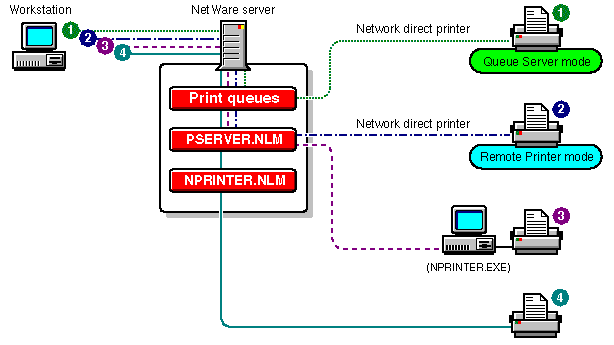
Network-Direct Print Devices Running on Same Network with Printers Attached to a Workstation and a NetWare Server
NetWare 5 supports existing network-direct printers and hardware queue servers produced by various manufacturers. These devices either connect to a printer and then to the network or are installed in a port at the printer.
In many cases, these devices offer a fast, effective, low-cost printing solution in NetWare 5 as well as NetWare 3 environments.
Typically, these print devices are shipped with their own installation utilities. The manufacturer's utilities configure the device to recognize network print components and to communicate with the network. To effectively use network-direct print devices in a NetWare 5 environment, you will need to know the manufacturer's procedures for installing the specific device that you are using.
Many of these devices can be configured to run in either remote printer mode or queue server mode, as described in the following sections.
The following illustration, Network-Direct Print Devices Running on Same Network with Printers Attached to a Workstation and a NetWare Server, shows representative network printing setups incorporating network-direct print devices used in both queue server and remote printer modes.
Figure 14
Network-Direct Print Devices Running on Same Network with Printers Attached to a Workstation and a NetWare Server
In this mode, the device functions in a way similar to a workstation running the NetWare 5 NPRINTER or the NetWare 3 RPRINTER. Devices configured for remote printer mode are controlled by a NetWare print server. By using this mode, you are NDS-aware and will also get notification and other functionality available through NetWare Administrator. These advantages are generally not available in queue server mode described in the next section. Devices running in this mode under NetWare 5 run considerably faster than they did under NetWare 3. The increased speed and flexibility offered with NetWare 5 makes remote printer mode a very effective way of providing network printing with these devices. In this mode, the hardware print server directly accesses the print queue using NetWare Core ProtocolTM calls. In NetWare 3, this mode was faster than remote printer mode, but the improved performance of the NetWare 5 PSERVER has minimized this distinction. Queues created in the bindery context can be seen by both NDSTM and bindery users, so both types of users can access these hardware print servers. Network-direct print devices developed before NDS are designed to work well with the NetWare bindery. When used in queue service mode, some of these products present the following set of common issues of concern to the network administrator within a NetWare 5 environment.
When using these devices in remote printer mode, you should reserve printer slots 0-15 for them.
Because the communication protocol between print servers and network-direct devices running in remote printer mode have not changed since NetWare 3, the running print server can be a NetWare 5 print server.
As a result of these duplicate steps, you may end up with unused NetWare 3 printer configuration files on the NetWare 5 server.Remote Printer Mode
Queue Server Mode