Upgrading from ZENworks 6.5 Handheld Management
The following sections provide information to help you successfully upgrade from ZENworks 6.5 Desktop Management to ZENworks 7 Handheld Management:
- Upgrading the ZENworks Handheld Management Server Software
- Upgrading the ZENworks Handheld Management Access Point or the Desktop Synchronization Integration Software
- Upgrading the Windows CE or Palm OS IP Clients
Upgrading the ZENworks Handheld Management Server Software
Before upgrading the ZENworks 6.5 Handheld Management Server, ensure you have ConsoleOne 1.3.6 installed.
You must also prepare the directory by extending the Novell eDirectoryTM schema. For detailed information on how to extend the schema, see Schema Extension and Product Licensing.
After successfully extending the schema, upgrade the ZENworks 6.5 Handheld Management Server to ZENworks 7 Handheld Management by performing the Installing ZENworks Handheld Management Server Components procedure.
Upgrading the ZENworks Handheld Management Access Point or the Desktop Synchronization Integration Software
You can upgrade the ZENworks 6.5 Handheld Management Access Point or the Desktop Synchronization Integration Software in any one of the following ways:
- Using the ZENworks Handheld Management CD
- Using the Proxy (ZENworks Handheld Management Access Point) Upgrade Utility
IMPORTANT: If you upgrade the ZENworks Handheld Management Access Point to ZENworks 7 Handheld Management, you must also upgrade the Desktop Synchronization Integration Software to ZENworks 7 Handheld Management. Also, if you upgrade the Handheld Management Server to ZENworks 7 Handheld Management, you must upgrade the ZENworks 6.5 Handheld Management Client associated to the server to ZENworks 7 Handheld Management.
Using the ZENworks Handheld Management CD
Upgrading the ZENworks Handheld Management Access Point: To upgrade the ZENworks Handheld Management Access Point, perform the Installing the ZENworks Handheld Management Access Point on Additional Computers procedure.
Upgrading the Desktop Synchronization Integration Software: To upgrade Desktop Synchronization Integration Software, perform the Installing Desktop Synchronization Integration Software procedure.
Using the Proxy (ZENworks Handheld Management Access Point) Upgrade Utility
-
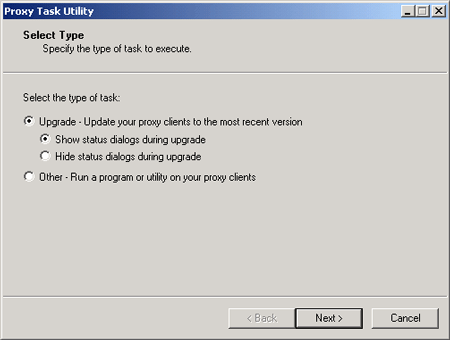
Run prxytask.exe (in installation_path).
-
Click Upgrade - Update Your Proxy Clients to the Most Recent Version.
-
Click the desired option:
Show Status Dialogs During Upgrade: Select this option if you want ZENworks Handheld Management to display an informational dialog box on the Proxy Service (ZENworks Handheld Management Access Point) machines to instruct users to not reboot during the upgrade process.
Hide Status Dialogs During Upgrade: Select this option if you do not want ZENworks Handheld Management to display an informational dialog box on the Proxy Service (ZENworks Handheld Management Access Point) machines during the upgrade.
-
Click Next.
-
Select the Proxy Service (ZENworks Handheld Management Access Point) machines that you want to upgrade.
or
Click Select All to upgrade all Proxy Service machines in your installation.
-
Click Next, then click Finish.
You can verify that each Proxy Service (ZENworks Handheld Management Access Point) machine has been upgraded to ZENworks 7 Handheld Management by viewing the properties of the ZENworks Handheld Management server object in ConsoleOne®.
In ConsoleOne, right-click the ZENworks Handheld Management server object, click Properties, then click either the Access Points or Desktop Sync Machines tab. The Product Version column lists the version of each machine's Access Point or Desktop Synchronization Integration software. You can sort the list by clicking the Product Version heading at the top of the column.
Upgrading the Windows CE or Palm OS IP Clients
If you have Windows CE or Palm OS devices that can make a TCP/IP connection, and these devices use the ZENworks 6.5 Handheld Management IP clients to communicate, you should upgrade the Windows CE IP client or Palm OS IP client on each device to ZENworks 7 Handheld Management.
- To upgrade the Windows CE IP client, you must create the appropriate CAB files and distribute them to each device. For step-by-step instructions, see Installing the Windows CE IP Client.
NOTE: If a Windows CE device synchronizes on a desktop machine that has the ZENworks Handheld Management Desktop Synchronization Integration software installed, the Windows CE IP client will be upgraded automatically; you do not need to create the appropriate CAB file.
- To upgrade the Palm OS IP client, see Installing the Palm OS IP Client .