1.3 ConsoleOne User Interface
1.3.1 User Interface Overview
To achieve a consistent look and feel, the shell provides a set of common user interface elements: an object browser, a view, a main menu, a toolbar, a status bar, a property book, and context menus. The illustration below identifies several of the major user interface components. Information displayed can vary, depending on the namespace used.
Figure 1-2 The ConsoleOne User Interface Components
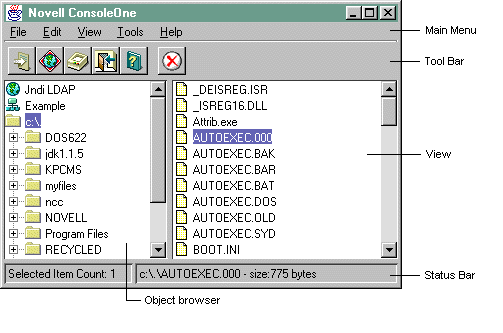
The object browser displays the directory tree structure in the left panel of the shell.
In the right panel, the default view displays the subordinates of the item selected in the object browser. Developers can create alternate views.
The main menu, toolbar, status bar, and context menus organize access to the tasks, features, and functions associated with an item or namespace.
Among ConsoleOne features that are common to all namespaces are those of exiting the shell and setting options or preferences for the shell and snap-ins.
See Also:
1.3.2 Object Browser
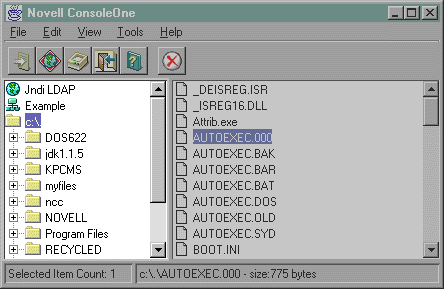
The object browser is a hierarchical (tree) display of objects in the left panel of ConsoleOne. It presents objects from various namespaces in a hierarchical fashion.
Upon start-up, ConsoleOne identifies the namespace snap-ins that have registered to it and then displays each of them in the object browser. As each namespace is navigated or selected by the user, the main menu, toolbar and status bar each reflect the objects, operations, actions and views of the selected namespace.
Figure 1-3 The Object Browser
Parent Topic:
Related Topics:
1.3.3 Console View
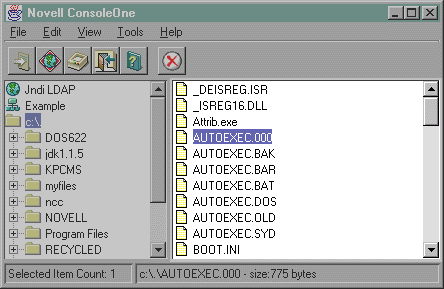
For ease of development, ConsoleOne provides a default console view. Snap-in providers who do not want to add additional views for containers can use the default console view. The default console view displays a name and an image for each object entry in a namespace.
The default console view is made available to every namespace, however, it is not intended to be used as a general purpose namespace viewer. It is recommended that each namespace provide a primary view that presents the most appropriate representation of its objects.
The figure below shows an example default console view.
Figure 1-4 The ConsoleOne Default Console View
In registering a snap-in against the default console view, you should use the default view UniqueID, which is "Console View."
For more detailed information on how to register a snap-in to the default console view, see Adding a New View.