Linux User Management on NNLS
Novell® Linux User Management (LUM) is a key component of Novell NterpriseTM Linux Services (NNLS) and provides two basic functions:
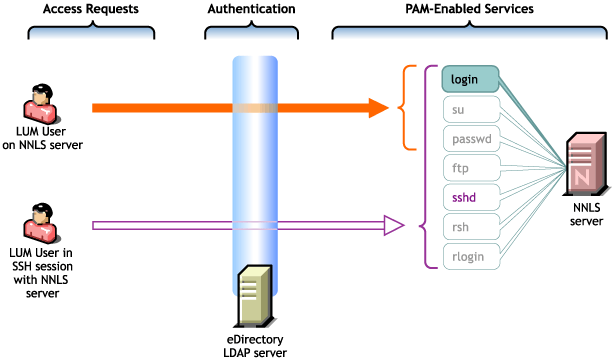
Figure 11 illustrates how LUM works with PAM-enabled services. For a more detailed overview, see "Linux User Management (LUM)" in the Novell Nterprise Linux Services Overview, Planning, and Implementation Guide.
Figure 11
Linux User Management on NNLS
Table 4 shows the PAM-enabled services that can be controlled by having LUM installed. By default, only the login command is enabled for LUM support during the NNLS installation.
Table 4. PAM-enabled Services
| Command | Where Executed | Function for LUM Users |
|---|---|---|
ftp |
Another host |
Transfer files to and from the NNLS server after supplying an eDirectory/LUM username and password. |
login |
NNLS server or in an SSH session with the NNLS server |
Log in to the NNLS server using an eDirectory/LUM username and password, either directly or in an SSH session with the server if sshd is also enabled. |
passwd |
NNLS server or in an SSH session with the NNLS server |
Change the eDirectory password for the current user. NOTE: The recommended method for changing passwords in NNLS is through Virtual Office. For more information, see "Password Management and Samba Passwords" in the Novell Nterprise Linux Services Overview, Planning, and Implementation Guide. |
rlogin |
Another host |
Log in to the NNLS server from a remote host system shell prompt after supplying an eDirectory/LUM username and password. |
rsh |
Another host |
Execute a command on the NNLS server from a remote host system shell prompt after supplying an eDirectory/LUM username and password. |
sshd |
Another host |
Establish a secure encrypted connection with the NNLS server after supplying an eDirectory/LUM username and password. |
su |
NNLS server or in an SSH session with the NNLS server |
While logged in as an eDirectory/LUM user, temporarily become another user. This is most often used to temporarily become the root user (who is purposely not a LUM user) to administer the local Linux machine will full system privileges. |
The user-creation steps you completed earlier in this guide (Create Users (eDirectory User Objects)) created three LUM users with rights to log in to the NNLS server.