8.1 Selecting a User Identification Method for Liberty or SAML 2.0
User identification determines how an account at the identity provider is matched with an account at the service provider. If federation is enabled between the two, the user can set up a permanent relationship between the two accounts. If federation is not enabled (see Section 5.4.5, Configuring an Authentication Request for an Identity Provider), you cannot set up a user identification method.
-
In the Administration Console, click > > > > > .
-
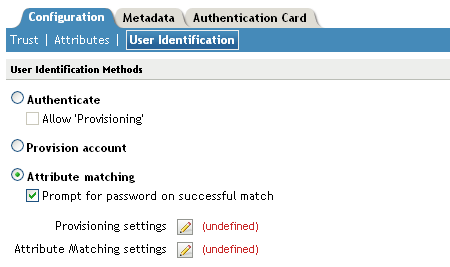
Specify how users are identified on the SAML 2.0 or Liberty provider. Select one of the following methods:
-
Authenticate: Select this option when you want to use login credentials. This option prompts the user to log in at both the identity provider and the service provider on first access. If the user selects to federate, the user is prompted, on subsequent logins, to authenticate only to the identity provider.
-
Allow ‘Provisioning’: Select this option to allow users to create an account when they have no account on the service provider.
This option requires that you specify a user provisioning method.
-
-
Provision Account: Select this option when the users on the identity provider do not have accounts on the service provider. This option allows the service provider to trust any user that has authenticated to the trusted identity provider
This option requires that you specify a user provisioning method.
-
Attribute matching: Select this option when you want to use attributes to match an identity server account with a service provider account. This option requires that you specify a user matching method.
-
Prompt for password on successful match: Select this option to prompt the user for a password when the user’s name is matched to an account, to ensure that the account matches.
-
-
-
Select one of the following:
-
If you selected the option, select a method, then click .
If you have not created one, continue with Section 8.3, Configuring the Attribute Matching Method.
-
If you selected the option, select a method, then click .
If you have not created one, continue with Section 8.4, Defining the User Provisioning Method.
-
If you selected the option with the option, select a method, then click .
If you have not created one, continue with Section 8.4, Defining the User Provisioning Method.
-
If you selected the option without the option, click .
-
-
Click , then update the Identity Server.