

| |
In addition to processing online audit files (Generating Volume Audit Reports), AUDITCON also allows you to process offline audit files. These offline files can be stored on the auditor's workstation, removable media, or even in the auditor's directory on the server file system. Files stored in the server file system are considered offline, even if they contain audit data, because the server does not directly manage these files as audit files.
Offline audit files are in the same compressed, binary format as the server's audit files described in Audit File Formats.
This section describes how to process and protect these offline audit files.
NOTE: AUDITCON controls access to the offline audit file based on the current contents of the Audit File object for that file. Your rights to the Audit File object might be different from your rights when the offline audit file was recorded, so, for example, you might not be able to read an offline audit file that you recorded. This is a constraint imposed by AUDITCON, and not a server access control mechanism. Offline audit files must be protected by the client trusted computing base or (for removable media) by physical protection.
Choose Reports from old offline file from the Available audit options menu (101).
AUDITCON prompts you for the name of an offline audit file.
For DOS workstations, the filename can be an absolute DOS pathname (for example, F:\AUDIT\95FEB15.DAT) or a relative pathname in your current directory (for example, AUDIT.DAT).
Enter the pathname for the offline audit file. Press Enter to open the audit file, or Esc to return to menu 600.
If AUDITCON cannot open the file, it displays an error message.
If AUDITCON can open the file, it displays menu 602, which permits you to choose more operations on the offline audit file.
Figure 62
Menu 602: Reports from Old Offline File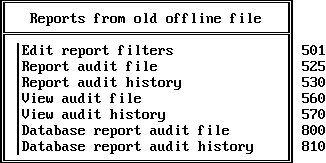
Choose the desired operation, then press Enter to perform that operation.
This section describes how to create and edit report filters that you can use to display specific information that is of interest. There is no distinction between filters for online files and filters for offline files; if you've already created a filter for viewing online audit files, you can use (or modify) that filter for viewing offline audit files.
Choose Edit report filters from the Reports from old offline files menu (602).
AUDITCON displays menu 501.
Follow the procedures in Edit Report Filters to create or edit audit report filters.
This section describes how to generate a formatted report of the audit records in an offline audit file.
Choose Report audit file from the Reports from old offline files menu (602).
AUDITCON displays menu 525.
Follow the procedures in Edit Report Filters to generate an audit report for an offline audit file.
References in that section to the current audit file should be interpreted as references to an offline audit file.
This section describes how you can generate an text report of the audit history information in an offline audit file.
Choose Report audit history from the Reports from old offline files menu (602).
AUDITCON displays menu 530.
Follow the procedures in Report Audit History to generate a text audit history report for an offline audit file.
References in that section to the current audit file should be interpreted as references to an offline audit file.
This section describes how you can view (on your workstation screen) audit records from an offline audit file.
Choose View audit file from the Reports from old offline files menu (602).
AUDITCON displays menu 560.
Follow the procedures in View Audit File to view an offline audit file.
References in that section to the current audit file should be interpreted as references to an offline audit file.
This section describes how you can view (on your workstation screen) the audit history for an offline audit file.
Choose View audit history from the Reports from old offline files menu (602).
AUDITCON displays menu 570.
Follow the procedures in View Audit History to view the audit history for an offline audit file.
References in that section to the current audit file should be interpreted as references to an offline audit file.
This section describes how to generate a report of the audit records in an offline audit file in a form suitable for loading into a database.
Choose Database report audit file from the Reports from old offline files menu (602).
AUDITCON displays menu 800.
Follow the procedures in Database Report Audit File to generate an audit report for an offline audit file.
References in that section to the current audit file should be interpreted as references to an offline audit file.
This section describes how you can generate a report of the audit history information in an offline audit file in a form suitable for loading into a database.
Choose Database report audit history from the Reports from old offline files menu (602).
AUDITCON displays menu 810.
Follow the procedures in Database Report Audit History to generate a text audit history report for an offline audit file.
References in that section to the current audit file should be interpreted as references to an offline audit file.
| |