ROUTE.COM and ROUTE.NLM in a Bridged Token Ring Network
Source route bridging provides end stations (clients and hosts) with the ability to discover routes dynamically and determine which one to use when sending data to a particular destination. Depending on your network configuration and the route selection algorithm used, several routes can be discovered for each destination. The source examines the available routes and then determines the best route to use when sending data.
An end station can be configured to begin the route discovery process using either of two general methods:
NOTE: This guide uses the terms all-routes explorer frame and single-route explorer frame. In IBM literature, these frames are called all-routes broadcast frame and single-route broadcast frame, respectively. In RFCs, the term spanning tree explorer frame is equivalent to the term single-route explorer frame.
By default, the Novell end station implementation originates route discovery using single-route explorer frames. When the end station sends out a single-route explorer frame, it travels over a single route that is configured manually or determined automatically by the Spanning Tree Protocol. This protocol uses the configuration of each bridge in the network to determine a single route, as described in "Spanning Tree Protocol.”
With this method, the destination receives only one explorer frame, resulting in considerably less traffic than the use of all-routes explorer frames (as described in the next section).
When the destination receives an explorer frame, it can respond in one of three ways:
A specifically routed frame uses the information contained in the original explorer frame to take the same route back to the source. An all-routes explorer frame is propagated and takes all possible routes back to the source. Single-route explorer frames behave as described at the beginning of this section.
NOTE: The Novell implementation does not support a response with a single-route explorer frame. It responds with only a specifically routed frame or an all-routes explorer frame, the default being an all-routes explorer frame.
When the all-routes explorer frame is received by the destination, it chooses the best route based on one of the following criteria:
The criteria used to choose the route is determined by the end station implementation. Novell's implementation chooses the route traveled by the frame that is received first (the fastest route).
Route discovery begins when the source route end station generates an all-routes explorer frame and sends it to its local ring. As the process continues, each bridge examines the all-routes explorer frame to determine whether it has already been on any of the other rings attached to the bridge. If the frame has not been on one of the attached rings, it is forwarded to that ring. Because frames are not transmitted on rings on which they have previously traveled, no frame can follow the same route twice. With this mechanism, a frame is propagated in such a way that all possible routes to a destination are discovered, but no routes containing loops are received by the destination.
With this method, the destination receives one explorer frame for each possible route to the destination, resulting in considerably more traffic than the use of single-route explorer frames.
Depending on the implementation, the destination responds with one of three types of frames described earlier. The source then chooses the best route from all the frames it receives, based on the same criteria described in the previous section. As before, the criteria used are determined by the end station implementation.
In comparing the two methods of route determination, using single-route explorer frames creates the least amount of traffic in the network. This method produces only one frame on the destination ring.
In contrast, the number of duplicate frames created by using all-routes explorer frames can increase route determination traffic to the point of significantly degrading network performance. However, if your network can handle the extra route discovery traffic, the use of all-routes explorer frames has two advantages:
IMPORTANT: If the destination responds with a single-route explorer frame or specifically routed frame to a single-route explorer frame, the source cannot choose the best route. For the source to choose the best route, the destination must respond with an all-routes explorer frame.
For versions of Novell Internet Access Server 4.1 routing software and NetWare MultiProtocol RouterTM software that provide end station support for source route bridging, the configuration of ROUTE.NLM determines how the end station responds to explorer frames. Any machine that is running both Novell Internet Access Server 4.1 routing software and NetWare server software is acting as an end station. ROUTE.NLM must be loaded on any bridged interface that allows bridged clients to access the server, as well as on the bridged clients themselves.
Because the SRBRIDGE.LAN driver (used for logical boards) is also required when the system running Novell Internet Access Server 4.1 routing software provides print and file services for bridged clients, ROUTE.NLM is loaded automatically when a board using the SRBRIDGE.LAN driver is configured in the Novell Internet Access Server Configuration utility (NIASCFG). For physical boards, load ROUTE.NLM by setting the Source Route Status option to Enabled in NIASCFG (parameter path: Select Configure NIAS > Protocols and Routing > Protocols > Source Route End Station).
Although the functionality of ROUTE.NLM can be configured on a per-interface (board) basis, we recommend that you use the default functionality. The options available for each ROUTE.NLM parameter are discussed in Novell Internet Access Server 4.1 Routing Configuration.
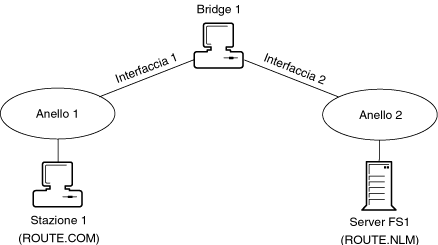
Any client node that will be attaching to a bridged server must load ROUTE.COM, the file that provides client support, as shown in Figure 4-1.
By default, the source route client (ROUTE.COM) begins the route discovery process by originating a single-route explorer frame. ROUTE.COM can be configured to use all-routes explorer frames as well, but this can degrade network performance by creating more traffic on the network.
Figure 4-1.
ROUTE.COM and ROUTE.NLM in a Bridged Token Ring Network
When a single-route explorer frame is sent by the client, it travels along a single-route (of forwarding interfaces) determined by the Spanning Tree Protocol. When this frame is received by the destination file server, the server responds with one of the following types of frames:
The most efficient response is a specifically routed frame. A specifically routed frame travels along the single route that was discovered by the explorer frame sent from the client. This is possible because all explorer frames sent from the source keep track of the ID numbers of all the bridges and rings they traversed to reach the destination node.
By default, the Novell source route server end station software responds to a single-route explorer frame with an all-routes explorer frame. Although you can configure your network to respond to an explorer frame with a specifically routed frame, we recommend that you use the default settings.
NOTE: Before the 1994 release of the source route server end station software, the defaults were different. In the earlier releases, the source route server software responded with a specifically routed explorer frame and could also be configured to respond to an explorer frame with an all-routes explorer frame. We recommend that you use matching versions of ROUTE.NLM and ROUTE.COM throughout your source route bridge topology to maintain a consistent mode of operation.
When the source receives responses from the destination, the source route end station software determines which one of the three criteria described on "Which frame is received first (the fastest route)” it uses to choose the best route. ROUTE.COM chooses the best route based on which frame is received first.
If the DEF (default) option is used, ROUTE.NLM responds in one of two ways:
When the destination responds with an all-routes explorer frame, the frame is propagated, as explained previously, and the (original) source receives one explorer frame for each route. Because each bridge encountered by the explorer frame records the bridge number and next ring number in the explorer frame's information field, each frame contains its own routing information. The fastest route is chosen.
The Spanning Tree Protocol automatically discovers the route that single-route explorer frames use. By definition, a single-route explorer frame travels a single route to the destination. As well as being determined automatically by using the Spanning Tree Protocol, this single route can be set manually by configuring each bridge interface on the network to forward or block single-route explorer frames.
IMPORTANT: We strongly recommend that you use the Spanning Tree Protocol to configure your bridge interfaces automatically.
A forwarding interface passes the following types of frames:
A blocking interface passes the following types of frames:
The Spanning Tree Protocol does not set all bridged interfaces automatically on a single Novell router to blocking mode. For clients and administrators to have access to bridged print/file services, network management, or other applications, at least one interface to each source route bridge must be able to forward packets.
By default, Novell Internet Access Server 4.1 uses the Spanning Tree Protocol. This automatic mode provides the most efficient and dynamic way to determine a single route because bridge interfaces reconfigure themselves automatically when other bridges fail. By configuring source route bridge interfaces in this way, they can automatically take advantage of the best available single route as other bridges go down or come up.
If you configure your network manually, you must ensure that there are no loops in the topology and that there is only one single-route path to any particular ring. It is also important to ensure that at least one single-route path is configured for each ring to maintain connectivity. Therefore, a great deal of effort is needed to effectively place each bridge and know its bridging mode. However, by carefully configuring the bridge interfaces in the network, you can create preferred routes for route determination, freeing those rings whose operation is most sensitive from most explorer frame traffic.
One risk of using the Spanning Tree Protocol is that the single route between two rings that are physically close together might not be the most direct path between those rings. This risk can be reduced by designing your network with backbones. It can also be reduced by having stations respond to single-route explorer frames with all-routes explorer frames. The use of all-routes explorer frames allows the stations that have been separated logically to determine the faster, more direct paths; however, in larger networks with multiple paths, the all-routes explorer frames' responses increase network traffic. The types of responses that are sent depend on how your software is configured. Refer to "Route End Station Implementation” for a complete discussion of these issues.
Another way of ensuring that the most direct or most desirable route is selected by the Spanning Tree Protocol is to carefully select which bridge is assigned to maintain and forward network configuration information to all other bridges. This bridge is called the root bridge.
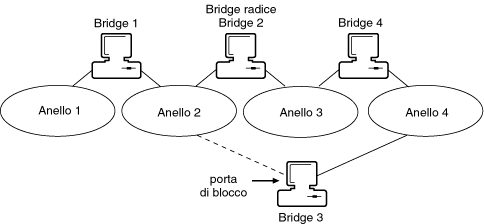
The Spanning Tree Protocol uses a hierarchical control structure to determine which bridge interfaces are allowed to forward single-route explorer frames. Using the Spanning Tree Protocol ensures that there is only a single data path between any two end stations and eliminates data loops, as shown in Figure 4-2.
Figure 4-2.
Eliminating a Data Loop with the Spanning Tree Protocol
In this hierarchy, the root bridge receives topology change information (for example, if certain bridges have been disabled) and automatically forwards this information throughout the network.
For best results, all bridges (including other vendors' bridges) should have the same Spanning Tree mode enabled (either IEEE or IBM) for all interfaces. This mode allows the bridge to communicate with other bridges to determine whether it should set its interfaces to forward single-route explorer frames.
If you set any bridge interface to forward or block frames manually, you might cause loops or other problems. Therefore, you should not manually configure any bridge unless you are extremely familiar with your network and the Spanning Tree Protocol.
The Bridge Label/Priority and Path Cost Increment parameters determine which paths on the network are used as the logical single route or spanning tree. These parameters are usually adjusted by an administrator, but a single path can be determined even if the default values are used.
The Bridge Label/Priority parameter has a default value of 8000. The default path cost is shown as zero at bridge startup time. In actual operation, this parameter changes depending on the microcode version of the interface board or, for remote bridges, the baud rate of the line that is connected to the bridge. If you change this parameter to a nonzero value, this value overrides the values that the bridge program otherwise calculates, and the nonzero value is inserted automatically.
Depending on how the bridge interface parameters are configured (automatically or manually), a bridge assumes one of the following roles:
The root bridge is at the top of the single-path hierarchy and should be assigned manually to ensure efficient network layout. It maintains and forwards network configuration information to all other bridges. The root bridge is centrally located in the single data path defined by the spanning tree configuration information exchanged. In Figure 4-2, Bridge 2 is the root bridge.
A designated bridge is one that has been designated to be on the single-path route and forward frames. In Figure 4-2, Bridge 1 and Bridge 4 are designated bridges.
There are two port states: forwarding and blocking. When a bridge interface has been configured for forwarding, the port forwards single-route explorer frames to the attached network segment. An interface that has been configured for blocking does not forward single-route explorer frames to the attached network segment. The Spanning Tree Protocol automatically assigns port states to create a single data path and eliminate loops. As shown in Figure 4-2, one port of Bridge 3 has been placed in a blocking state (the port connected to Ring 2). The designated bridges for Ring 2 are Bridge 1 and Bridge 2 (the root bridge).
The main parameter that determines the role of a bridge is the Bridge Number parameter. This number is a hexadecimal value that is formed by appending the Bridge Label/Priority parameter value to the beginning of the MAC address of the interface board connected to the lowest-numbered ring. (The Bridge Label/Priority parameter value is the most significant bit of the Bridge Number parameter.) The bridge that has the lowest Bridge Number value is assigned the role of root bridge.
Because the root bridge should be centrally located on the network, its selection should not be left to chance. Because the Bridge Label/Priority parameter value is the most significant part of the Bridge Number parameter value, the most efficient way to determine the root bridge is to adjust the value of the Bridge Label/Priority parameter.
Once the root bridge is determined, all the other bridges negotiate with each other to determine which is assigned the role of designated bridge. The role of designated bridge is assumed by the bridge with the lowest path cost to the root bridge, or by the bridge with the lowest bridge ID (if the path costs are equal).
All path cost calculations are made from the root bridge outward. You can manually assign a path cost to a bridge, or the bridge software can calculate a path cost. The path cost is calculated as the sum of the costs of all the bridges between a given bridge and the root bridge. The path cost of the root bridge is always zero.
The root bridge keeps itself apprised of any changes in the network by sending out a Bridge Protocol Data Unit (BPDU). The BPDU contains the bridge ID of the root bridge, a path cost of zero, and some timing information. The BPDU is then received by any designated bridges on the rings directly connected to the root bridge.
Each designated bridge updates the path cost and timing information in the BPDU and transmits the updated BPDU to the other ring. As the BPDU travels through the network, the bridges use this information to determine whether they need to change roles. Whenever a bridge that is not a designated bridge does not receive a BPDU from the designated bridge within the maximum age timeout, it assumes the designated bridge is down, transmits a Topology Change BPDU, and begins the transition to a forwarding state.
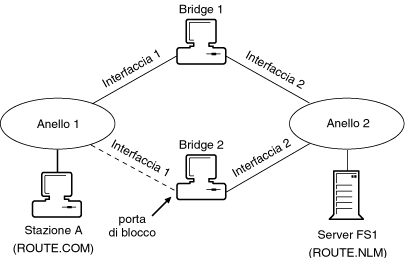
For example, in Figure 4-3, Bridge 1 is the designated bridge connecting Ring 1 and Ring 2. If Bridge 1 fails, Bridge 2 becomes the designated bridge connecting Ring 1 and Ring 2 and its ports are changed to the forwarding state. This reconfiguration occurs automatically when ports are configured with the Spanning Tree Mode option set to Automatic.
Figure 4-3.
Assigning a Designated
Bridge
Heavily used NetWare servers should be assigned a high Bridge Label/Priority parameter value so that they are less likely to be designated as a root bridge. For example, in Figure 4-4, Bridge 3 has been assigned the lowest Bridge Label/Priority parameter value so that it is likely to be designated as a root bridge.
Figure 4-4.
Determining the Root Bridge Based on the Bridge Number Parameter Value
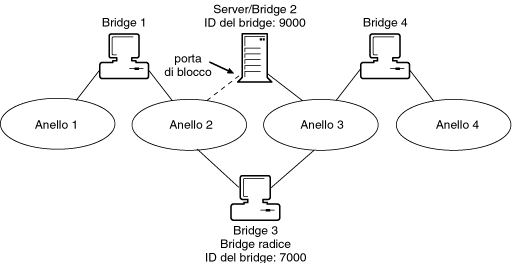
In addition, if Bridge 2 were a remote bridge (connected to the network with WAN links), you should assign the Bridge Label/Priority parameter a higher number (9000) to ensure that it is not selected as the root bridge. This ensures that the Spanning Tree Protocol does not cause the lower-cost link, such as a LAN link, to be blocked in favor of a higher-cost WAN link. In Figure 4-4, Bridge 1 and Bridge 4 have the Bridge Label/Priority parameter set to the default (8000) and the root bridge is assigned a lower Bridge Label/Priority parameter value (7000).