2.5 NDAP Provider for Novell Directory Services (NDS)
2.5.1 Introduction
The NDAP provider for NDS provides access to NDS services through JNDI. It also provides access to contexts that implement the behavior and attributes of NDS objects, NDS partitions, and the NDS schema. The detail specifications for the schema of the NDS naming system are provided in the NDK: Novell eDirectory Schema Reference, which is part of the NDS Libraries for C documentation. The NDAP provider for NDS requires the Novell client.
All NDS directory contexts in the NDS provider extend the NdsObject class, which provides methods that allow you to perform non-naming operations on JNDI contexts. Single attribute values in the NDS provider extend the NdsAttributeValue class, of which there are 28 separate subclasses representing NDS attribute syntaxes.
2.5.2 NDS Provider Components
The important components (interfaces and classes) of the NDS provider are the following:
- NdsObject interface is the root class for all contexts that represent NDS objects. It provides a window into functionality not provided by JNDI. NdsObject extends the DirContext, NdsIteratorFactory, Referenceable, and Partitionable interfaces. It defines methods dealing with rights as well as methods related to operational attributes.
- NdsAttributeValue interface defines a common way of manipulating and passing the value of any syntax object in the NDS schema to an interface that accepts NDS attribute values. The 28 subclasses representing single attribute syntax values extend the NdsAttributeValue interface. See the NDS Provider Package for a listing and details of these subclasses.
- NdsIteratorFactory interface generates NDS iterators used to create a large virtual list. It consists of four methods of the same name (createIterator) for creating NDS iterators. These methods differ only in the parameters passed in. See NDS Iterator Implementation for further details relating to NDS iterator functionality.
- NdsNCPServer interface defines NDS servers that provide NCP transport and session services. It is intended to represent both bindery-based and NDS-based NCP servers.
- NdsPartition interface defines methods for aborting partition operations.
- NdsReplica interface defines variables and methods for replica operations.
- SchemaAttribute interface defines the attribute types and constraints (flags) that restrict the attribute values.
- SchemaClass interface defines for each class the object components, which define the types of objects that can exist in the NDS tree.
- SchemaSyntax interface defines the standard data types for the values within specified attribute types stored in NDS.
2.5.3 NDS Initial Context Implementation
In order to access the NDS interfaces and classes you must construct an initial context factory implementation. Following is an example of how the NDS initial context factory implementation might be constructed.
   Hashtable properties = new Hashtable();

   property.put(Context.INITIAL_CONTEXT_FACTORY,
      "com.novell.service.nds.naming.
          NdsInitialContextFactory");

   property.put(Context.PROVIDER_URL, <server name>);

   DirContext initCtx = new InitialDirContext(properties);
The following contexts federate to other naming systems:
- DirectoryMapDirContext implicitly federates to the NetWare File System Provider.
- VolumeDirContext implicitly federates to the NetWare File System Provider.
- NCPServerDirContext implicitly federates to the NCP Extensions Provider.
- QueueDirContext implicitly federates to the Queue Management System (QMS) Provider.
The following contexts extend NdsDirContext to allow access to partition and replica functionality, but they do not implicitly federate to other naming system.
- NdsPartitionDirContext
- NdsPartitionTreeRootContext
- NdsReplicaContext
After the initial context has been implemented, you can then get the session environment object using code similar to the following:
   InitialContext initCtx = new InitialContext (hash);

   hash = initCtx.getEnvironment ();

   Session sess = (Session) hash.get (Environment.SESSION.OBJECT);
For a detailed discussion of initial context implementation, see Initial Context Implementations in the Novell Services Introduction.
2.5.4 Important NDSProvider Methods
Listed below are some important NDS provider methods of which to be aware. For a complete list of available methods, go to the Reference Guide documentation for NJCL and JNDI.
- NdsObject.getAttributeEffectiveRights - Returns a NamingEnumerator of the effective rights for the specified NDS trustee object. There are 5 additonal versions of this method with different parameters.
- NdsObject.getBaseClass - Returns the name of the object class (immediate parent class) that was used to create the object.
- NdsObject.getDistinguishedName - Returns the distinguished name of the NDS object.
- NdsObject.getModificationTime - Returns the object modification time as a Date type.
- NdsObject.getObjectEffectiveRights - Returns the effective rights of the specified NDS trustee object. Another version of this method uses a String object parameter.
- NdsObject.getObjectFlags - Returns the DSI Entry Flag ID for the object. These 12 flags are defined in the NDS Libraries for C documentation (NSA > NDS: Values > DSI Entry Flags Values).
- NdsObject.getSubordinateCount - Returns the number of objects immediately subordinate to the DirContext.
- NdsObject.getTreeName - Returns the name of the NDS tree where the object resides.
- NdsAttributeValue.approximate - Compares two objects for approximate equality.
- NdsAttributeValue.getNdsSyntaxId - Returns the integer that represents the syntax ID.
- NdsAttributeValue.supportsMatchingRules - Returns a Boolean indicating whether the matching rules passed in are supported.
- NdsIteratorFactory.createIterator - Creates an NdsIterator Object based on the parameters passed in. There are 5 versions of this method, each with a different parameter set.
- NdsNCPServer.getUTCTime - Returns the Universal Coordinated Time (UTC) setting of the server.
- NdsNCPServer.listPartitions - Provides a list of replica partition names stored on this NCP server.
- NdsPartition.abortOperations - Aborts all pending partition operations. Another version of this method passes in a String parameter rather than Name.
- NdsReplica.receiveUpdates - Receives updates from the master replica.
- NdsReplica.sendUpdates - Sends updates to all other replicas.
- NdsReplica.setReplicaType - Sets the replica type for the partition.
- NdsReplica.syncReplica - Synchronizes replicas restricted by the specified time delay. Another version of this method specifies the server and flags.
Additional methods are available from the javax.naming.Context and javax.naming.directory.DirContext classes.
2.5.5 Relationship of NDS Provider Interfaces and Classes
The relationship between the NDS Provider interfaces and classes is illustrated in the following four diagrams.
Figure 2-4 NDS Object Interfaces and Classes
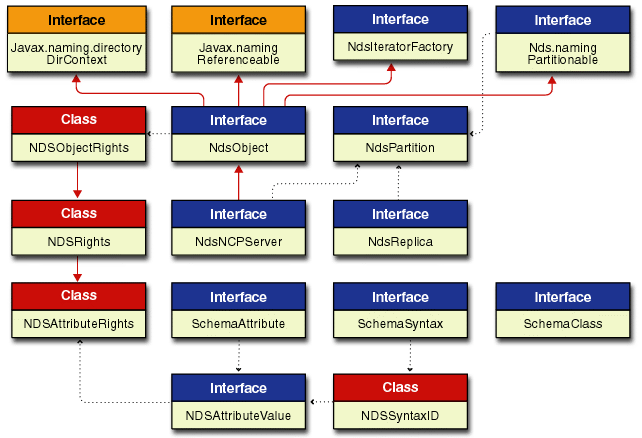
The NDS Object diagram shows the relationship of the different interfaces and classes to the NdsObject interface. In this diagram of interfaces and classes a solid red line ending with a solid arrow represent an extension of a class. The dotted black lines ending with a small solid arrow imply some relationships between the different interfaces and classes. Links are provided to the Reference Guide documentation for each of these important NDS object interfaces and classes.
The following links are provided for you to access the Reference Guide documentation for the most important interfaces and classes:
- NdsObject interface extends DirContext, Referencable, Partitionable, and NdsIteratorFactory interfaces, and is extended by the NdsNCPServer interface.
- NdsIteratorFactory interface is extended by NdsObject. See Figure 2.9 for a graphical representation of the relationship between NDS iterator interfaces and classes.
- NdsNCPServer interface extends NdsObject and has a relationship with NdsPartition.
The NdsAttributeValue interface relationships are shown in Figures 2-6, 2-7, 2-8, and 2-9. The other interfaces shown in the above diagram (NdsReplica, SchemaClass, SchemaAttribute and SchemaSyntax) do not have direct relationships (implementation or extension) to other NDS interfaces and classes.
Figure 2-5 NDS Attribute Value Interfaces and Classes
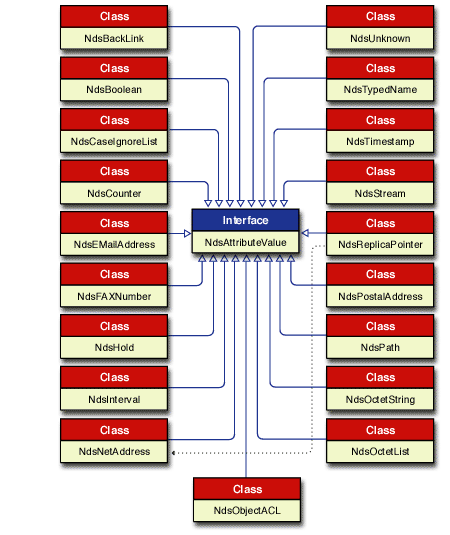
The NDS Attribute Value diagram above shows the relationship of the NdsAttributeValue interface to 19 of the 28 subclasses (single attribute values). Each of these subclasses implements the NdsAttributeValue interface. In this diagram of interfaces and classes a solid blue line ending with a hollow arrow represents an implementation of an interface. The dotted black lines ending with a small solid arrow imply some relationships between the different interfaces and classes. Links are provided to the Reference Guide documentation for each of these important NDS attribute value interfaces and classes.
The following links are provided for you to access the Reference Guide documentation for the most important interfaces and classes:
- NdsAttributeValue interface is implemented by all subclasses (single attribute values).
- See the NDS Provider Package for information on the subclasses that implement the NdsAttributeValue interface.
Figure 2-6 NDS Integer Class Diagram
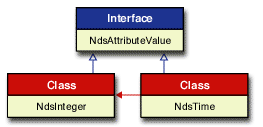
The NDS Integer diagram shows the relationship of the NdsInteger and NdsTime classes to the NdsAttributeValue interface. NdsTime extends NdsInteger and implements NdsAttributeValue. In this diagram of interfaces and classes a solid blue line ending with a hollow arrow represents an implementation of an interface. A solid red line ending with a solid arrow represent an extension of a class. Links are provided to the Reference Guide documentation for each of these important integer interfaces and classes.
The following links are provided for you to access the Reference Guide documentation for the most important interfaces and classes:
- NdsAttributeValue interface is implemented by NdsInteger and NdsTime.
- NdsInteger class implements the NdsAttributeValue interface and is extended by NdsTime.
- NdsTime class implements the NdsAttributeValue interface and extends the NdsInteger class.
Figure 2-7 NDS String Class Diagram
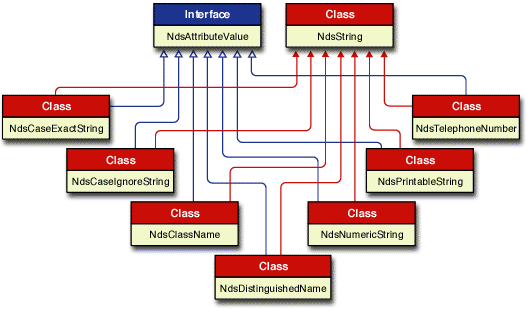
The NDS String diagram shows the relationship of those subclasses that implement the NdsAttributeValue and extend the NdsString class. In this diagram of interfaces and classes a solid blue line ending with a hollow arrow represents an implementation of an interface. A solid red line ending with a solid arrow represent an extension of a class. Links are provided to the Reference Guide documentation for each of these important NDS string interfaces and classes.
The following links are provided for you to access the Reference Guide documentation for the most important interfaces and classes:
- NdsAttributeValue interface is implemented by NdsCaseExactString, NdsCaseIgnoreString, NdsClassName, NdsDistinguishedName, NdsNumericString, NdsPrintableString, and NdsTelephoneNumber.
- NdsString class is extended by NdsCaseExactString, NdsCaseIgnoreString, NdsClassName, NdsDistinguishedName, NdsNumericString, NdsPrintableString, and NdsTelephoneNumber.
- NdsCaseExactString class provides access to attribute values of the CaseExactString syntax. It implements the NdsAttributeValue interface and extends the NdsString class.
- NdsCaseIgnoreString class provides access to attribute values of the CaseIgnoreString syntax. It implements the NdsAttributeValue interface and extends the NdsString class.
- NdsClassName class provides access to attribute values of the ClassName syntax. It implements the NdsAttributeValue interface and extends the NdsString class.
- NdsDistinguishedName class provides access to attribute values of the DistinguishedName syntax. It implements the NdsAttributeValue interface and extends the NdsString class.
- NdsNumericString class provides access to attribute values of the NumericString syntax. It implements the NdsAttributeValue interface and extends the NdsString class.
- NdsPrintableString class provides access to attribute values of the PrintableString syntax. It implements the NdsAttributeValue interface and extends the NdsString class.
- NdsTelephoneNumber class provides access to attribute values of the TelephoneNumber syntax. It implements the NdsAttributeValue interface and extends the NdsString class.
2.5.6 NDS Iterator Implementation
An Iterator in NDS is a concept for handling large virtual lists. It provides list and search functionality but can deal with very large result sets, on the order of hundreds of thousands. An iterator for contexts allows the programmer to traverse the search result in either direction, creating a large virtual list of objects on the server containing all the entries that pass the search filter. The search does not span servers, but is restricted to the particular server in question.
The iterator implementation for NDS requires the use of three interfaces and two classes:
The following diagram (Figure 2-9) shows the relationship between these interfaces and classes. The subsections that follow present more detailed information on the NDS Iterator implementation.
Figure 2-8 NDS Iterator Interfaces and Classes
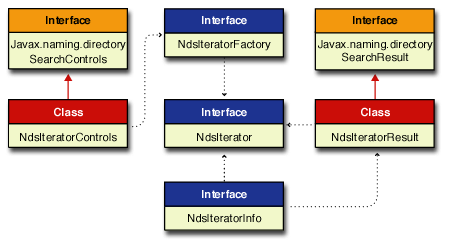
In this diagram of interfaces and classes a solid red line ending with a solid arrow represent an extension of a class. The dotted black lines ending with a small solid arrow imply some relationships between the different interfaces and classes. Links are provided in the following subsections to the Reference Guide documentation for each of these important NDS Iterator interfaces and classes.
2.5.7 NdsIteratorFactory Interface
The NdsIteratorFactory interface generates NDS iterators used to create a large virtual list. It consists of four methods of the same name (createIterator) for creating and defining NDS iterator searches. These methods differ in the parameters passed in. See the NdsIteratorFactory interface in the Reference Guide for more information on the format for calling these methods.
The createIterator(String, Attributes, String[]) method searches the children of a single context for objects that contain a specified set of attributes, and then it returns the attributes specified in the attributesToReturn parameter in an NdsIterator object. The search is performed using the default javax.naming.directory.SearchControls settings.
For an object to be selected, each attribute in the matchingAttributes parameter must match some attribute of the object. If matchingAttributes is NULL all objects in the target context are returned. If matchingAttributes is empty no attributes will be returned. The precise definition of 'equality' used in comparing attribute values is defined by the underlying directory service, which might use a schema to specify a different equality operation. See the search(Name, Attributes, String[]) method in Sun’s JNDI 1.1.1 Javax.naming.directory.DirContext interface for a full description of this functionality.
The createIterator(String, Attributes) method searches for objects that contain a specified set of attributes, and then returns all the attributes in an NdsIterator object. It is equivalent to supplying NULL for the atributesToReturn parameter in the createIterator(String, Attributes, String[]) method described above.
The createIterator (String, String, NdsIteratorControls) method searches in the named context or named object for entries that satisfy the given search 'filter', and then returns the results as an NdsIterator object. It performs the search as specified by the controls cons parameter, which is defined in the NdsIteratorControls constructor.
The format for and the interpretation of ’filter’ follows RFC 2254 with the following interpretations for the attr and value variables mentioned in the RFC:
- The attr variable is a string representing the attribute’s identifier. This is equivalent to the ID parameter passed to the constructor of Attribute.
- The value variable is the string representation of the attribute’s value. The translation of this string representation into the attribute’s value is directory-specific.
For the assertion '(someCount=127)', for example, attr is 'someCount' and value is '127'. The provider determines that the attribute’s value is an integer, based on the attribute ID ('someCount') and possibly its schema. It then parses the string '127' appropriately. If the directory does not support a string representation of some or all of its attributes, the form of the search method that accepts filter arguments in the form of Objects can be used instead. The service provider for such a directory would then translate the filter arguments to its service-specific representation for filter evaluation.
RFC 2254 defines certain operators for the filter, including substring matches, equality, approximate match, greater than, less than, and so forth. These operators are mapped to operators with corresponding semantics in the underlying directory. For example, for the equals operator, suppose the directory has a matching rule defining 'equality' of the attributes in the filter. This rule would be used for checking equality of the attributes specified in the filter with the attributes of objects in the directory. Similarly, if the directory has a matching rule for ordering, this rule would be used for making 'greater than' and 'less than' comparisons. Not all of the operators defined in RFC 2254 are applicable to all attributes. When an operator is not applicable, the exception InvalidSearchFilterException is thrown.
The createIterator (String, String, Object[], NdsIteratorControls) method searches in the named context or named object for entries that satisfy the given search filter. It performs the search as specified by the search controls cons parameter, which is defined in the NdsIteratorControls constructor.
The filterExpr parameter is interpreted according to RFC 2254, with the exception that it may contain variables of the form {i} where i is an integer. The variable {i} specifies the i’th element from the array filterArgs, which is to be substituted for the string '{i}'. It is provider-specific whether or not the substitution requires that the element’s string representation be used. Interpretation of filterExpr is otherwise identical to how filter is interpreted in the search(Name, String, SearchControls) form of search.
The createIterator(String, NdsIteratorControls, String, String) method lists subordinates in the named context or named object for entries that satisfy the given filter of class and subordinate names, then returns the objects without attribute names or values in an NdsIterator object.
The items stored in NdsIteratorControls that apply to the list iterator with their default values are:
- scalability = NdsIteratorControls.DS_ITR_PREFER_SCALABLE
- timeout = 0
- retObj = false
The name for the classNames filter is the name of an object class such as User, Computer, or Server. The value given for the subordinateName filter can be one of the following:
- The left-most name of an object, such as Adam or Graphics Printer
- A string with asterisks (*), such as A* or Gr*
- NULL, which means any name is valid.
The location of the subordinate object(s) in the NDS tree is immediately subordinate to the object specified by objectName. The relationship between className and subordinateName is an ’AND’ relationship. When className and subordinateName are provided, a list of immediate subordinate objects restricted by both filters is returned. When className is NULL and subordinateName is NULL, a list of all immediate subordinates is returned. When className is provided and subordinateName is NULL, a list of immediate subordinates restricted only by the className filter is returned. When className is NULL and subordinateName is provided, a list of immediate subordinates restricted only by the subordinateName filter is returned.
The following examples show how to use wildcards for untyped names:
- c* - Any object whose left-most name begins with a 'c' character.
- M*y Any object beginning with 'M' and ending with'y' such as Mary.
If the wildcard name specified for subordinateName includes a type, such as 'CN'; the name must include the equals (=) sign. The following examples show how to use wildcards for typed names:
- cn=* - Any object whose left-most name is a common name.
- cn=c* - Any object whose left-most name is a common name and begins with 'c'.
- o*=* - Any object whose left-most name has a naming attribute beginning with an 'o', such as O or OU.
- o*=c* Any object whose left-most name has a naming attribute beginning with an 'o', and whose name begins with 'c'.
2.5.8 NdsIterator Interface
The NdsIterator interface creates a large virtual list of objects on the particular server in question containing all the entries that pass the search filter. An NdsIterator has a current position identified by a number between 0 and 1001 in the large virtual list. This number represents a relative position. Zero always indicates that the current position is at the top of the list, and 1000 indicates the bottom. A number of 500 means the position is near the middle of the list, and the number 1001 (symbol DS_ITR_EOF) indicates the position is at the end of the list just after the last entry in the list or if no entries are present.
The position numbers are used in the setPosition(int position, int timeout) method to set the current iterator position in the list of search results objects. The timeout parameter sets the time in seconds allowed before returning. For no time limit set timeout to zero.
Another version of the setPosition() method passes in another NdsIterator that is used to set the current iterator position. It is not necessary that the two iterators be identical. The system tries to find the closest match in the source iterator and positions the destination iterator accordingly.
A third setPosition() method implements the 'type down' functionality by passing in an attribute and a string value to use for type down. For example, if you have a list sorted by surname you can specify 'D' and it will position to the first name starting with D. If you specify 'DA' it positions to the first name starting with DA, and so forth. If there are no entries matching the value string, it positions to the first one that is greater than the specified value or EOF.
Other methods to assist in navigating up and down the list of search result entries include skip(), hasNext(), next(), hasPrevious(), previous(), current(), and count(). See the NdsIterator interface in the Reference Guide for more detailed information on each of these methods.
2.5.9 NdsIteratorInfo Interface
The NdsIteratorInfo interface encapsulates information about an NdsIterator. An NdsIteratorInfo object is returned when the NdsIterator.getInfo() method is called. It is also used as a parameter in NdsIteratorResult constructors. NdsIteratorInfo defines two methods that are used to provide positionable and scalable information about an Iterator. See the NdsIteratorInfo interface in the Reference Guide for detailed information on these methods.
2.5.10 NdsIteratorControls Class
The NdsIteratorControls class encapsulates factors that determine the scope of iterators and what gets returned as a result of the iterator. The sort index is an array of strings with the first string the primary index, the second string the secondary index, and so forth. The default sort indexes are Baseclass and Name. An NdsIteratorControls instance is not synchronized against concurrent multithreaded access. Multiple threads trying to access and modify a single NdsIteratorControls instance should synchronize access to the object. The serialized form of an NdsIteratorControls object consists of the sort indexes (an array of strings) and the serialized form of SearchControls.
One NdsIteratorControls constructor uses the default sort index 'CN' while the other constructor creates an NdsIteratorControls object using the following arguments:
- scope - The search scope (DirContext.OBJECT_SCOPE, DirContext.ONELEVEL_SCOPE, or DirContext.SUBTREE_SCOPE).
- maxCount - The maximum number of entries to return. If 0, return all entries that satisfy the filter.
- timeout - The number of seconds to wait before returning. If 0, wait indefinitely.
- attrs - The identifiers of the attributes to return along with the entry. If NULL, return all attributes; and if empty, return no attributes.
- retobj - If TRUE, return the object bound to the name of the entry; if FALSE, do not return the object.
- deref - If TRUE, dereference links during search.
- indexSelect - An optional string selecting the index to be used in creating the iterator. If NULL or empty, the index is selected by the server based on the search filter. This argument applies only to SKADS iterators.
- sortKey - List of attributes specifying the sort keys to use when sorting the objects. Up to three attributes may be specified. This argument applies only to non-SKADS iterators.
- scalability - Determines whether the NdsIterator
must connect to a SKADS server, tries to connect to a SKADS server
first, or must connect to a non-SKADS server. The scalability argument
must be one of the following values:
- DS_ITR_REQUIRE_SCALABLE (return an error if unable to connect to a SKADS server)
- DS_ITR_PREFER_SCALABLE (first tries to connect to a SKADS server but if unable to do so, the iterator functionality will be emulated by the client libraries)
- DS_ITR_FORCE_EMULATION (forces emulation mode even if it can connect to a SKADS server)
The six NDSIteratorControls methods allow manipulation of the sort indexes. See the NdsIteratorControls class in the Reference Guide for more detailed information on these methods.
2.5.11 NdsIteratorResult Class
An enumeration of NdsIteratorResult objects is returned from several of the NdsIterator methods. Each NdsIteratorResult object contains the name of the object and other information about the object. The name is either relative to the target context of the search (which is named by the name parameter), or it is a URL string. If the target context is included in the enumeration (as is possible when the cons parameter specifies a search scope of SearchControls.OBJECT_SCOPE or SearchControls.SUBSTREE_SCOPE), its name is the empty string. See the NdsIteratorResult class in the Reference Guide for more detailed information on the constructors and methods.