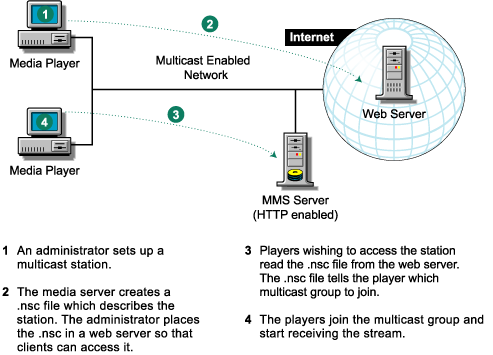


There are two main ways that Windows Media servers send data to Windows Media Player clients: multicast and unicast. The multicast source relies on multicast-enabled routers to forward the packets to all client subnets that have clients listening. There is no direct relationship between the clients and the Windows Media server. Stations are used to multicast streams to clients. The server generates an .nsc (NetShow channel) file when the multicast station is first created. Typically, the .nsc file is delivered to the client from a Web server. This file contains information that the Windows Media Player needs to listen for the multicast.
Figure 4 illustrates the multicast process:
Figure 4
If you want players to receive the station broadcast within a different multicast domain than the Media Server is on, then you would need to set up multicast agents within those multicast domains. A multicast domain is an area in the network that can be reached by a multicast. Packets multicasted within one domain are not received in other domains.
Figure 5 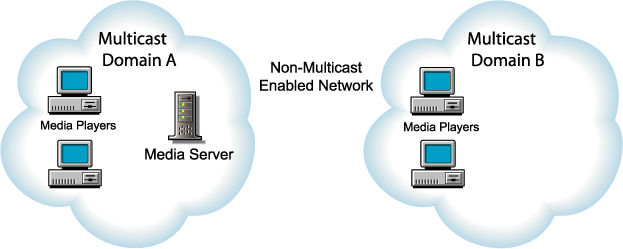
In order to receive the broadcast, place a media appliance within the Multicast Domain B and enable the multicast feature. The multicast agent within the appliance creates a unicast HTTP connection to the media server to obtain the stream and then rebroadcasts it using multicasting within the multicast domain. This allows the media players to receive the broadcast.
Figure 6 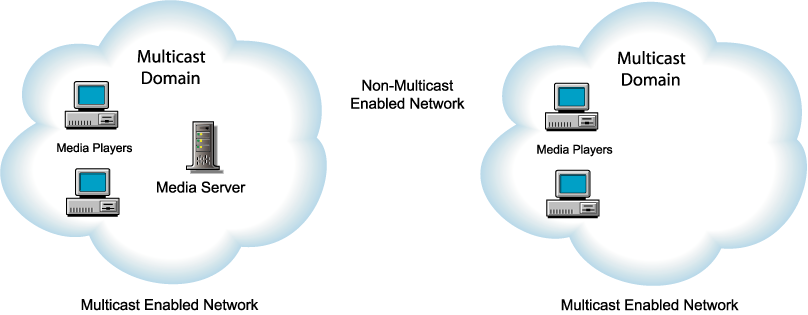
In the proxy server, you must have an MMS forward proxy and an HTTP forward proxy enabled. HTTP streaming must also be enabled on the MMS server. The browser must have a forward proxy service configured. The media device must proxy the HTTP requests issued by the clients to obtain the .nsc files for the station being broadcast from Domain A.
When a browser requests an .nsc file through the device with the multicast agent enabled, the device starts the multicasting the station if the station is not being multicasted already. To multicast a station the multicast agent within the device creates a unicast MMS-HTTP connection to the media server. The streaming data received over this connection is then multicast on the local lan by the appliance.
Figure 7 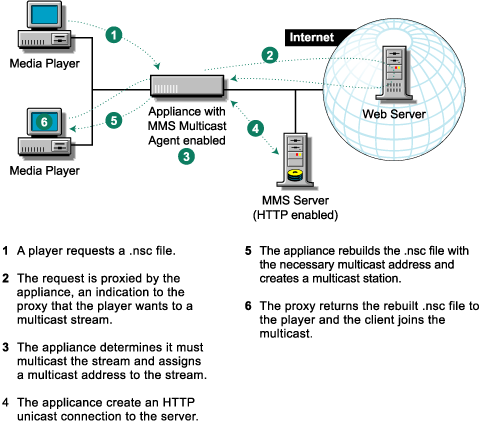
IMPORTANT: The MMS Media Server must have HTTP streaming enabled.
IMPORTANT: When creating a multicast station, select multicast and distribution.
IMPORTANT: When defining the multicast range for the multicast agent, make sure it doesn't conflict with other applications, such as NTP or a Real multicast.
IMPORTANT: The DNS name in the player request is used to determine which accelerator service the request is destined for. This requires the URL to contain the DNS name or the IP address of the MMS server. A URL containing a netbios will result in an error.
The command line syntax for enabling and configuring multicasting is:
set mmsMulticastProxyEnable = yes | no
set mmsMultiProxyTTL = 1-255 (Sets how many hops the multicast is allowed)
add mmsMulticastProxyRange = multicast_address_range (Sets the address range for the MMS multicast)
set smc mmsmulticastproxymaxrebroadcasttime = (Max duration the station will be rebroadcast