- Uninstall any third-party remote control agent or remote control application running on the managed workstation.
- Install the Novell® ClientTM that ships with ZfD on the managed workstation.
If you want to install Remote Management Agent on the managed workstation during Novell Client installation, click Custom Install > Remote Management. See Installing the Remote Management Service using the Novell Client Installer for details.
IMPORTANT: If you do not install Remote Management during Novell Client installation, you can use the Novell Application LauncherTM to add the Application object for Remote Management Agent to the managed workstation. See Installing the Remote Management Component. To add the Application object, ensure that you install Novell Application Launcher during the Novell Client installation.
Ensure that you select the option to install the Workstation Manager on the managed workstation.
- Register the managed workstation with NDS®.
For details, see Setting Up Automatic Workstation Import.
- Install the network management utility, ConsoleOneTM, on the management console.
- Import the registered managed workstation into NDS. For details, see Setting Up Automatic Workstation Import.
- Associate the Remote Management Policy settings for the managed workstation in either of the following ways:
For a Workstation object or for the Container of a Workstation object, you can associate a Remote Management Policy with the Workstation object or Container.
For a Workstation object, you can ignore the Remote Management Policy and associate the settings from the Remote Management settings page.
You can similarly associate Remote Management settings with the User object, Group, or Container of the logged-in user. For details, see The Package Associations Report in Reporting in Administration.
NOTE: If you are upgrading ZENworks 2 to ZfD 3, ensure that the ZfD 3 policies have been created and appropriately associated.
- Acquire the required rights to access a managed workstation. For details, see Setting Up Remote Management Security in Remote Management in Deployment.
IMPORTANT: ZfD Remote Management functionality can be used to remotely manage Windows* 95/98 or Windows NT*/2000 workstations. If you need to remotely manage Windows NT/2000 servers, you can use the ZENworks for Severs (ZfS) Remote Management functionality. For more information see the ZfS documentation Web site .
The following illustration depicts the functionality of ZfD Remote Management:
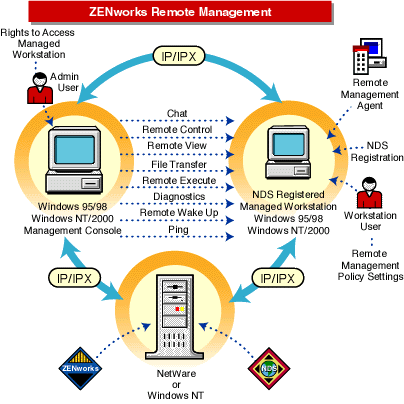
IMPORTANT: For the management console to be able to communicate with the managed workstation over IPXTM, ensure that IP as well as IPX stacks are installed on the managed workstation.
For any two machines to communicate, there must be a common protocol stack available on both machines.
IPX support for Chat, Diagnostics, File Transfer, and Remote Wake Up is not available.