
The context of an object is its position in the NDS tree.
In NWAdmin, the position of the object is shown in the graphic layout.
You can see in the picture below, for instance, that User Bob is in Organizational Unit Accounts, which is in Organizational Unit Finance, which is in Organization YourCo.
Sometimes, however, you need to express the context of an object in an NDS utility. For example, you could be setting up Bob's workstation and need to supply a name context, as shown below.
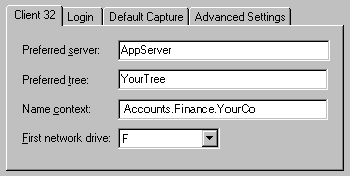
The context is specified as a list of containers separated by periods, between the object in question and the [Root]. In the example above, the User object Bob is in the container Accounts, which is in the container Finance, which is in the container YourCo. (You don't list the container [Root].)
Notice that if you say the context, replacing the periods with the words 'which is in,' the context seems logical.
The complete name of an object is its object name with the context appended. For example, the complete name of User object Bob is Bob.Accounts.Finance.YourCo.
Sometimes typeful names are displayed in NDS utilities. Typeful names include the object type abbreviations from the list below:
Object Class |
Type |
Abbreviation |
All leaf object classes |
Common Name |
CN |
Organization |
Organization |
O |
Organizational Unit |
Organizational Unit |
OU |
Country |
Country |
C |
In creating a typeful name, NDS uses the type abbreviation, an equal sign, and the object's name. For instance, Bob's partial typeful name is CN=Bob. Bob's complete typeful name is CN=Bob.OU=Accounts.OU=Finance.O=YourCo. You can use typeful names interchangeably with typeless names in NDS utilities.
The process NDS uses to find an object's location in the Directory tree is called name resolution. When you use object names in NDS utilities, NDS resolves the names relative to either the current context or the [Root].
Workstations have a context set when the networking software runs. For instance, Bob's workstation would be set to the current context as follows:
Accounts.Finance.YourCo
Current context is a key to understanding the use of leading periods, relative naming, and trailing periods.
Use a leading period to resolve the name from [Root], no matter where the current context has been previously set. In the example below, the leading period tells the CX (Change Context) utility to resolve the name relative to the [Root].
CX.Finance.YourCo
NDS interprets the command as 'Change context to the Finance container, which is in the YourCo container, resolved from [Root].'
The workstation's current context changes to the Finance container, which is in the YourCo container.
Relative naming means that names are resolved relative to the workstation's current context, rather than [Root]. Relative naming never involves a leading period, since a leading period indicates resolution from [Root].
Suppose a workstation's current context is set to Finance.

The relative object name of Bob is
Bob.Accounts
NDS interprets the name as 'Bob, which is in Accounts, resolved from the current context, which is Finance.'
Trailing periods can only be used in relative naming. Therefore, you can't use both a leading period and a trailing period. A trailing period changes the container from which NDS resolves the name.
Each trailing period changes the resolution point one container toward the [Root]. Suppose you want to change your workstation's current context from Timmins to Allentown in the example below.
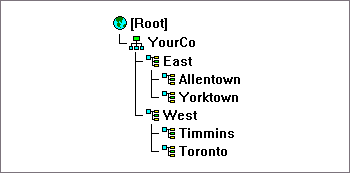
The proper CX command uses relative naming with trailing periods:
CX Allentown.East..
NDS interprets the command as 'Change the context to Allentown, which is in East, resolved from two containers up the tree from the current context.'
Similarly, if Bob is in the Allentown container and your workstation's current context is Timmins, Bob's relative name is
Bob.Allentown.East..