If you have more than 1,000 objects in your NDS* tree, or slow or unreliable WAN links, you should consider partitioning (dividing) the NDS Directory.
Partitioning allows you to take part of the Directory off one server and put it on another server.
A partition is a logical division of the NDS database. A Directory partition forms a distinct unit of data in the NDS tree that stores Directory information.
Each Directory partition consists of a set of container objects, all objects contained in them, and data about those objects. NDS partitions don't include any information about the file system or the directories and files contained there.
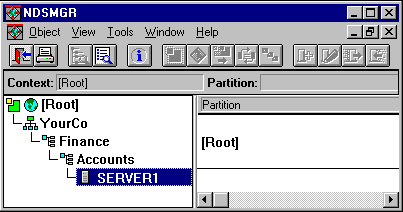
Partitioning is done with the NDS Manager utility, which you can access from NWAdmin or run independently. A sample NDS Manager screen is shown below.
Partitions are identified in NDS Manager by the partition icon: 
In the example, the partition icon is next to [Root]. This means [Root] is the topmost container in the partition. No partitions are shown by any other containers, so the [Root] partition is the only one.
This is the default partitioning for NDS, keeping the entire Directory together in one partition.
Notice in the screen that server SERVER1 is highlighted. When you highlight a server in NDS Manager, any replicas held on that server are shown on the right. In this case, SERVER1 holds a replica of the [Root] partition. See also Replicas: Keeping NDS Running.
Partitions are named by their topmost container. In the example below there are two partitions, named [Root] and Finance. Finance is called a child partition of [Root], since it was split off from [Root]. [Root] is called the parent partition of Finance.
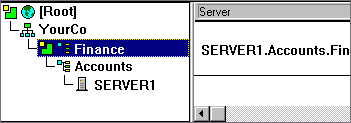
You might create such a partition because the Directory has so many objects that the server is overwhelmed and access to NDS is slow. Creating the new partition allows you to split the database and pass the objects in that branch to a different server.
In the example above, suppose that server SERVER1 holds replicas of both the [Root] partition and the Finance partition. At this point, you haven't gained any performance advantage from NDS since SERVER1 still holds the entire Directory (replicas of both partitions).
To gain the desired performance advantage, you need to move one of the replicas to a different server. For instance, if you move the [Root] partition to SERVER2, then SERVER2 holds all objects in the [Root] and YourCo containers. SERVER1 only holds objects in the Finance and Accounts containers. The load on both SERVER1 and SERVER2 is less than it would be with no partitioning.
Suppose your network spans two sites, a North site and a South Site, separated by a WAN link. Three servers are at each site.
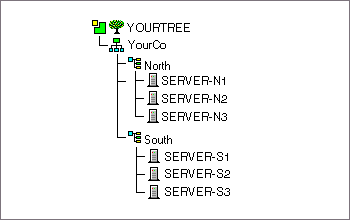
NDS performs faster and more reliably in this scenario if the Directory is divided in two partitions. The following explanation tells why.
With a single partition, the replicas are either kept at one site or distributed between the two sites. This proves unwieldy for two reasons:
The two-partition solution shown below solves performance and reliability problems over the WAN link.
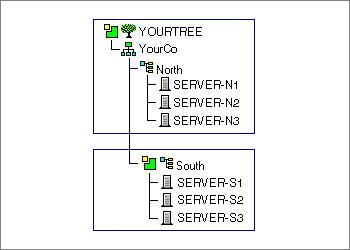
Replicas of the [Root] partition are kept on servers at the North site. Replicas of the South partition are kept on servers at the South site, as shown below.
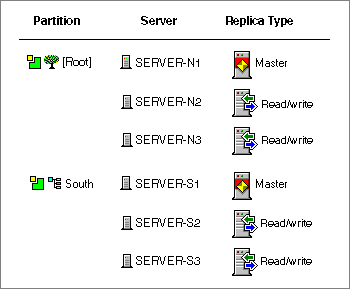
For each site, the objects that represent local resources are kept locally. Synchronization traffic among servers also happens locally over the LAN, rather than over the slow, unreliable WAN link.
NDS traffic is generated over the WAN link, however, when a user or administrator accesses objects at a different site.