Using the Virtual Internal Ring to Support Three or More Interfaces
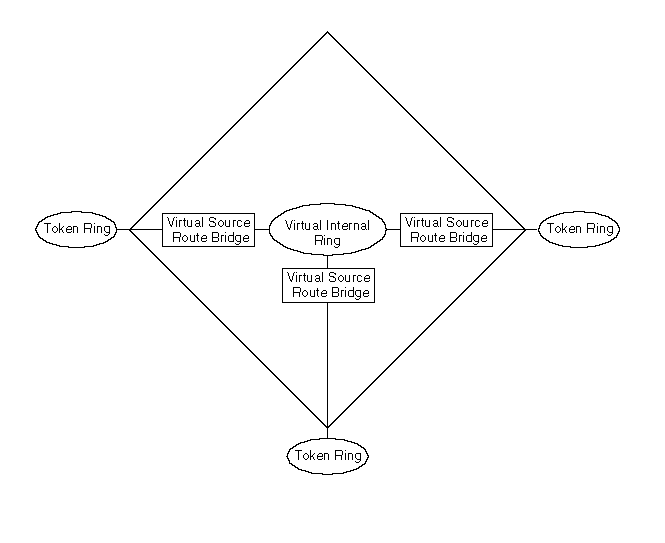
Presently, most source route bridges support only two-port bridging. The reason is that the interface boards that specifically support source route bridging typically provide only for two-way bridging. In other words, they can bridge from only one source ring to a single destination ring. In source route bridging, each bridge hop is specified by a source ring number, bridge number, and destination ring number. Because more than one destination ring is possible in a multiport bridge, the hardware cannot be configured to support multiport bridging directly. To overcome this limitation, Novell Internet Access Server 4.1 supports the use of a virtual internal ring, as shown in Figure 9 .
NOTE: Some vendors might provide boards without this limitation. If this is the case, and as long as all boards are from the same vendor, the source route bridge does not require the virtual internal ring.
Figure 9
Using the Virtual Internal Ring to Support Three or More Interfaces
With the internal ring, any receiving interface has a virtual internal bridge associated with it (labeled virtual source route bridge in Figure 9 ). Each virtual internal bridge can pass packets from the external source ring to one destination ring (the virtual internal ring). Each forwarding interface can then bridge from the virtual internal ring to a single external destination.
Although virtual internal rings and virtual internal bridges have no corresponding physical devices, they appear in the routes specified in a frame's routing information field. From the point of view of the software, they are treated as if they were actual rings and bridges. The additional logic needed to implement the virtual internal ring with multiple virtual internal bridges does not impact performance. In fact, by using the virtual internal ring, the bridging logic can take advantage of the hardware support on the interface boards and significantly improve overall bridge performance. However, configuring a virtual internal ring adds one hop to the route.
For more information about multiport bridging, refer to Understanding.
Before you begin, you must complete the following tasks:
To load the virtual internal ring, complete the following steps:
Load NIASCFG, then select the following parameter path:
Select Configure NIAS > Protocols and Routing > Protocols > Source Route Bridge
Set the Bridge Status parameter to Enabled .
Assign a value to the Bridge Number parameter.
Assign a value to the Virtual Ring Number parameter to enable the internal virtual ring, press Enter , then press Esc to return to the Internetworking Configuration menu.
WARNING: If no ring number is configured for the virtual internal ring, binding to the board has no effect. Although NIASCFG allows you to bind to the board, the binding does not actually occur.
Bind the source route bridge software to each interface.
Select Bindings and do one of the following:
If you are adding a new binding:
If you are modifying an existing binding, select the interface to which you are binding the protocol.
For LAN interfaces, set the Ring Number parameter to the correct value for the token ring connected to the interface.
For WAN interfaces, select the WAN call destination that connects the bridge to the other bridge.
For information about defining WAN call destinations, refer to Configuring a Permanent PPP Connection in the NetWare Link/PPP documentation.
Press Esc to return to the Internetworking Configuration menu; save your changes when prompted.
If you want these changes to take effect immediately, restart the router.
If you want to configure other parameters, do so now, then restart the router when you are finished.
When the bridge protocol is attached to a LAN or WAN interface, the virtual internal ring is automatically attached to the bridge. Each attachment of the bridge protocol to an interface essentially causes the creation of a virtual internal bridge for that interface.