Configuring Local Two-Port Bridging
When configured as a standalone two-port token ring bridge, Novell Internet Access Server 4.1 works like an IBM bridge. Local two-port bridging enables you to perform the following services:
- Replace existing bridges while adding a migration path to an environment with simultaneous bridging, routing, and NetWare® print and file services.
- Physically extend the length of a network or increase the number of users a network can support.
Token ring LANs are limited in the network's physical length and the number of supported nodes. Source route bridging limits only the size of the network by the maximum number of allowed bridges (hops) between any given source and destination nodes. Novell supports the IBM and IEEE 802.5 bridging standards for a seven-hop limitation and allows you to extend a Novell-bridged network up to a 13-hop limit.
- Partition your network into segments so that most traffic remains local to the segment.
This reduces the overall bandwidth used on all segments of the network while still providing access to the rest of the bridged network. Segmentation can also be used to control access to certain rings or departments.
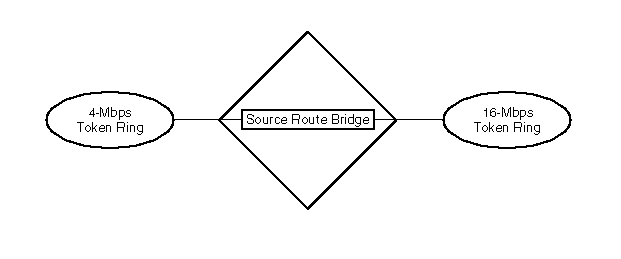
- Connect PC users on both 4-Mbps and 16-Mbps token ring networks, as shown in Figure 7 .
PC users on the same network segment must operate at the same speed. Linking LANs operating at different speeds is especially important when organizations install newer 16-Mbps token ring networks but still have a large number of 4-Mbps token ring networks.
- Enable the Novell LAN Network Manager (LNM) Agent to support the following management server functions:
- LAN Reporting Mechanism (LRM)
- Ring Error Monitor (REM)
- Configuration Report Server (CRS)
- Ring Parameter Server (RPS)
- LAN Bridge Server (LBS)
Figure 7
Local Bridging Between 4-Mbps and 16-Mbps Token Ring Networks
For more information about two-port bridging, refer to Understanding.
How to Configure Local Two-Port Bridging
Before you begin, you must configure two token ring boards.
To configure local two-port bridging, complete the following steps:
-
Load NIASCFG, then select the following parameter path:
Select Configure NIAS > Protocols and Routing > Protocols > Source Route Bridge
-
Set the Bridge Status parameter to Enabled .
-
Assign a value to the Bridge Number parameter, press Enter , then press Esc to return to the Internetworking Configuration menu.
-
Bind the source route bridge software to each interface.
-
Select Bindings and do one of the following:
If you are adding a new binding:
- Press Ins .
- Select Source Route Bridge .
- Select the interface to which you are binding the protocol.
If you are modifying an existing binding, select the interface to which you are binding the protocol.
-
Set the Ring Number parameter to the correct value for the token ring connected to the interface.
-
Press Esc to return to the Internetworking Configuration menu; save your changes when prompted.
-
If you want these changes to take effect immediately, restart the router.
If you want to configure other parameters, do so now, then restart the router when you are finished.
Previous | Next