Understanding Tiered Electronic Distribution
Review the following sections for an understanding of Tiered Electronic Distribution (TED):
- Distribution Management through Tiered Electronic Distribution
- The Basic Distribution Process
- TED's eDirectory Objects
- Physical Network Connections
- Distribution Flow Details
- Relationships of the TED Objects
- The ZfS Agents Used by TED
- The Tiered Distribution Model
- TED's Key Components
Distribution Management through Tiered Electronic Distribution
Tiered Electronic Distribution (TED) provides you with a way to manage your servers through the distribution of electronic data between servers. For example, application programs, collections of data files, software patches, and server policies.
When you install Policy and Distribution Services, the installation process creates TED and server policy objects in the eDirectory tree, copies software to the various servers, and sets up basic configurations for the TED and Server Policies components according to your installation selections.
The TED software can be hosted on NetWare®, Windows NT, Windows 2000, Linux, and Solaris servers.
TED uses a tiered distribution model that enables one server to indirectly service hundreds or even thousands of other servers. TED makes it easy to distribute files and policy packages by building them into compressed data files and hosting them in distribution channels for dissemination to the appropriate servers.
TED lets you schedule the distribution processes to take advantage of off-peak hours. It also sends notification of distribution status by sending e-mail messages, logging events, displaying real-time messages, database reporting, and sending SNMP traps.
The Basic Distribution Process
The TED distribution process is based on the creation of Distributions (compressed file collections) that you use to move files and policies to your network servers. For more information, see Understanding the Distribution Processes.
Following is a simplified distribution process. It is governed by schedules that you set for each of the TED objects involved with the Distribution file.
- A Distributor creates a security certificate to provide distribution security.
- A Distribution is built on the Distributor server's file system according to the configuration you create in the Distribution object.
- You associate the Distribution with a Channel.
- You subscribe your target Subscriber servers to the Channel. This will cause them to receive all of the Distributions contained in that Channel.
- The certificate (from 1 above) is copied to Subscriber servers for Distribution security verification.
- The Channel's listed Distributions are sent from the Distributor to the Subscriber servers whose security certificates are valid.
- The Subscriber extracts the files or policies from the compressed Distribution file and applies them according to the Distribution object's configuration.
The schedules that you need to coordinate for sending Distributions are the Distributor's Refresh schedule, the Distribution's Build schedule, and the Channel's Send schedule.
The schedules that you need to coordinate for receiving and extracting Distributions are the Channel's Send schedule and the Subscriber's Extract schedule.
For information on scheduling, see TED Object Scheduling Issues.
TED's eDirectory Objects
TED uses eDirectory objects and the related software for performing its distribution functions. The Distinguished Name (DN) of all TED objects includes the server name and component function of the host server.
The eDirectory schema extensions included in TED define the classes of eDirectory objects that can be created in your eDirectory tree, including information that is required or optional at the time the object is created. Every object associated with TED in an eDirectory tree has a class defined for it in the tree's schema.
You will extend the schema of your tree for the following eDirectory objects when you install ZfS 3.0.2:
Relationships of the TED Objects
The following illustrates the relationships of the main TED objects:
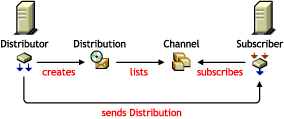
Note the following from this illustration:
- A Distributor creates a Distribution
- The Distribution is listed in a Channel
- A Subscriber subscribes to the Channel
- The Subscriber receives the Distribution from the Distributor (possibly via a parent Subscriber)
Physical Network Connections
Distributor and Subscriber servers can be physically connected to the network in any configuration, including having some servers across WAN links. The following describes the possible physical interactions between Distributor and Subscriber servers:
- A Subscriber server can be in the same geographic location as its Distributor server
- A Subscriber server can be in a different geographic location from its Distributor server, such as across a WAN link
- A Distributor server can service multiple Subscriber servers
- A Subscriber server can be serviced by multiple Distributor servers
- A Subscriber server can receive its Distribution files directly from a Distributor server
- A Subscriber server can receive its Distribution files indirectly via another Subscriber server acting as a parent Subscriber
Distribution Flow Details
The following illustrates the physical flow of TED Distributions:
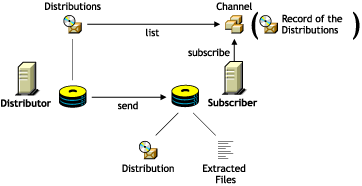

Note the following from the illustration:
- A Distribution file is stored on the Distributor server's hard drive
- The Channel lists a Distribution (it does not hold a copy of the Distribution)
- The Subscriber subscribes to a Channel to obtain all of the Distributions listed there
- The Subscriber extracts the Distribution contents from the file's compressed format and writes the content to the volume and directory specified in the Distribution's configuration
IMPORTANT: When there are multiple versions of a File or Desktop Application Distribution, the Subscriber maintains copies of each of the versions, as is specified in the Distribution object's properties. The default is to maintain 10 versions per Distribution type.
The ZfS Agents Used by TED
The following ZfS agents are used to perform the TED distribution process' actual functions:
Distributor Agent
The Distributor Agent is installed on each server where you select the Distributor option on the Server Selection for Policy and Distribution Services installation page.
This TED agent has the following functions:
- Builds Distributions based on the information contained in the Distribution objects that are associated with the Distributor.
- Reads eDirectory for all TED configuration information (Distribution, Channel, and Subscriber information), and builds and sends Distributions accordingly.
- Handles all notifications and events for the Subscriber.
- Sends DS configuration information found in Subscriber objects to each Subscriber as part of each Distribution.
- Adheres to Distribution schedules for building the Distributions belonging to a Distributor.
- Adheres to Channel schedules for sending Subscribers' configuration information and any of the Distributions listed in the Channel.
- Logs Tiered Electronic Distribution information to the TED.LOG file for reporting purposes
Subscriber Agent
The Subscriber Agent is installed on each server where you select the Subscriber/Policies option on the Server Selection for Policy and Distribution Services installation page.
This TED agent has the following functions:
- Subscribes its Subscriber server to Channels for receiving Distributions.
- Receives and extracts (installs) the following Distribution types to the server's file system:
- File
- FTP
- HTTP
- RPM
- Desktop Application 1
1 The Desktop Application Distribution is only available when ZENworks for Desktops (ZfD) is installed.
- Receives and hands off some Distribution types to the Policy/Package Agent (see Policy/Package Agent).
- In the parent Subscriber role, receives a Distribution and forwards it on to other Subscriber servers.
- Logs Tiered Electronic Distribution information to the TED.LOG file for reporting purposes
Policy/Package Agent
The Policy/Package Agent is installed on each server where you select the Subscriber/Policies option on the Server Selection for Policy and Distribution Services installation page.
This Server Policies agent has the following TED functions:
- Extracts and enforces policy information from Policy Package Distributions.
- Extracts and installs the contents of Server Software Packages (Software Package Distributions).
- Logs policy and software package information to the DEFAULTLOG.TXT file for reporting purposes
This agent has other policy-related functions. For more information, see Server Policies.
The Tiered Distribution Model
The power of the tiered distribution model is that you can spread the workload for sending Distributions. This is particularly important to the Distributor servers. By sharing distribution duties with parent Subscribers, a Distributor server can have more resources available for reading eDirectory, building each of its Distributions, and logging information to the database.
Tiered distribution levels can be very deep, providing a very large number of Subscribers that any one Distributor can service---without doing so directly.
The following illustrates a distribution routing hierarchy containing a Distributor, several parent Subscribers, and many end-node Subscribers:
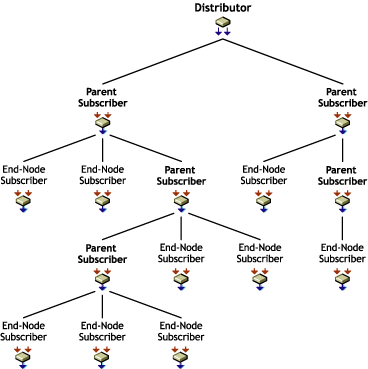
The Distributor can service hundreds of parent Subscribers directly, or service just a few first-tier parent Subscribers and let them do the bulk of the distribution work. In the above illustration, the Distributor only has to send its Distribution to two parent Subscribers, yet nine end-node Subscribers will receive the Distribution.
The parent Subscribers shown in this illustration can also receive the Distribution for extraction if they were also subscribed to the Distribution's Channel. If all of the parent Subscribers in the above illustration were subscribed to receive the Distribution being sent to the end-node Subscribers, the Distributor will have serviced 14 total Subscriber servers while only itself sending the Distribution twice.
Each parent Subscriber can service hundreds of other parent Subscribers or end-node Subscribers (the intended recipients of the Distributions). The workload for passing on a Distribution by a parent Subscriber is minimal in compared to the workload for the Distributor to build the Distribution.
As you can see, the tiered distribution model allows you to minimize the distribution workload for your Distributor servers.
TED's Key Components
In summary, the key components of TED include:
- eDirectory schema extensions that include objects for Distributors, Distributions, Channels, Subscribers, and External Subscribers
- ConsoleOne snap-ins and iManager plug-ins that provide creation, configuration, and management of TED
- A Distributor Java process hosted on a NetWare, Windows NT, Windows 2000, Linux, or Solaris server for handling distribution of data packages to Subscribers
- A Subscriber Java process hosted on a NetWare, Windows NT, Windows 2000, Linux, or Solaris server that subscribes to a Channel for its Distributions
- A routing hierarchy for each Distributor that has a hierarchical list of Subscribers who can both receive Distributions for themselves and pass the Distributions on to other Subscribers
- Parent Subscribers that pass Distributions on to other Subscribers
- An External Subscriber object that allows distributing between trees or to servers that do not have eDirectory server objects
- The Distributor Agent that controls the actual processes of building the Distribution files on the Distributor, and the Subscriber Agent that controls extracting from Distribution files on the Subscriber
- Policy/Package Agent that extracts and enforces policy information from Policy Package Distributions, and extracts and installs the contents of software packages
- Certificates that provide distribution security