Database Synchronization
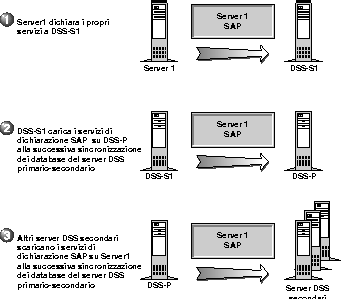
Any time a NetWare/IP server or client requests a network service, such as DISPLAY SERVERS or NLIST, it relies on information maintained by the DSS servers. Therefore, a DSS server must be available to all NetWare/IP nodes at all times. To provide redundancy and load balancing, NetWare/IP supports DSS server replication in which a single, authoritative DSS server is configured as the primary DSS server and one or more replicas are configured as secondary DSS servers. Each type of DSS server is described in the following sections.
The primary DSS server maintains the master database of SAP and RIP information and is therefore the authoritative DSS server for the NetWare/IP domain. A single primary DSS server supports all servers and clients in a NetWare/IP domain. Because the performance of the NetWare/IP network depends on the performance of the primary DSS server, it is recommended that you designate as the primary DSS server a server that has relatively low use. If heavy NetWare/IP traffic is anticipated, a server may need to be dedicated to providing the primary DSS server capabilities.
In addition to maintaining the master SAP/RIP database, the primary DSS server supplies global configuration parameters used by all NetWare/IP nodes, such as the NetWare/IP domain name, the virtual IPX network number, and the UDP port numbers used for the NetWare/IP service. For more information on the global parameters maintained by the primary DSS server, see Primary DSS Configuration Form
To provide redundancy and load balancing for DSS on the NetWare/IP internetwork, one or more replica DSS servers, called secondary DSS servers, should be configured. Together, the primary DSS server and its secondaries form a distributed database of SAP/RIP information.
Each DSS server maintains a read-write copy of the global DSS database. This means that the secondary DSS server not only provides SAP/RIP information to its local NetWare/IP hosts, it also accepts SAP/RIP updates.
When a NetWare/IP server starts up, it registers its services with the closest available DSS server. This DSS server is then responsible for maintaining SAP/RIP data for the server and communicating the global communication parameters. Then, at a defined interval, the secondary DSS servers synchronize their databases with the primary DSS server, making the information registered with the secondaries available throughout the entire internetwork. Thus, the secondary DSS servers share the burden of maintaining SAP/RIP information for the internetwork.
When a secondary DSS server comes up for the first time, it must obtain and save global NetWare/IP parameters that come from the primary DSS server. The next time the secondary DSS server comes up, it again looks for the primary DSS server to obtain the current configuration. If it cannot find the primary DSS server, however, it defaults to the configuration it used the last time it was up.
The primary DSS server and its secondaries automatically synchronize their databases at an interval defined by the primary DSS server. Every DSS database file contains a version number that increments each time the file is updated. Before synchronization, the secondary DSS server compares its database file version number with the primary's version number. If the secondary determines that synchronization is necessary based on the database version number, it initiates a zone transfer.
During the zone transfer, the secondary DSS server uploads all new and changed SAP/RIP records registered at its database to the primary DSS database. Then the secondary DSS server downloads any records that have been changed or added to the primary DSS database since the last synchronization.
Service and routing information registered with a secondary DSS server is not available throughout the internetwork immediately. This is because SAP and RIP information passes from the secondary DSS server to the primary DSS server at the first database synchronization after a record is updated. The information is not transferred from the primary to the remaining secondaries until the next database synchronization.
Using the default database synchronization interval, which is five minutes, it could be up to 15 minutes (the equivalent of three database synchronization intervals) before newly advertised services are available throughout the entire NetWare/IP internetwork. Figure 3-1 illustrates the primary DSS-secondary DSS database synchronization process.
NOTE: If the primary DSS server is down, the secondaries cannot learn about any new services registered with other secondaries. They can learn only about new services from local hosts. When the primary DSS server comes back up, database synchronization resumes.
Figure 3-1.
Database Synchronization
There are two methods you can use to manage the amount of SAP traffic generated on a NetWare/IP network.
In an IPX-based NetWare network, an administrator can manage SAP and RIP traffic by implementing IPX filters. In particular, an administrator can implement service information filters to reduce the traffic associated with advertising services and routes throughout the network. In a mixed IP-IPX network, this type of filtering is still possible. And, because the best place to enable and configure filtering is where SAP and RIP traffic are generated, IPX-based filtering is most effective when configured at each NetWare/IP server that is configured as a forwarding gateway. For more information about NetWare/IP gateways, see Gateway Configuration
To enable IPX-based filtering, you use the Internetworking Configuration (INETCFG) utility to enable filtering and the Filter Configuration (FILTCFG) utility to define the filters. For instructions on enabling and configuring IPX-based filtering, see Configuring Other Filtering Options
In addition to IPX filtering, an administrator can manage SAP traffic by implementing filters in DSS. DSS SAP filters, when applied, allow only SAP traffic that meets specified criteria to be replicated to other DSS servers. DSS SAP filters are applied globally. Every DSS server uses the same set of filters to determine whether or not SAP information should be shared.
If DSS SAP filtering is enabled, each SAP packet received by a DSS server is checked against the defined filters. If the packet matches a filter, the information is flagged as global and is replicated when the DSS servers synchronize. If the packet does not match a filter, the information is flagged as local and is not replicated.
For more information on DSS SAP filtering, see DSS SAP Filtering Configuration Form