DNS Client Access Form
To set up the primary DSS server, you must
Before you can configure a server as the primary DSS server, it must meet the following hardware and software requirements:
(a x 520) + 835,000 = memory in bytes needed on the server.
NOTE: If you choose to set up DSS on a server that belongs to a remote DNS domain, you must add resource records to two master DNS databases. You must add a name server record to the master DNS database that is servicing your NetWare/IP domain identifying the DSS server as a name server for the NetWare/IP domain and an address record to the master DNS database of the remote domain specifying the IP address to hostname mapping for the server.
The UNICON forms you use to complete the primary DSS server configuration are shown and described in the following sections.
If you need information about a specific field when accessing an online form using UNICON, press <F1> .
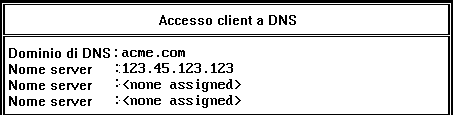
The primary DSS server must be set up as a DNS client or resolver. Use the DNS Client Access form to configure the primary DSS server as a DNS client.
Figure 8-1.
DNS Client Access Form
The utility displays this form only if you do not have DNS client access set up on this server before you try to configure DSS or NetWare/IP on this server.
You might already have DNS access set up if you configured this machine as a DNS name server, or if you used the Server Profile Configuration form to enable DNS client access, or if the server is running another product that uses DNS.
NOTE: UNICON's Server Profile Configuration form is described in Server Profile Configuration Form
From UNICON's Main Menu, choose the following to display the DNS Client Access form:
The information required to complete this form can be found on a completed NetWare/IP Support Services Planning Worksheet as described in NetWare/IP Support Services Planning Worksheet A description of each field follows:
DNS Domain ---the name of the DNS domain to which the server belongs. The utility checks to make sure that you enter a valid DNS domain name. If you are not sure of the correct syntax, see Domain Names
Name Server ---the DNS name server this DSS server should contact first to resolve DNS queries. Type the hostname or IP address of the nearest DNS name server.
Name Server ---the additional Name Server fields specify additional DNS name servers this DSS server should contact to resolve DNS queries. You do not need to fill in these fields if information about all hosts in your network is available through the first DNS name server.
Use the Primary DSS Configuration form to set up a NetWare® server as the primary DSS server and to specify the global parameter values for a NetWare/IP domain. You can also use this form to modify the primary DSS server configuration.
Figure 8-2.
Primary DSS Configuration Form

From UNICON's Main Menu, choose the following to display the Primary DSS Configuration form:
The information required to complete the Primary DSS Configuration form can be found on a completed Primary DSS Server Configuration Worksheet as described in Primary DSS Server Configuration Worksheet A description of each field follows:
NetWare/IP Domain ---the domain for which this DSS server maintains SAP/RIP information. All NetWare/IP servers and clients using this primary DSS server are members of this domain. The NetWare/IP domain conforms to the same naming conventions as the DNS domain. For additional information about NetWare/IP domains, see NetWare/IP Domain
Primary DSS Host Name ---the fully qualified hostname of the current server, in the form of hostname .DNS_domain_nam e .
IPX Network Number (in hex) ---the IPXTM external network number for your NetWare/IP network. You can assign an arbitrary hexadecimal number of one to eight digits (1 to FFFFFFFF), but the number must be unique throughout your IPX internetwork. If you have a mixed IP-IPX internetwork, make sure that the number you assign is not already being used by another NetWare server on one of your IPX segments. This is the virtual IPX network number used by all NetWare/IP hosts in the NetWare/IP domain.
Tunable Parameters ---displays the Tunable Parameters form.
Figure 8-3.
Tunable Parameters Form
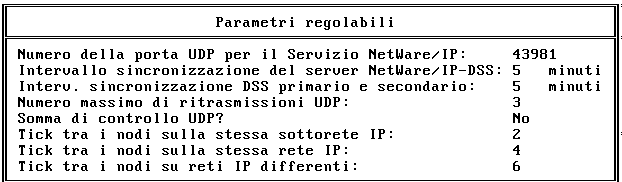
The Tunable Parameters form enables you to modify the following parameters, which affect all hosts in the NetWare/IP domain:
UDP Port Number for NetWare/IP Service ---the first of two consecutive port numbers used by DSS servers and NetWare/IP servers and clients to exchange NetWare/IP packets. This port number identifies the port to which UDP datagrams are directed; the next consecutive port number is the port to which NetWare/IP SAP and RIP queries are directed. The default port numbers are 43981 and 43982. If either of these port numbers is already in use for other services on the network, you must assign a different series of port numbers.
DSS-NetWare/IP Server Synchronization Interval ---how often the NetWare/IP servers in the NetWare/IP domain query DSS for updated information. The default interval is 5 minutes. The range is 1 to 60 minutes.
Primary-Secondary DSS Synchronization Interval ---how often the secondary DSS servers in this NetWare/IP domain query the primary DSS server for updated information. The default interval is 5 minutes. The range is 1 to 240 minutes.
Maximum UDP Retransmissions ---the number of times a NetWare/IP host will retransmit a UDP packet without receiving an acknowledgment. After this number of transmissions, the packet is dropped. The default is 3 times. The range is 1 to 48 times.
UDP Checksum? ---specifies whether UDP datagrams will use error detection and correction fields for client to server communications. The default is No, which enables UDP to provide its fastest transmission service because it does not have to check for errors. However, it is possible for data to become corrupt during transit. If you choose Yes, packets marked with checksum errors are rejected and retransmitted.
Ticks between Nodes on the Same IP Subnet ---the amount of time in ticks (1/18 of a second) it takes a packet to travel one way between hosts on the same subnetwork. The default is 2 ticks. The range is 1 to 1,000 ticks.
Ticks between Nodes on the Same IP Net ---the amount of time in ticks (1/18 of a second) it takes a packet to travel one way between hosts on the same network. The default is 4 ticks. The range is 1 to 1,000 ticks.
Ticks between Nodes on Different IP Nets ---the amount of time in ticks (1/18 of a second) it takes a packet to travel one way between two hosts on different TCP/IP networks. The default is 6 ticks. The range is 1 to 1,000 ticks.
DSS SAP Filters ---displays the DSS SAP Filtering Configuration form. This form is described in the following section.
NOTE: If you change the NetWare/IP domain name, IPX network number, UDP Port Number values, or DSS SAP Filtering after the initial configuration, you must stop and restart the primary DSS server, each secondary DSS server, each NetWare/IP server, and each NetWare/IP client. Changes to the other global parameters are propagated throughout the NetWare/IP network dynamically.
Use the DSS SAP Filtering Configuration form to enable and configure DSS SAP filtering.
Figure 8-4.
DSS SAP Filtering Configuration Form
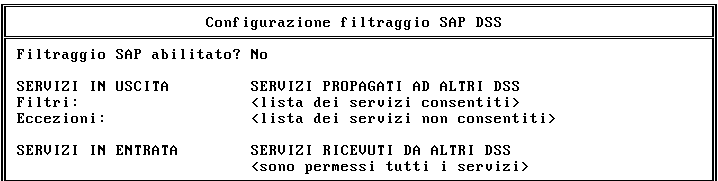
DSS SAP filters, when applied, allow only SAP traffic that meets specified criteria to be replicated to other DSS servers. DSS SAP filters are applied globally. Every DSS server uses the same set of filters to determine whether or not SAP information should be shared.
If DSS SAP filtering is enabled, each SAP packet received by a DSS server is checked against the defined filters. If the packet matches a filter, the information is flagged as global and is replicated when the DSS servers synchronize. If the packet does not match a filter, the information is flagged as local and is not replicated.
In addition to defining filters, you can define exceptions. Exceptions are defined like filters and enable you to more broadly define a set of filters. Together, filters and exceptions enable you to control the amount of SAP information DSS servers propagate on a NetWare/IP network.
A DSS SAP filter consists of three elements:
When defining filters, you can use ALL to specify all IP network and subnetwork addresses or SAP types. Also, you can use the following wildcards as values in the Server Name field:
* ---match any string. SRV* matches all server names which begin with srv, such as srv-mail, srv002, srv-eng, etc.
? ---match any single character. MAILSRV? matches all server names with mailsrv as the first seven characters followed by any single character, such as mailsrv1, mailsrv2, etc.
[abc] ---match a single character a, b, or c. MAILSRV[158] matches the three server names mailsrv1, mailsrv5, and mailsrv8. Do not separate values with spaces or commas. Only alphanumeric characters are valid.
For example, a filter defined as
Net/Subnet of SAP Reportee: ALLSAP Type (in hex): 0x0004Server Name: *
specifies that SAP packets of type 4 from any network address or server name are shared with all DSS servers.
You can define exceptions to filters. For example, suppose you define the filter in the example above, but you don't want SAP packets from a particular server to be distributed globally. You can define an exception to the filter that flags all SAP packets sent by that server as local.
When the DSS server receives a SAP packet from that server, it checks the filter list to see if the information should be distributed globally. The filter indicates that it should. Then, the DSS server checks the exception list. In this case, the exception indicates that it should not, so the SAP information is flagged as local.
When you enable and configure DSS SAP filtering, SAP information that is received by a DSS server but not distributed globally because of filtering is still visible to all NetWare/IP servers and clients that directly use that DSS server. This implies that for each site or geographic region in your network, you should use a standard list of preferred DSS servers. Each NetWare/IP client and server should have the same list of servers in its Preferred DSS Server List.
For instructions on enabling and configuring DSS SAP filtering, see Enabling and Configuring DSS SAP Filtering
From UNICON's Main Menu, choose the following:
If the server is not configured for DNS access, the utility displays a message indicating that you must configure this host as a DNS client. If this message does not appear, go to Step 4 .
Press <Esc> to continue.
Fill in the DNS Domain field and at least one Name Server field and press <Esc> .
Choose the Configure Primary DSS option.
Enter the name of the NetWare/IP domain.
Enter the fully qualified hostname of the server.
Enter the IPX network number you have chosen for the NetWare/IP network.
(Optional) Next to Tunable Parameters, choose <see form> and press <Enter> to modify the NetWare/IP tunable parameter settings.
For instructions on modifying these parameters, see Modifying Tunable Parameters
(Optional) Next to DSS SAP Filters, choose <see form> and press <Enter> to enable and configure DSS SAP filtering.
For instructions on enabling and configuring DSS SAP filtering, see Enabling and Configuring DSS SAP Filtering
To exit the Primary DSS Configuration form and save your changes, press <Esc> .
When prompted, choose Yes to save the primary DSS server configuration.
To return to UNICON's Main Menu, press <Esc> as needed.
After configuring the primary DSS server, you must start the Domain SAP/RIP Service on the server as described in Starting a DSS Server
IMPORTANT: If you did not already add resource records identifying the primary DSS server to the master DNS database, you must add the records now as described in Setting Up DNS Support If this is a registered DSS server, you must add both NS and A records for the server. If this is an unregistered DSS server, add only an A record for the server.