DNS Client Access Form
To set up a NetWare/IP server, you must complete the following tasks:
Before you can configure a NetWare/IP server, the server must meet the following hardware and software requirements:
(a x 380) + 258,000 = memory in bytes needed on the server.
The NWIPCFG forms you use to configure a NetWare/IP server are shown and described in the following sections.
If you need information about a specific field when accessing an online form using NWIPCFG, press <F1> .
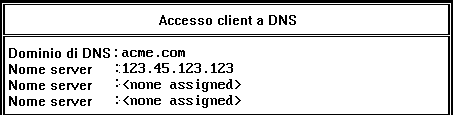
The server must be set up as a DNS client or resolver. Use this form to configure the server as a DNS client.
Figure 9-1.
DNS Client Access Form
The utility displays this form only if you do not have DNS access set up on this server. You might already have DNS access set up if you configured this machine as a DNS name server, you used the Server Profile Configuration form to enable DNS client access, or the server is running another product that uses DNS.
From NWIPCFG's NetWare/IP Administration menu, choose the following to display the DNS Client Access form:
The information required to complete the DNS Client Access form can be found on a completed NetWare/IP Support Services Planning Worksheet as described in NetWare/IP Support Services Planning Worksheet A description of each field follows.
DNS Domain ---the name of the DNS domain to which the server belongs. The utility checks to make sure that you enter a valid DNS domain name. If you are not sure of the correct syntax, see Domain Names
Name Server ---the DNS name server this NetWare/IP server should contact first to resolve DNS queries. Type the hostname or IP address of the nearest DNS name server.
Name Server ---the additional Name Server fields specify additional DNS name servers this DSS server should contact to resolve DNS queries. You do not need to fill in these fields if information about all hosts in your network is available through the first DNS name server.
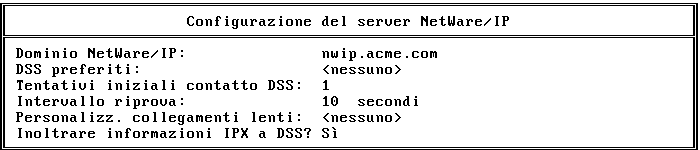
Use the NetWare/IP Server Configuration form to configure a NetWare/IP server.
Figure 9-2.
NetWare/
IP Server Configuration Form
From NWIPCFG's NetWare/IP Administration menu, choose the following to display the NetWare/IP Server Configuration form:
The information required to complete the NetWare/IP Server Configuration form can be found on a completed NetWare/IP Servers Planning Worksheet as described in NetWare/IP Servers Planning Worksheet A description of each field follows.
NetWare/IP Domain ---the name of the NetWare IP domain. All the NetWare/IP servers and clients using the same primary DSS server are members of this domain. The NetWare/IP domain name conforms to the same naming conventions as the DNS domain names. For additional information about setting up a NetWare/IP domain, see NetWare/IP Domain
Preferred DSSes ---the hostnames, IP addresses, or subnetwork IP addresses of up to five DSS servers that are closest to this NetWare/IP server. The NetWare/IP server will attempt to contact the DSS servers on this list sequentially before querying a DNS name server for a list of all available DSS servers. In addition, the only way for a NetWare/IP server to locate an unregistered DSS server is if it is configured as a preferred DSS server for the NetWare/IP server. For more information on using the Preferred DSSes field to optimize network performance, see Optimizing Performance in WAN Environments
Initial DSS Contact Retries ---the number of times the NetWare/IP server will retransmit an unacknowledged query to a DSS server at startup. The default is 1 retry. The range is 0 to 50 retries.
Retry Interval ---the length of time in seconds the NetWare/IP server will wait before retransmitting a unacknowledged query to a given DSS server at startup. The default is 10 seconds. The range is 5 to 100 seconds.
Slow Link Customizations ---the amount of time in ticks (1/18 of a second) it takes a packet to travel one way between this NetWare/IP server and a specified host or subnetwork. The range is 1 to 255 ticks. For more information on customizing slow links, see Optimizing Performance in WAN Environments .
Forward IPX Information to DSS ---specifies whether this NetWare/IP server should act as a forwarding gateway. The default is no. For more information on NetWare/IP gateways, see Gateway Configuration
Preferred IP Address ---the IP address chosen for NetWare/IP. The utility displays this field only if the server contains more than one network board. Pressing <Enter> in this field displays a list of available IP addresses for this server.
You use the NWIPCFG utility to configure a NetWare/IP server. The information you need to configure a NetWare/IP server is contained in the NetWare/IP Servers Planning Worksheet as described in NetWare/IP Servers Planning Worksheet
From NWIPCFG's NetWare/IP Administration menu, choose the following:
NWIPCFG issues a DHCP request for NetWare/IP information. If a DHCP server responds, you are prompted to confirm the NetWare/IP domain name and primary DSS server name.
In the NetWare/IP Domain field, enter the fully qualified NetWare/IP domain name.
Fill in other configuration fields as appropriate for your network.
Press <Esc> to exit the form.
When prompted, choose Yes to save the NetWare/IP server configuration.
After you configure the NetWare/IP server, you must start the NetWare/IP service as described in Starting the NetWare/IP Service
You can configure a NetWare/IP server to function as a forwarding gateway, a one-way forwarding gateway, or a non-forwarding gateway. For a description of each type of gateway, see Gateway Configuration
The following sections provide procedures for completing the gateway configuration tasks.
To configure a server as a bidirectional forwarding gateway, you must complete the following tasks:
To configure a NetWare/IP server as a one-way forwarding gateway, which only enables IPX-based clients to see and access IP services, you must complete the following tasks:
To configure a NetWare/IP server as a non-forwarding gateway, you must bind IPX to a network board in the server.
You must bind the IPX protocol to a server's LAN driver and to a specific network board to configure the server as a non-forwarding or forwarding gateway. You can bind IP and IPX to the same LAN driver and network board, or you can install a separate network board and LAN driver to bind to IPX.
For more information on the BIND command, refer to the Utilities Reference manual, which is part of the NetWare 4 documentation set. For instructions on binding a protocol to a network board, see Supervisione della rete , which is also part of the NetWare 4 documentation set.
From NWIPCFG's NetWare/IP Administration menu, choose the following:
With the cursor in the Forward IPX Information to DSS? field, press <Enter> .
When prompted, choose Yes to enable the forwarding function.
Press <Esc> to exit the form.
When prompted, choose Yes to save the configuration changes.
NOTE: You can also enable SAP/RIP forwarding from the server console prompt by typing load nwip /forward=yes <Enter> .
To remove the gateway function from a NetWare/IP server, you must unbind the IPX protocol from the LAN driver. Also, if the server is configured as a forwarding gateway, you must disable the forwarding parameter. The following sections provide procedures for each of these tasks.
For instructions on unbinding a protocol from a network board, see Supervisione della rete , which is part of the NetWare 4 documentation set.
To remove a forwarding gateway, you must modify the NetWare/IP server configuration to disable the forwarding of SAP and RIP information from the IPX network to DSS.
From NWIPCFG's NetWare/IP Administration menu, choose the following:
With the cursor in the Forward IPX Information to DSS? field, press <Enter> .
When prompted, choose No to disable the forwarding function.
To exit the form, press <Esc> .
When prompted, choose Yes to save the NetWare/IP server configuration.
NOTE: You cannot disable SAP/RIP forwarding from the server console prompt with the load nwip /forward=no <Enter> command. You must disable forwarding as described above and restart the NetWare/IP service.