3.1 NDSNamespace
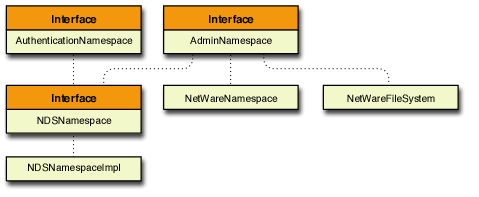
NDSNamespace is an interface containing methods specific to NDS. It extends AdminNamespace and AuthenticationNamespace and is used to administer the NDS namespace.
The relationship between these different components is shown in the following illustration:
Figure 3-1 The class hierarchy of the NDSNamespace interface.

NDSNamespace requires both NDS and a JVM to function. It provides full NDS object, schema, and partition management. NDSNamespace provides the following NDS management functionality:
- Retrieving an Object Entry
- Getting a Handle to the NDS Namespace
- Retrieving Subordinate Objects
- Retrieving Information about an Object
- Adding an Attribute to an NDS Object
- Modifying an Attribute
- Creating a User Object
- Deleting an Object
- Moving an Object
- Moving an Object
- Determining if an Object Exists
- Getting a Trustee's Effective Rights to a Given Object
- Getting Effective Attribute Rights
- Getting the Name of an Object
3.1.1 Retrieving an Object Entry
An object entry (objEntry) is a basic representation of a namespace object used by ConsoleOne. It contains only the name of the object and the object type. For more information about objEntries, see the ObjectEntry class.
To retrieve an object entry, use the following method. In this example, a fully distinguished name of an object, in this case "novell_inc/broberts.javadev.er.novell", is used to return the object entry associated with that object.
 //build an ObjectEntry from a fully distinguished name:
 ObjectEntry newOE = ns.getObjectEntry("novell_inc/broberts.javadev.er.novell");
If you have already obtained the object entry of the parent container of an object, you can retrieve an object entry by providing the objEntry parameter, which is the container that holds the object named "broberts". The method will return the object entry associated with that object.
// objEntry is a container that contains broberts. ObjectEntry newOE2 = ns.getObjectEntry(objEntry, "broberts");
See Also:
3.1.2 Getting a Handle to the NDS Namespace
The following method retrieves the namespace associated with a given ObjectEntry:
 //Get the namespace from the given object entry in ConsoleOne.
 NDSNamespace ns = (NDSNamespace)objEntry.getObjectType().getNamespace();
If you are not using ConsoleOne, you can create the namespace using the following method:
//If not using ConsoleOne the namespace is created like this: NDSNamespaceImpl ns = new NDSNamespaceImpl();
See Also:
3.1.3 Retrieving Subordinate Objects
The getChildren method returns the direct subordinate objects of a given object entry.
 //objEntry is a container
 ObjectEntryEnumeration oeEnum = ns.getChildren(objEntry);
See Also:
3.1.4 Retrieving Information about an Object
The getDetails(objEntry) method returns information about the object entry, including the mandatory and optional attributes, and all attribute values.
NOTE:The user interface refers to NDS properties, but most of the code refers to them as attributes. For clarity, this document refers to them as attributes.
The process begins by retrieving the NSObject, which contains all the information about an NDS object, using the getDetails(objEntry) method, as follows:
 //Get the NSObject
 NSObject obj = ns.getDetails(objEntry);
 //Get out mandatory attributes
 String[] manAttr = obj.getMandatoryAttributes();
 //Get optional attributes
 String[] opAttr = obj.getOptionalAttributes();
 //Get un-valued attributes
 String[] unvalAttr = obj.getUnvaluedAttributeNames();
 //Get a particular attribute with its associated value.
 ObjectAttribute attr = obj.getAttribute("CN");

 //Get all the attributes that contain values for the object.
 String[] attributeNames = obj.getAttributes();

 //To get all the values of an attribute.
 ObjectAttribute objAttr = obj.getAttribute("ACL");
 if(objAttr != null)
 {
      Enumeration valueEnum = objAttr. getValueComponents();
 }
See Also:
3.1.5 Adding an Attribute to an NDS Object
Adding an attribute to an NDS Object consists of several steps.
First you specify the attribute to be added, for example, the Member attribute, which makes the object a member of a group.
 //This code adds a group member to a group
 String attrName = "Member";
Next, you retrieve the object attributes and values.
 //Get the object details
 NSObject obj = ns.getDetails(objEntry);
Then you retrieve the attribute definition, given the attribute name.
 //Get attribute definition for new attribute
 AttributeDefinition attrDef = ns.getAttributeDefinition(objEntry,attrName);
Next, you retrieve the NDS syntax of the attribute.
 //Get the syntax
 NDSSyntax syntax = (NDSSyntax)attrDef.getSyntax();
With the attribute name, definition, and syntax, you now can create the attribute value.
 //Create the value
 ValueComponent val = syntax.createValueComponent("wuser.Burns_ou.SNPP");
Now that you have created the attribute value, you can create the attribute and add the value.
 //Create the attribute and add the value
 ObjectAttribute objAttr = attrDef.createAttribute();
 objAttr.addComponent(val);
 obj.addAttribute(objAttr);
Finally, you write the modification to the NDS directory.
 //Write the change.
 ns.update(obj);
See Also:
3.1.6 Modifying an Attribute
This code example shows you how to modify an existing attribute by changing its value. For example, to modify the Password Minimum Length attribute, you would follow these steps.
First, you must specify the name of the attribute.
String attrName = "Password Minimum Length";
Next, you retrieve the NSObject. You must have the object entry to retrieve the NSObject.
 //Get the NSObject
 NSObject obj = ns.getDetails(objEntry);
Then you retrieve the object attribute to modify.
 //Get the attribute to modify
 ObjectAttribute pwMinLen = obj.getAttribute(attrName);
Next, you retrieve the existing attribute value.
 //Get the value to modify
 ValueComponent oldvc = (ValueComponent)pwMinLen.getValueComponents().nextElement();
Then create the new attribute value.
 //Create the new value
 NDSSyntax syntax = (NDSSYntax)pwMinLen.getAttributeDefinition().getSyntax();
 ValueComponent newvc = syntax.createValueComponent(new Long(10));
After you have created the new value, you can replace the old value.
 //Replace the value
 pwMinLen.replaceComponent(oldvc, newvc);
Finally, you update the NDS directory with the new value.
 //Write change to DS
 namespace.update(obj);
See Also:
3.1.7 Creating a User Object
To create a new User object, you must declare String objects that contain the following information about the object:
- The name of the new User object
- The user's surname
- The class of the object
- The base class of the object
 String userName = new String("newUser");
 String surName = new String("Surname");
 String objClass = new String("Object Class");
 String baseClass = new String("User");
Next, you must create an object entry underneath a given container, which will be the parent entry of the new object.
 //Factory an ObjectEntry. parentEntry is where the object will exist after it is created.
 ObjectEntry newObjEntry = ns.createObjectEntry(parentEntry,userName,baseClass);
With the object entry created, you can get the attribute definitions for that object.
 //Get attribute definition for the attributes
 AttributeDefinition surnameAttrDef = ns.getAttributeDefinition(parentEntry, surName);
 AttributeDefinition objclassAttrDef = ns.getAttributeDefinition(parentEntry, objClass);
Then you retrieve the syntaxes for all of the attributes.
 //Get the syntaxes
 NDSSyntax surnameSyntax = (NDSSyntax) surnameAttrDef.getSyntax();
 NDSSyntax objclassSyntax = (NDSSyntax) objclassAttrDef.getSyntax();
Now that you have the attributes defined, you can create the values for them.
 //Create the values
 ValueComponent surnameVal = surnameSyntax.createValueComponent("Last Name ");
 ValueComponent objclassVal = surnameSyntax.createValueComponent("User");
Next you create the attributes.
 //Create the attributes
 ObjectAttribute surnameAttr = surnameAttrDef.createAttribute();
 ObjectAttribute objclassAttr = objclassAttrDef.createAttribute();
Now you can add the values to the new attributes.
 //Add the values
 surnameAttr.addComponent(surnameVal);
 objclassAttr.addComponent(objclassVal);
Finally, you create a Vector containing all the attributes.
 //Create a vector of the attributes
 Vector attrVec = new Vector();
 attrVec.addElement(surNameAttr);
 attrVec.addElement(objClassAttr);
Next, you create the NSObject.
 //Factory the NSObject
 NSObject nsObject = ns.createNSObject(newObjEntry, attrVec);
Finally, you create the object in the NDS directory.
 //Create the object in DS
 ns.create(nsObject);
See Also:
3.1.8 Deleting an Object
Deleting an object consists of calling the delete method, given the object entry to be deleted. This method deletes the object from the NDS database.
ns.delete(objEntry);
See Also:
3.1.9 Moving an Object
This method moves the given object to another location, subordinate to a new parent object. To begin the move operation, you must retrieve the object entries associated with the object to be moved (the old entry) and the parent object under which it will be moved.
 ObjectEntry oldEntry = ns.getObjectEntry(objEntry, "testUser");
 ObjectEntry newParent = objEntry.getParent();
Given the old entry and the new parent, you then use the move method to move the object to a new location in the NDS directory.
 //Moves the given object to its containers parent.
 ns.move(oldEntry, newParent);
See Also:
3.1.10 Renaming an Object
Renaming an object consists of retrieving the object, giving the object entry and the object name, and then renaming the object, as follows.
 //Get the object to be renamed.
 ObjectEntry oldEntry = ns.getObjectEntry(objEntry,"testUser");
 //Renames the given object to its new name.
 ns.rename(oldEntry, "newName");
See Also:
3.1.11 Determining if an Object Exists
To check to see if an object exists in the directory, you use the doesExist method, passing the object entry and object name as parameters.
 //Check to see if the object exists.
 boolean exists = ns.doesExist(objEntry, "wsmithers");
See Also:
3.1.12 Getting a Trustee's Effective Rights to a Given Object
To get a trustee's effective rights to an object, you must retrieve the object entries for both the trustee and the object the rights are granted on.
A trustee can have any of the following rights to an object:
- Browse
- Add
- Delete
- Rename
- Supervisor
- InheritCtl
These rights are to the object itself, not to its attributes.
To retrieve the object entries, you must provide the distinguished name of both objects as parameters in the getObjectEntry methods called.
 ObjectEntry obj1 = ns.getObjectEntry(objEntry, "wsmithers");
 ObjectEntry obj2 = ns.getObjectEntry(objEntry, "admin");
Given the two object entries, you can then call getObjectEffectiveRights, which will print to the screen all object rights the trustee has.
These rights are described in Object Rights
 //Get rights for trustee wsmithers on container admin
 NDSObjectRights objRights = (NDSObjectRights)ns.getObjectEffectiveRights(obj2,obj1);
 System.out.println("[Entry Rights] for: object: admin  trustee: wsmithers");
 System.out.println("privileges....: " + objRights.getPrivileges());
 System.out.println("has Browse....: " + objRights.hasBrowseRights());
 System.out.println("has Add.......: " + objRights.hasAddRights());
 System.out.println("has Delete....: " + objRights.hasDeleteRights());
 System.out.println("has Rename....: " + objRights.hasRenameRights());
 System.out.println("has Supervisor: " + objRights.hasSupervisorRights());
 System.out.println("has inheritCtl: " + objRights.hasInheritCtlRights());
See Also:
3.1.13 Getting Effective Attribute Rights
Getting effective attribute rights for a trustee to an object is much the same as getting effective object rights. Attribute rights can be granted to all attrributes or specific attributes.
First, you must retrieve the object entries associated with the trustee and the object the rights are granted on.
 ObjectEntry obj1 = nameSpace.getObjectEntry(objEntry, "wsmithers");
 ObjectEntry obj2 = nameSpace.getObjectEntry(objEntry, "admin");
Next, you must retrieve the rights the object has to all the object attributes.
 //Get rights for trustee wsmithers on container admin for all attributes
 NDSPropertyRights attrRights = (NDSPropertyRights)ns.getPropertyEffectiveRights(obj2,obj1,"[All Attributes Rights]");
 System.out.println("[All Attributes Rights] for: object: admin  trustee: wsmithers");
 System.out.println("privileges....: " + attrRights.getPrivileges());
 System.out.println("has Compare...: " + attrRights.hasCompareRights());
 System.out.println("has Read......: " + attrRights.hasReadRights());
 System.out.println("has Write.....: " + attrRights.hasWriteRights());
 System.out.println("has Self......: " + attrRights.hasSelfRights());
 System.out.println("has Supervisor: " + attrRights.hasSupervisorRights());
 System.out.println("has inheritCtl: " + attrRights.hasInheritCtlRights());
Finally, you retrieve the rights the trustee has to the Access Control List (ACL) attribute.
 //Get rights for trustee wsmithers on container admin for all attribute
 ACL attrRights = (NDSPropertyRights)ns.getPropertyEffectiveRights(obj2,obj1,"ACL");
 System.out.println("ACL Rights for: object: admin  trustee: wsmithers");
 System.out.println("privileges....: " + attrRights.getPrivileges());
 System.out.println("has Compare...: " + attrRights.hasCompareRights());
 System.out.println("has Read......: " + attrRights.hasReadRights());
 System.out.println("has Write.....: " + attrRights.hasWriteRights());
 System.out.println("has Self......: " + attrRights.hasSelfRights());
 System.out.println("has Supervisor: " + attrRights.hasSupervisorRights());
 System.out.println("has inheritCtl: " + attrRights.hasInheritCtlRights());
See Also:
3.1.14 Getting the Name of an Object
The distinguished name of an object consists of all the names in its directory path from its leaf-most node to the root-most. You can retrieve all or part of an object name. For more information about distinguished names, see eDirectory Names.
To retrieve the distinguished name along with the tree root name, you must provide the object entry associated with that object.
 //This returns a string like SNPP/wsmithers.admin.hq
 String objFullName = ns.getFullName(objEntry);
To return the distinguished name excluding the root name, you must provide the object entry.
 //This returns a string like wsmithers.admin.hq.
 String objFDN = ns.getUnrootedName(objEntry);
To return the relative distinguished name of an object, which is the root-most portion of the name, you must have the associated object entry.
 //This will return the RDN from an object entry like mtebbs.
 String objRDN = objEntry. getName();
If you have the object entry, you can return the tree root name.
 //This will return the tree name from an object entry like Novell_Inc.
 String rootName = objEntry.getRoot().getName();