


With a transparent/L4 streaming proxy, an L4 switch on the same network as the client workstation intercepts media player requests from the client and sends them to the appliance. The transparent streaming proxy service processes the requests for the players.
Figure 15
Transparent streaming proxy doesn't require player configuration.
After the switch and the appliance are configured, proxy services are transparent to the player.
Figure 16 provides a visual map for the information in this section.
NOTE: The letters in Figure 16 are referenced in the table that follows. The addresses shown are for illustration purposes only. You will need to substitute actual addresses for your network.
Figure 16 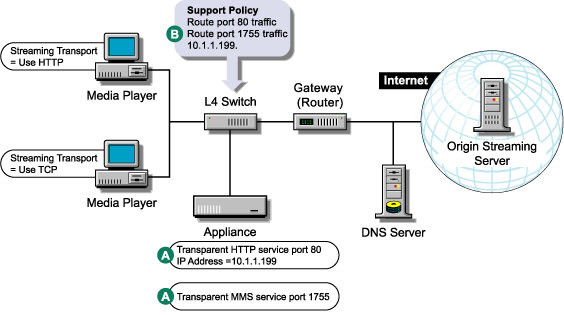
Table .
| To | Do This | Notes |
|---|---|---|
Understand Media Excelerator's features. |
|
|
Ensure your basic network configuration is complete. |
|
|
Set up HTTP transparent proxy services on the appliance. |
|
See A in Figure 16. |
Set up an MMS transparent service. |
For more information see Streaming Tab in the Volera Excelerator 2.3 Administration Guide. |
See B in Figure 9. If logging is enabled, MMS log files for the MMS accelerator server will have the same name as the MMS accelerator service. Both native MMS and HTTP-MMS requests will be logged in this log file. NOTE: UDP requests are filled using TCP unless the Allow UDP for Filling option is checked when a Media Cache service is created. |
Set up your L4 switch to route traffic (either port 80 or port 1755) to the appliance. |
|
See B in Figure 16. This will route all MMS and HTTP traffic to the appliance. |