

| |
The server general parameters required by Native File Access for UNIX are located in the NFS.CFG file. These parameters are common to NFS and NIS. When modifying this file, make sure you stop the services using nfsstop and restart using nfsstart.
The following table lists the configuration parameters in NFS.CFG.
Table 1. Novell Native File Access for UNIX General Parameters
This section explains the following tasks:
In the ConsoleOne main menu, right-click the server you want to configure and then click Properties.
The following panel appears:
Figure 3
Server General Parameters Panel
These are the general parameters. The fields are read-only.
Host Name---The name of the NetWare server.
IP Address---The primary IP address of the NetWare server.
Subnet Mask---The subnet mask that, when added to the IP address, provides the IP network number.
Server Name---The name of the NetWare server.
Operating System---The version of the operating system being used by the host.
Context---The context or logical position of the server within the NDS tree.
Tree---The current NDS tree.
Time Zone---The world time zone reference for your area. The time zone is used for time stamps and to set time synchronization. The time zone reference is set during the NetWare installation.
In the ConsoleOne main menu, right-click the server you want to configure and then click Properties > Directory Access.
The following panel appears:
Figure 4
Server General Parameters - Directory Access Panel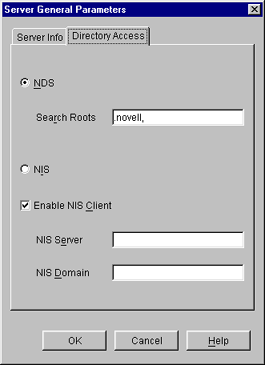
This panel contains the parameters that can be configured to set the directory access of NetWare NFS Server.
Modify the following Directory Access parameters as necessary:
NDS---Sets the access to NDS.
Search Root---Lists the Fully Distinguished Name of containers from where the search should start for users and groups only. The names are separated by commas. Make sure that the parameter has valid values whenever the NDS structure changes.
NIS---Enables remote NIS.
Enable NIS Client---Specifies whether the NIS Client is enabled or not.
NIS Server---Specifies the remote NIS server name.
NIS Domain---Specifies the domain served by that remote NIS.
Click OK.
Modify the following parameters as necessary:
SNMP Alert Level---The level of SNMP alerts reported to SNMP management stations. Select an alert level from the drop-down list. You can also turn off SNMP reporting from this list.
Each level incorporates the information from the levels listed above it. For example, if you select Minor, you also receive messages about major and critical alerts.
NOTE: Administering NetWare 5 NFS Services on NetWare 5 from ConsoleOne on NetWare 6 is not supported.
| |