

Click the Cost tab.
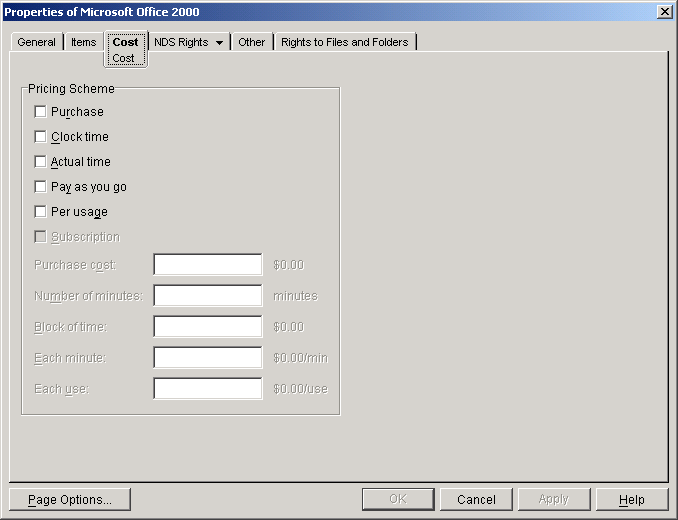
Select one or more of the following pricing schemes:
Purchase: The user pays a one-time fee for the package. The user can use the package whenever necessary.
Clock Time: The user purchases a set amount of time to use the package. The time begins when the user purchases the package, runs continuously, and expires after the set amount of time.
Actual Time: The user purchases a set amount of time to use the package. Only the actual time spent using the item is recorded. If the user purchases 5 hours, he or she can use 1 hour today, 3 hours tomorrow, and 1 hour next week.
Pay-As-You-Go: The user pays by the minute to use the package. The time begins when the user launches a package item and ends when the item is exited.
Per Usage: The user pays each time he or she uses the package.
Subscription: The user pays a set amount for a subscription to the package. You determine the subscription period (7 days, 14 days, 30 days, etc.). At the end of the subscription period, the user's subscription is automatically renewed. By default, users can cancel a subscription. If you want to disable a user's ability to cancel a subsubscription, see Assigning Users .
You can use a combination of these pricing schemes. For example, you could have a one-time purchase fee (Purchase pricing scheme) for a package, charge a fee for every time one of the package's applications is used (Per Usage pricing scheme), and also charge a per-minute fee for using the application. (Pay-As-You-Go pricing scheme). For information about which pricing schemes can be used together, click the Help button on the Cost page.
The Pay-As-You-Go and Actual Time schemes should not be used with Web applications because the OnDemand Services UsageServer is unable to track the actual time Web applications are in use. For details, see Usage Tracking Support for Each Application Type .
IMPORTANT: All schemes, other than the Purchase scheme, require OnDemand Services to track usage of the package's items. If you select a usage-based scheme, you need to make sure that usage tracking is enabled and configured properly. For information, see Tracking Application Usage .
Fill in the cost information for the selected schemes.
Click OK to save the information.