

The UsageServer combines with the UsageClient to track application usage. You must run the UsageServer if any packages use a pricing scheme based on time or use (see Establishing the Package 's Cost ). The following sections provide information about the UsageServer process:
The UsageServer consists of two components, the OSAgent and the UsageServer process, both of which run on the same server. The OSAgent is responsible for facilitating a connection between the UsageClient (running on the user's workstation or the DeFrame terminal server) and the UsageServer process. The UsageServer is responsible for maintaining usage information in eDirectory. The following diagram illustrates this process.
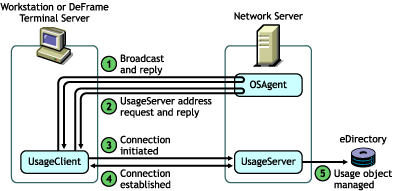
For the UsageClient broadcast to find an OSAgent, as shown in the diagram in the previous section, How the UsageServer and UsageClient Work , the UsageClient and OSAgent must be in the same subnet. If you have user workstations or DeFrame servers that will not be in the same subnet as the OSAgent, you can explicitly provide the UsageClient with the OSAgent's IP address.
With desktop (ZENworks for Desktops) applications, you use the Launch Item gadget's UsageServer setting to explicitly define the IP address of the OSAgent you want the UsageClient to connect to. The following diagram illustrates the desktop application usage process when the UsageServer's address is explicitly defined in the Launch Item gadget.
![Desktop application usage process with the UsageServer[apos ]s address explicitly defined](../graphics/ods_usage2_a.gif)
For information about configuring the Launch Item gadget to provide the UsageServer address, see Adding the UsageServer 's Address to the Launch Item Gadget .
With thin-client (DeFrameTM) applications, the DeFrame server's UsageClient, not the workstation's UsageClient, tracks application usage. The DeFrame server's UsageClient does not receive the OSAgent's IP address from the Launch Item gadget. Instead, you need to add the OSAgent's IP address to the DeFrame server's Windows registry. The UsageClient then pulls the IP address from the registry. The following diagram illustrates the thin-client application usage process when the UsageServer's address is explicitly defined in the DeFrame server's registry.
![Thin-client application usage process with the UsageServer[apos ]s address explicitly defined](../graphics/ods_usage3_a.gif)
For information about adding the UsageServer's address to a DeFrame server's Windows registry, see Adding the UsageServer 's Address to a DeFrame Server 's Registry .
If your usage tracking requirements are placing a heavy load on a single UsageServer, you can set up multiple UsageServers to lessen the server load. For information about installing additional UsageServers, see Installing Additional Maintenance and UsageServer Processes .
The UsageServer load balancing capabilities are limited to round-robining the usage sessions. For example, if you have three UsageServers (US1, US2, and US3), the first session will be assigned to US1, the second to US2, and the third to US3. The fourth session will then be assigned to US1, the fifth to US2, and so forth. Because the usage sessions handled by one UsageServer might end before another UsageServer's sessions and new sessions are added in this round-robin manner, true load balancing might not be achieved. Overall, however, the workload will be lessened on any one server.
In a load-balanced UsageServer environment, it doesn't matter which UsageServer makes the initial usage session connection. The UsageClient will be given the address of the UsageServer that is supposed to handle the next session.
For UsageServer load balancing to work, the following conditions must be met: