ZENworks for Desktopsでは、Scannerを使用して、Windows 98、Windows NT/2000、またはWindows XPを搭載したインベントリ対象ワークステーションのハードウェアおよびソフトウェアの情報を収集します。
Scannerは、フロッピーディスクドライブ、ハードディスクドライブ、BIOS、バス、マウス、キーボード、ディスプレイアダプタ、ネットワークアダプタカード、モデム、Jazドライブ、Zip*ドライブ、サウンドカード、メモリカード、シリアルポート、パラレルポート、およびプロセッサなどのハードウェアの詳細を収集します。ソフトウェアスキャンでは、インベントリ対象ワークステーションのアプリケーションを確認し、ベンダ名、製品名、バージョンなどのスキャンするソフトウェアに関する情報のレポートを作成します。
Scannerが収集するスキャン情報は、スキャンデータファイル(.str)としてスキャンディレクトリ(scandir)に保存されます。最小限のスキャンデータがeDirectoryワークステーションオブジェクトにも保存されます。
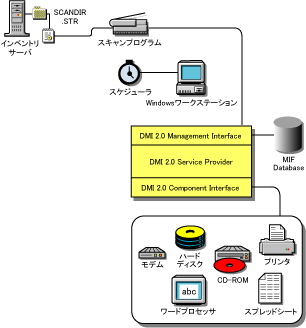
インベントリ対象ワークステーション(Windows 98、Windows NT/2000、およびWindows XP)をスキャンするScannerは、業界標準のDMI (Desktop Management Interface)規格2.0に準拠するスキャンも実行します。これらのプログラムは、DMIのMI (Management Interface)を使用して、インベントリ対象ワークステーションにインストールされているハードウェアコンポーネントを調べます。Scannerは、DMIによってインベントリ対象ワークステーションに搭載されている特定のコンポーネントをスキャンします。ScannerはDMIサービス層に照会して、この情報を取得します。
MIによって、DMI準拠のScannerはサービス層内のサービスプロバイダを探知できます。サービスプロバイダは、管理可能なコンポーネントから情報を収集し、管理情報フォーマットデータベースに保存します。CI (Component Interface)は、管理可能なコンポーネントおよびサービス層と通信します。次の図は、ScannerとDMIとの相互作用を示しています。
たとえば、Compaq Family Deskpro EN Model-SFF6500ワークステーションでWindows 98を実行している場合、CompaqのWebサイトからManagement Productソフトウェア(Windows 95/98/NT用Compaq Insight Management Desktop Agentsソフトウェア)をダウンロードします。
Scannerは、MicrosoftのWMI (Windows Management Instrumentation)規格に基づいて、Windows 98/NT/2000/XPインベントリ対象ワークステーションからハードウェアデータを収集します。
WMIは、企業環境で管理情報へのアクセスを可能にするWBEM(Web-Based Enterprise Management)をMicrosoftが実装したものです。WMI 1.5は、業界標準であるCIM (Common Information Model)スキーマに完全に準拠しています。詳細については、Microsoft WMIのWebサイトを参照してください。WMIは、DMIやSNMPなど、既存の管理規格にも対応しています。
Scannerは、WMIを使用してインベントリ対象ワークステーションにインストールされているハードウェアコンポーネントを調べます。また、WMIを使用してインベントリ対象ワークステーションに搭載されている特定のコンポーネントもスキャンします。
WMI準拠のScannerは、Windows 98、Windows XP、およびWindows NT/2000インベントリ対象ワークステーションでのみサポートされています。
デフォルトでは、DMIスキャンとWMIスキャンの両方が有効です。DMIスキャンまたはWMIスキャンのいずれかを無効にするには、インベントリポリシーのウィンドウで[Enable DMI]または[Enable WMI]チェックボックスの選択を解除します。
System.Type |
対象外 |
Win32_SystemEnclosure.ManufacturerまたはWin32_ComputerSystem.Manufacturer |
System.MachineName |
対象外 |
Win32_ComputerSystem.Caption |
System.AssetTag |
DMTF|System Enclosure| 001.2 |
Win32_SystemEnclosure.SMBIOSAssetTag |
System.Model |
対象外 |
Win32_SystemEnclosure.ModelまたはWin32_ComputerSystem.Model |
System.ModelNumber |
対象外 |
Win32_SystemEnclosure.SerialNumber |
System.SystemIdentifier(GUID) |
対象外 |
対象外 |
System.ManagementTechnology |
対象外 |
対象外 |
eDirectory.DNName |
対象外 |
対象外 |
eDirectory.TreeName |
対象外 |
対象外 |
NetworkAdapter.MACAddress |
対象外 |
Win32_NetworkAdapterConfiguration.MACAddress (Win32_NetworkAdapterSettingとの関連によって、Windows NT/2000/XPでのみ取得されます) |
IP.Address |
対象外 |
Win32_NetworkAdapterConfiguration.IPAddress (Win32_NetworkAdapterSettingとの関連によって、Windows NT/2000/XPでのみ取得されます) |
IP.Subnet (Subnet Mask) |
対象外 |
Win32_NetworkAdapterConfiguration.IPSubnet (Win32_NetworkAdapterSettingとの関連によって、Windows NT/2000/XPでのみ取得されます) |
NetworkAdapter.MACAddress |
対象外 |
Win32_NetworkAdapterConfiguration.MACAddress (Win32_NetworkAdapterSettingとの関連によって、Windows NT/2000/XPでのみ取得されます) |
IPX.Address |
対象外 |
Win32_NetworkAdapterConfiguration.IPXAddress (Win32_NetworkAdapterSettingとの関連によって、Windows NT/2000/XPでのみ取得されます) |
NetworkAdapter.MACAddress |
対象外 |
Win32_NetworkAdapterConfiguration.MACAddress (Win32_NetworkAdapterSettingとの関連によって、Windows NT/2000/XPでのみ取得されます) |
DNS.HostName |
対象外 |
Win32_NetworkAdapterConfiguration.DNSHostName + DNSDomain (Win32_NetworkAdapterSettingとの関連によって、Windows NT/2000/XPでのみ取得されます) |
Modem.Description |
対象外 |
Win32_POSTModem.Description |
Modem.Name |
対象外 |
Win32_POSTModem.Name |
Modem.Vendor |
対象外 |
対象外 |
Modem.DeviceID |
対象外 |
Win32_POSTModem.DeviceID |
NetworkAdapter.Speed |
DMTF|Network Adapter 802 Port|001.5 |
Win32_NetworkAdapter.MaxSpeed (Win32_NetworkAdapter.AdapterType=Ethernet 802.3、FDDI (Fiber Distributed Data Interface)、またはトークンリングの場合は、Windows NT 4でのみ) |
NetworkAdapter.Name |
対象外 |
Win32_NetworkAdapter.Name (Win32_NetworkAdapter.AdapterType = Ethernet 802.3、FDDI、またはトークンリング場合は、Windows NT 4でのみ) |
NetworkAdapter.PermAddress |
DMTF|Network Adapter 802 Port|001.2 |
Win32_NetworkAdapter.PermanentAddress (Win32_NetworkAdapter.AdapterType = Ethernet 802.3、FDDI、またはトークンリング場合は、Windows NT 4でのみ) |
NetworkAdapter.AdapterType |
対象外 |
Win32_NetworkAdapter.AdapterType (Win32_NetworkAdapter.AdapterType = Ethernet 802.3、FDDI、またはトークンリング場合は、Windows NT 4でのみ) |
NetworkAdapter.ProviderName |
対象外 |
Win32_NetworkAdapter.Manufacture (Win32_NetworkAdapter.AdapterType = Ethernet 802.3、FDDI、またはトークンリング場合は、Windows NT 4でのみ) |
NetworkAdapter.DriverDescription |
DMTF|Network Adapter Driver |001.Driver Software Description |
Win32_SystemDriver.Description (Win32_SystemDriver.Name = Win32_NetworkAdapter.ServiceNameの場合は、Windows NT 4でのみ) |
NetworkAdapter.DriverName |
DMTF|Network Adapter Driver |001.Driver Software Name |
Win32_SystemDriver.PathName (Win32_SystemDriver.Name = Win32_NetworkAdapter.ServiceNameの場合は、Windows NT 4でのみ) |
NetworkAdapter.DriverVersion |
DMTF|Network Adapter Driver |001.Driver Software Version |
対象外 |
Login.CurrentLoggedinUser |
対象外 |
対象外 |
Login.LastLoggedin User |
対象外 |
対象外 |
Login.DomainName |
対象外 |
Win32_ComputerSystem.Domain |
NWClient.Version |
対象外 |
対象外 |
Processor.stepping |
対象外 |
CIM_Processor.Stepping |
Processor.DeviceID |
対象外 |
CIM_Processor.DeviceID |
Processor.Family |
DMTF|Processor|004.3 |
CIM_Processor.Family |
Processor.OtherFamily |
対象外 |
CIM_Processor.OtherFamilyDescription |
Processor.MaxClockSpeed |
DMTF|Processor|004.5 |
CIM_Processor.MaxClockSpeed |
Processor.CurrentClockSpeed |
DMTF|Processor|004.6 |
CIM_Processor.CurrentClockSpeed |
Processor.Role |
DMTF|Processor|004.2 |
CIM_Processor.ProcessorType |
Processor.Upgrade |
DMTF|Processor|004.7 |
CIM_Processor.UpgradeMethod |
Processor.Description |
DMTF|Processor|004.4 |
CIM_Processor.Description |
Processor.Name |
DMTF|Processor|004.3と同等のEnum |
CIM_Processor.Name |
BIOS.Manufacturer |
DMTF|SystemBIOS|001.2 |
Win32_BIOS.Manufacturer |
BIOS.BIOSDate |
対象外 |
Win32_BIOS.InstallDate |
BIOS.BIOSIDBytes |
対象外 |
対象外 |
BIOS.Copyright |
対象外 |
Win32_BIOS.Caption |
BIOS.SerialNumber |
対象外 |
Win32_BIOS.SerialNumber |
BIOS.BIOSType |
DMTF|SystemBIOS|001.3 |
Win32_BIOS.SMBIOSBIOSVersion |
BIOS.PrimaryBIOS |
DMTF|SystemBIOS|001.9 |
Win32_BIOS.PrimaryBIOS |
BIOS.Size |
DMTF|SystemBIOS|001.4 |
対象外 |
Bus.Type |
対象外 |
Win32_Bus.BusType |
Bus.Name |
対象外 |
Win32_Bus.Name |
Bus.Description |
対象外 |
Win32_Bus.Descritpion |
Bus.Version |
対象外 |
対象外 |
Bus.DeviceID |
対象外 |
Win32_Bus.DeviceID |
IRQ.Number |
DMTF|IRQ|002.IRQNumber |
CIM_IRQ.IRQNumber |
IRQ.Availability |
DMTF|IRQ|002.Availability |
CIM_IRQ.Availability |
IRQ.TriggerType |
DMTF|IRQ|002.TriggerType |
CIM_IRQ.TriggerType |
IRQ.Shareable |
DMTF|IRQ|002.Shareable |
CIM_IRQ.Shareable |
Keyboard.Layout |
DMTF|Keyboard|003.Layout |
CIM_Keyboard.Layout |
Keyboard.Subtype |
対象外 |
対象外 |
Keyboard.Type |
DMTF|Keyboard|003.Keyboard.Type |
CIM_Keyboard.Description |
Keyboard.Fkeys |
対象外 |
CIM_Keyboard.NumberOfFunctionKeys |
Keyboard.Delay |
対象外 |
対象外 |
Keyboard.TypematicRate |
対象外 |
対象外 |
Monitor.NumberOfColorPlanes (NEW) |
対象外 |
Win32_VideoController.NumberOfColorPanes |
Monitor.HorizontalResolution |
DMTF|Video|004.Current Horizontal Resolution |
Win32_VideoController.CurrentHorizontalResolution |
Monitor.VerticalResolution |
DMTF|Video|004.Current Vertical Resolution |
Win32_VideoController.CurrentVerticalResolution |
Monitor.DisplayType |
DMTF|Video|004.Video Type |
Win32_VideoController.VideoArchitecture |
Monitor.MemoryType |
DMTF|Video|004.Video Memory Type |
Win32_VideoController.VideoMemoryType |
Monitor.MaxMemorySupported |
DMTF|Video|004.Video RAM Memory Size |
Win32_VideoController.MaxMemorySupported |
Monitor.Bitsperpixel |
DMTF|Video|004.Current Number of Bits per Pixel |
Win32_VideoController.CurrentBitsPerPixel |
Monitor.ControllerDescription |
DMTF|Video|004.Video Controller Description |
Win32_VideoController.Description |
Monitor.MaxRefreshrate |
DMTF|Video|004.Maximum Refresh Rate |
Win32_VideoController.MaxRefreshRate |
Monitor.MinRefreshrate |
DMTF|Video|004.Minimum Refresh Rate |
Win32_VideoController.MinRefreshRate |
Mointor.DACType |
対象外 |
Win32_VideoController.AdapterDACType |
Monitor.ChipSet |
対象外 |
対象外 |
Monitor.ProviderName |
対象外 |
対象外 |
Monitor.VideoBIOSManufacturer |
DMTF|Video BIOS|001.BIOS Manufacturer |
CIM_VideoBIOSElement.Manufacturer |
Monitor.VideoBIOSVersion |
DMTF|Video BIOS|001.Video.BIOS Version |
CIM_VideoBIOSElement.Version |
Monitor.VideoBIOSReleaseDate |
DMTF|Video BIOS|001.Video.BIOS Release Date |
CIM_VideoBIOSElement.InstallDate |
Monitor.VideoBIOS.IsShadowed |
DMTF|Video BIOS|001.Video.Shadowing State |
CIM_VideoBIOSElement.IsShadowed |
ParallelPort.Name |
DMTF|Parallel Ports|003.Parallel Port Index |
CIM_ParallelController.Name |
ParallelPort.DMASupport |
DMTF|Parallel Ports|003.DMA Support |
CIM_ParallelController.DMASupport |
ParallelPort.Address |
DMTF|Parallel Ports|003.Parallel Base I/O Address |
対象外 |
ParallelPort.IRQ |
DMTF|Parallel Ports|003.IRQ Used |
対象外 |
SerialPort.Name |
DMTF|Serial Ports|004.Serial Port Index |
CIM_SerialController.Name |
SerialPort.Address |
DMTF|Serial Ports|004.Serial Base I/O Address |
対象外 |
SerialPort.IRQ |
DMTF|Serial Ports|004.IRQ Used |
対象外 |
FloppyDrive.DeviceID |
DMTF|Logical Drives|001.Logical Drive Name (DMTF|Logical Drives|001.Logical Drive Type=Floppy Drive(7)の場合) |
Win32_LogicalDisk.DeviceID (Win32_LogicalDisk.DriveType = 2(リムーバブルディスク)およびWin32_LogicalDisk.MediaType = [1,10]の場合) |
FloppyDrive.Manufacture |
対象外 |
対象外 |
FloppyDrive.Description |
Hard Code:Floppy Drive (DMTF|Disks|003.Storage Type=Floppy Disk(4)の場合) |
Win32_LogicalDisk.Description (Win32_LogicalDisk.DriveType = 2(リムーバブルディスク)およびWin32_LogicalDisk.MediaType = [1,10]の場合) |
FloppyDrive.MaxNumberofCylinders |
対象外 |
対象外 |
FloppyDrive.NumberOfHeads |
対象外 |
対象外 |
FloppyDrive.SectorsPerTrack |
対象外 |
対象外 |
FloppyDrive.Size |
DMTF|Logical Drives|001.Logical Drive Size (DMTF|Logical Drives|001.Logical Drive Type = Floppy Drive(7)の場合) |
Win32_LogicalDisk.Size (Win32_LogicalDisk.DriveType = 2(リムーバブルディスク)およびWin32_LogicalDisk.MediaType = [1,10]の場合) |
CDROMDrive.DeviceID |
DMTF|Logical Drives|001.Logical Drive Name (DMTF|Logical Drives|001.Logical Drive Type = 6の場合) |
Win32_CDROMDrive.Drive |
CDROMDrive.Manufacture |
対象外 |
Win32_CDROMDrive.Manufacturer |
CDROMDrive.Description |
対象外 |
Win32_CDROMDrive.Description |
CDROMDrive.Caption |
Hard code:CDROM Device (DMTF|Disks|001.Logical Drive Type = 6の場合) |
Win32_CDROMDrive.Caption |
HardDrive.Media Type |
DMTF|Disks|003.Removable Media |
Win32_DiskDrive.MediaType |
HardDrive.Vendor |
対象外 |
Win32_DiskDrive.Manufacturer |
HardDisk.Description |
DMTF|Disks|003.Interface Description (DMTF|Disks|003.Storage Type=Hard Disk(3)の場合) |
Win32_DiskDrive.Description |
HardDisk.Cylinders |
DMTF|Disks|003.Number of Physical Cylinders |
Win32_DiskDrive.TotalCylinders |
HardDisk.Heads |
DMTF|Disks|003.Number of Physical Heads |
Win32_DiskDrive.TotalHeads |
HardDisk.Sectors |
DMTF|Disks|003.Number of Physical Sectors per Track |
Win32_DiskDrive.SectorsPerTrack |
HardDisk.Capacity |
DMTF|Disks|003.Total Physical Size |
Win32_DiskDrive.Size |
LogicalDrive.Name |
対象外 |
Win32_LogicalDiskDeviceID (Win32_LogicalDisk.DriveType = 3 (ローカルディスク)の場合) |
LogicalDrive.VolumeSerialNumber |
対象外 |
Win32_LogicalDisk.VolumeSerialNumber (Win32_LogicalDisk.DriveType = 3 (ローカルディスク)の場合) |
LogicalDrive.Volume (Volume Label) |
対象外 |
Win32_LogicalDisk.VolumeName (Win32_LogicalDisk.DriveType = 3 (ローカルディスク)の場合) |
Operating System.OSType |
対象外 |
Win32_OperatingSystem.OSType |
OperatingSystem.Version |
対象外 |
対象外 |
OperatingSystem.Codepage |
対象外 |
Win32_OperatingSystem.CodeSet |
OperatingSystem.InstallDate |
対象外 |
Win32_OperatingSystem.InstallDate |
OperatingSystem.TotalSwapSpaceSize |
DMTF|System Memory Settings|001.Total Size of Paging Files |
Win32_OperatingSystem.SizeStoredInPagingFiles |
OperatingSystem.Description |
DMTF|Operating System|001.Operating System Description |
Win32_OperatingSystem.Caption |
OperatingSystem.OtherTypeDescription |
対象外 |
Win32_OperatingSystem.OtherTypeDescription |
OperatingSystem.VirtualMemorySize |
DMTF|System Memory Settings|001.Total Virtual Memory |
Win32_OperatingSystem.TotalVirtualMemory |
OperatingSystem.VisibleMemorySize |
対象外 |
Win32_OperatingSystem.TotalVisibleMemorySize |
OperatingSystem.Role |
対象外 |
対象外 |
InventoryScanner.Version |
対象外 |
対象外 |
InventoryScanner.LastScanDate |
対象外 |
対象外 |
InventoryScanner.InventoryServer |
対象外 |
対象外 |
InventoryScanner.ScanMode |
対象外 |
対象外 |
SoundCard.Description |
対象外 |
Win32_SoundDevice.Description |
SoundCard.Name |
対象外 |
Win32_SoundDevice.Name |
SoundCard.Manufacturer |
対象外 |
Win32_SoundDevice.Manufacturer |
Cache.Level |
DMTF|System Cache|003.System Cache Level |
Win32_CacheMemory.Level |
Cache.WritePolicy |
DMTF|System Cache|003.System Cache Write Policy |
Win32_CacheMemory.WritePolicy |
Cache.ErrorCorrection |
DMTF|System Cache|003.System Cache Error Correction |
Win32_CacheMemory.ErrorCorrectType |
Cache.Type |
DMTF|System Cache|003.System Cache Type |
Win32_CacheMemory.CacheType |
Cache.LineSize |
DMTF|System Cache|003.Line Size |
Win32_CacheMemory.LineSize |
Cache.ReplacementPolicy |
DMTF|System Cache|003.Replacement Policy |
Win32_CacheMemory.ReplacementPolicy |
Cache.ReadPolicy |
DMTF|System Cache|003.Read Policy |
Win32_CacheMemory.ReadPolicy |
Cache.Associativity |
DMTF|System Cache|003.Associativity |
Win32_CacheMemory.Associativity |
Cache.Speed |
DMTF|System Cache|003.System Cache Speed |
Win32_CacheMemory.CacheSpeed |
Cache.Size |
DMTF|System Cache|003.System Cache Size |
Win32_CacheMemory.MaxCacheSize |
MotherBoard.Version |
対象外 |
Win32_BaseBoard.Version |
MotherBoard.Description |
対象外 |
Win32_BaseBoard.Description |
MotherBoard.Slots |
DMTF|Motherboard|001.Number of Expansion slots |
対象外 |
MotherBoard.Manufacture |
対象外 |
Win32_BaseBoard.Manufacture |
Battery.Name |
DMTF|Portable Battery|002.Portable Battery Device Name |
Win32_Battery.Name |
Battery.Chemistry |
DMTF|Portable Battery|002.Portable Battery Device Chemistry |
Win32_Battery.Chemistry |
Battery.Capacity |
DMTF|Portable Battery|002.Portable Battery Design Capacity |
Win32_Battery.DesignCapacity |
Battery.Voltage |
DMTF|Portable Battery|002.Portable Battery Design Voltage |
Win32_Battery.DesignVoltage |
Battery.Version |
DMTF|Portable Battery|002.Portable Battery Smart Battery Version |
Win32_Battery.SmartBatteryVersion |
Battery.Manufacturer |
DMTF|Portable Battery|002.Portable Battery Manufacturer |
Win32_PortableBattery.Manufacturer |
Battery.ManufactureDate |
DMTF|Portable Battery|002.Portable Battery Manufacturer Date |
Win32_Battery.InstallDate |
Battery.SerialNumber |
DMTF|Portable Battery|002.Portable Battery Serial Number |
対象外 |
PowerSupply.InputVoltageDescription |
DMTF|Power Supply|002.Power Supply Input Voltage Capability Description |
CIM_UninterruptiblePowerSupply.Description |
PowerSupply.Power |
DMTF|Power Supply|002.Total Output Power |
CIM_UninterruptiblePowerSupply.TotalOutputPower |
DMA.Number |
DMTF|DMA|001.DMA Number |
CIM_DMA.DMAChannel |
DMA.Description |
DMTF|DMA|001.DMA Description |
CIM_DMA.Description |
DMA.Availability |
DMTF|DMA|001.DMA Channel Availability |
CIM_DMA.Availability |
DMA_BurstMode |
DMTF|DMA|001.DMA BurstMode |
CIM_DMA.BurstMode |
UCS.DNName |
対象外 |
対象外 |
UCS.PrimaryOwnerContact |
DMTF|General Information|001.3 |
CIM_UnitaryComputerSystem.PrimaryOwnerContact |
UCS.PrimaryOwnerName |
DMTF|General Information|001.4 |
CIM_UnitaryComputerSystem.PrimaryOwnerName |
PointingDevice.DeviceType |
DMTF|Pointing Device|Pointing Device Type(1) |
CIM_PointingDevice.PointingType |
PointingDevice.Type |
DMTF|Pointing Device|Pointing Device Interface (2) |
CIM_PointingDevice.Name |
PointingDevice.NumberOfButtons |
DMTF|Pointing Device|Pointing Device Buttons (4) |
CIM_PointingDevice.NumberOfButtons |
PointingDevice.DriverName |
DMTF|Pointing Device|Pointing Device Driver Name (6) |
対象外 |
PointingDevice.DriverVersion |
DMTF|Pointing Device|Pointing Device Driver Version (7) |
CIM_PointingDevice.Name |
PointingDevice.IRQ |
DMTF|Pointing Device|Pointing Device IRQ (3) |
対象外 |
Slot.Description |
DMTF|System Slots|003.Description |
Win32_SystemSlot.SlotDesignation |
Slot.MaxDataWidth |
DMTF|System Slots|003.MaxDataWidth |
Win32_SystemSlot.MaxDataWidth |
Slot.ThermalRating |
DMTF|System Slots|003.Slot Thermal Rating |
Win32_SystemSlot.ThermalRating |
FileSystem.Drive |
対象外 |
Win32_LogicalDiskDeviceID (Win32_LogicalDisk.DriveType = 3 (ローカルディスク)の場合) |
FileSystem.FileSystemSize |
対象外 |
Win32_LogicalDisk.Size (Win32_LogicalDisk.DriveType = 3 (ローカルディスク)の場合) |
FileSystem.AvailableSpace |
対象外 |
Wind32_LogicalDisk.FreeSpace (Win32_LogicalDisk.DriveType = 3 (ローカルディスク)の場合) |
FileSystem.FileSystem |
対象外 |
Win32_LogicalDisk.FileSystem (Win32_LogicalDisk.DriveType = 3 (ローカルディスク)の場合) |
PCMCIA以外のモデムは、外部ポートを通じてコンピュータに接続されます。たとえば、シリアルポートを通じて接続されるPCMCIA以外のモデムもあります。ScannerはコンピュータにインストールされているPCMCIA以外のモデムを検出します。
PCMCIA以外のモデムは、スキャン時にアクティブではない場合があります。また、これらのモデムは、コンピュータ上で設定されていても、接続されない場合があります。この場合、Scannerはモデムを検出して、モデムのスキャン情報を報告します。