4.0 Running the Storage Tests
The figure below shows the TestConsole Main window in the tiled (default) mode, with a Storage Access Test project loaded. (See Section 3.4, TestConsole Window.)
Figure 4-1 Shows the TestConsole Window
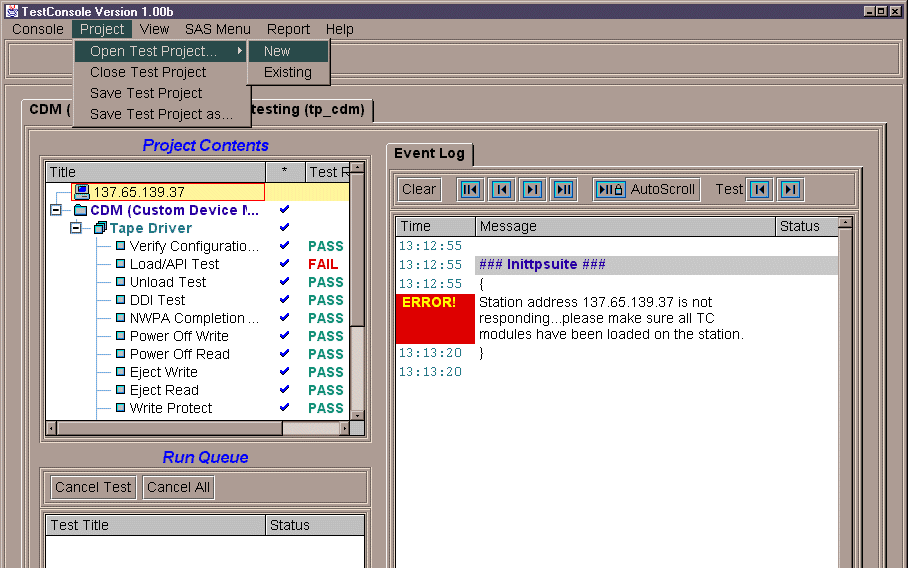
The Storage Test program offers several projects to choose from, depending on your application or configuration. Once you select one of the projects, such as the CDM Tests, you cannot return to any of the others without exiting (see Step 5 below).
-
Double-click the TestConsole icon on the Windows desktop.
-
Click Project > Open Test Project.
-
Select New if you are just beginning testing, or select Existing if you have already begun testing and have saved a project.
Select the test project you wish to run from the Test Project window (see the configuration diagrams in Section 1.7, Setting Up the Test Configuration to help you make a selection).
In some cases, such as the CDM or Peripheral Device projects, you will then see a smaller popup window asking you to choose a test project based on your hardware configuration.
-
Select a test or group of tests to run. You can select and run tests in the following ways:
- Double-click on a Project or Test Group to run all tests in that group.
- Open a Project/Test Group and double-click on an individual test to execute it.
- Right-click on any of the above to choose other options, such as Quick Select, or view the Test/Group properties.
-
When testing is finished, or you wish to exit, you can save or rename your project by clicking Project > Close Test Project.
See Running Tests for more details and options on test execution. When all the tests have completed successfully, you will be ready to enter the company and product information, and submit your results. See Test Results and Submission Procedures for instructions.
IMPORTANT:If the storage driver or test configuration is altered in any way, the Verify Configuration Test will show Failed and the test results will be marked with an “*”. The tests must be run with a valid setup for submission.