Transparent proxy services require browser requests to be routed to the appliance from a network router or switch. This chapter reviews four different router/switch configurations and contains setup instructions for each configuration type.
The four router/switch configurations are:
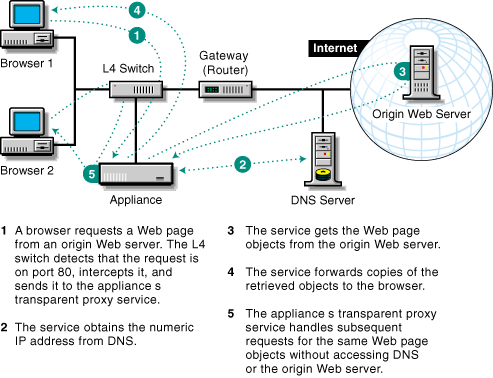
An L4 switch on the same network as the client workstation intercepts browser requests from the client and sends them to the appliance. The transparent proxy service processes the request for the browser.
Figure 10
Transparent proxy doesn't require browser configuration. After the switch and the appliance are configured, proxy services are transparent to the browser.
For tips and guidelines on setting up transparent proxy services using an L4 switch, see Transparent/L4 Proxy Setup.
A WCCP-capable router, which is configured as the default gateway for the client workstation, intercepts browser requests from the client and routes them to the appliance. The transparent proxy service processes the request for the browser.
Figure 11 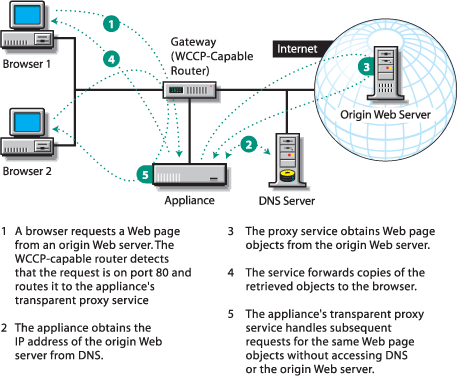
Transparent proxy doesn't require browser configuration. After the router and the appliance are configured, proxy services are transparent to the browser.
For tips and guidelines on setting up transparent proxy services using WCCP-capable routers, see Transparent/WCCP Proxy Setup.
An appliance's IP address is specified as the default gateway for the client workstation that the browser resides on. The appliance provides both routing and transparent proxy services.
Figure 12 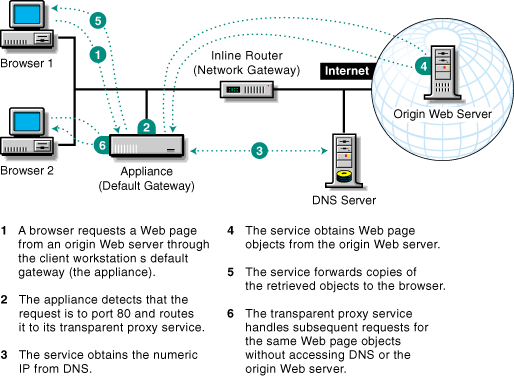
For tips and guidelines on setting up the appliance as a default gateway and a transparent proxy server, see Transparent/Default Gateway Setup.
An appliance's eth0 IP address is specified as the default gateway for the client workstations that the browsers reside on. The eth1 port connects to the Internet. The appliance provides routing and caching services and serves as the gateway to the Internet.
Figure 13 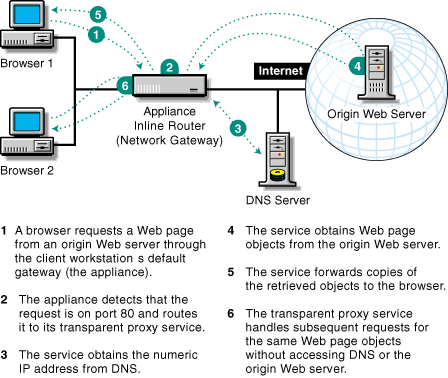
For tips and guidelines on setting up transparent proxy services with the appliance as an inline router, see Transparent/Inline Router Setup.