The following sections will help you configure your ZfD servers:
IMPORTANT: The recommendations discussed in the scenarios are generic because of the unique nature of the topology; further refinements may become necessary.
In ZfD, the deployment of inventory in a LAN environment implies deploying the product on a single inventory site. The following scenarios and recommendations are addressed:
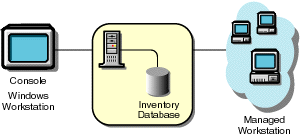
In this type of inventory configuration, the inventory server components and database are located on a Standalone Server. The Standalone Server is an inventory server with an Inventory database. There is no roll-up of data and the Sender-Receiver components are not used. This scenario is illustrated in the following figure.
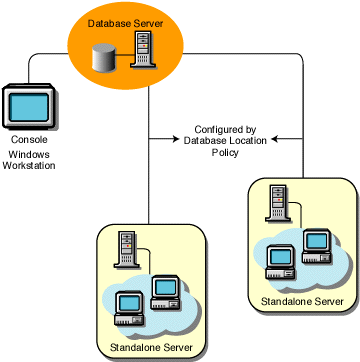
In this type of configuration, there are multiple inventory servers without databases. These inventory servers are connected to a database server. This inventory deployment is illustrated in the following figure.
Follow this configuration for deploying inventory up to 10,000 workstations. For deploying inventory on more than 10,000 workstations, attach one inventory server per 5,000 workstations, with two or three inventory servers per Inventory database.
In a WAN environment, complete the following tasks, in order, to design the inventory tree and deploy inventory:
Optional Step: If Another Database is Needed:
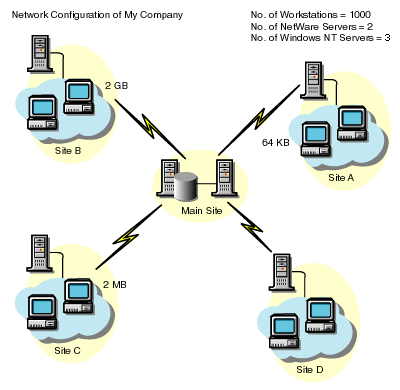
Guidelines for Creating Policies in a WAN covers recommendations for deployment. Describe the entire network of your company.
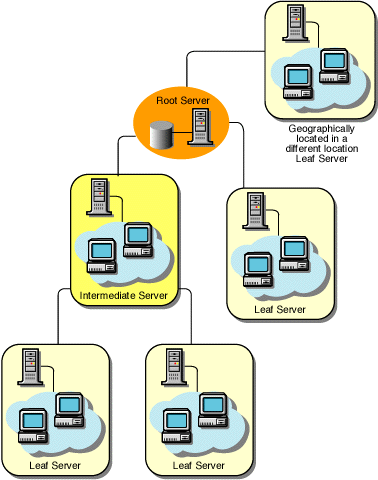
The following figure illustrates the network organization of a company with servers in different locations.
The Root Server in the Inventory Tree is the highest-level server. Necessarily, an Inventory database is attached to the Root Server. The inventory information available from the Inventory database of the Root Server will consist of all lower-level sites on the network and from the Root Server site. Factors that you must include:
Besides the database at the Root Server, you can maintain database servers at different sites. You may want to maintain additional databases if there are sites or subtrees that are managed for inventory at different locations, and these sites are connected to the network over a slow link. You should also determine if there are specific reasons to have a separate database for a single site or a set of sites. There may be some organization needs of your company to have the database server on different sites; as there is no product deployment need to have any other database. NOTE: For a majority of enterprises, there may be no need to have any other database besides the enterprise-wide single database. All site-specific reports can be generated from this database easily.
Identify the routes for inventory data for all sites to the nearest database, and finally the route to the database on the Root Server. To devise a route plan:
A single server can have different roles if it has sufficient resources. For example, an inventory server can be a Leaf Server with database. You can also designate a server as an Intermediate Server with Database, which receives inventory from the workstations and also has an Inventory database. A server can have any combination of roles. In ZfD, you choose the role for each server. See Implementing the Inventory Tree (Roles) for more information. The number of workstations attached to the server also determines the load. The following table lists the disk space requirements for the server:
Deploying Inventory in a LAN Environment
Scenario 1: LAN Environment with up to 5,000 Workstations
Scenario 2: LAN Environment with more than 5,000 Workstations
Recommendations for Deployment in a LAN Environment
Deploying Inventory over a WAN Environment
1. List the Sites in the Enterprise
2. Which is the Ideal Place for Root Server?
3. Is Any Other Database Needed?
Optional Step: If Another Database is Needed:
4. Identify the Route for Inventory Data
5. Identify Servers on Each Site for Inventory, Intermediate and Database
| Server Type | Disk Space Requirements |
|---|---|
Leaf Server |
(n1 x s) + (n1 x z) |
Leaf Server with Database |
(n1 x s x 2) + {(n1 x dbg)} |
Intermediate Server |
n2 x z |
Intermediate Server with Database |
(n2 x z) + (n2 x s) + {(n2 x dbg)} |
Intermediate Server with Workstations |
(n1 x s x 2) + (n2 x z) |
Intermediate Server with Database and Workstations |
(n1 x s x 2) + (n2 x z) + (n2 x s) + {(n1 x dbg) + (n2 x dbg)} |
Root Server |
(n2 x z) + (n2 x s) + {(n2 x dbg)} |
Root Server with Workstations |
(n1 x s x 2) + (n2 x z) + (n2 x s) + {(n1 x dbg) + (n2 x dbg)} |
Standalone Server |
(n1 x s x 1) + {(n1 x dbg)} |
In the table, n1 is the number of workstations attached to the server.
s is the size of the scan data files. This file size varies depending on the data collected. Calculate 50 to 60 KB scan data from each workstation to calculate the load.
dbg is the storage space of the scan data in the database. Calculate 100 to 120 KB per workstation as the disk space for the database.
n2 is the number of workstations rolled up to the server.
z is the size of the compressed scan data file per workstation. Calculate 7 to 10 KB for the roll-up of 50 KB scan data.
{ } denotes the disk space of the database server, depending on whether the database is on the same server or if it is connected to the server. If the database is on the same server, calculate the total disk space including the database space for the server. For example, if the Leaf Server with Database has the Inventory database on the same server, calculate the requirements for storage of scan data and include the database disk space also.
Ensure that the Inventory tree you design follow these guidelines:
After you design the tree, you should develop an implementation plan to cover the phased deployment plan for the network. Some guidelines for the implementation plan:
After your implementation plan is finalized, start the actual deployment according to the plan. Follow these steps: If you have already configured the servers for inventory setup, and you need to add another database server, follow these instructions: Run the installation program to install the Inventory database on the server. The installation program installs the Sybase database. If you are maintaining the database in Oracle, make sure that the Oracle database exists. See Installing the Inventory Database in Workstation Inventory in Getting Started. Shut down the Inventory Services. See Understanding the Service Manager. Based on the database you select, make sure that you configure the database. See Configuring the Policies for the Database in Workstation Inventory in Getting Started. Modify the role of the existing server for the Inventory Service object. If you are adding a new server, you need not modify the role of the server. If you want to change the role of the server, for example, from Leaf Server to Leaf Server with Database, you need to modify the role of the server in the Inventory Service object. Make sure that you enforce Full Scan for the Inventory Service Object. In ConsoleOne, right-click the Inventory Service object (servername_ZenInvservice) > click Properties > click the Inventory Service Object Properties tab. Check the Enforce Full Scan option > click OK. Bring up the Inventory service. The following sections cover these scenarios:
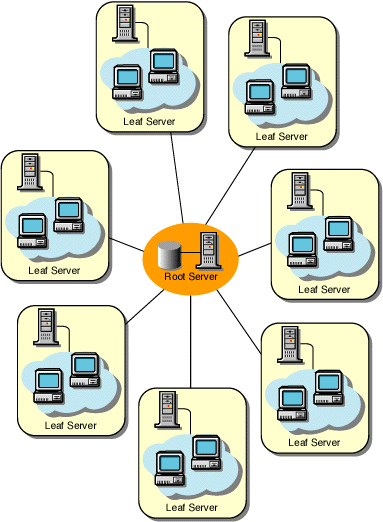
All inventory servers are connected to a central enterprise database server. The Leaf Servers do not have a database and Intermediate Servers are not required.
In this configuration, the Leaf Servers roll up data to the next-level Intermediate Server and finally to the Root Server. Another server at a different location is also connected to the Root Server.
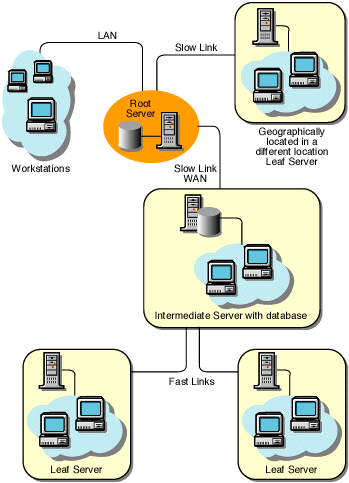
In this configuration, the inventory servers are connected to the Intermediate Server over fast WAN links. The Intermediate Server also has an Inventory database and transmits the information to the Root Server. Other servers are also connected to the Root Server.
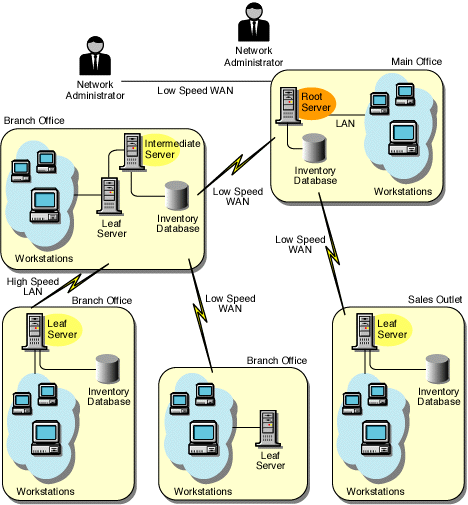
In this configuration, there are branch offices and a main office. The branch offices also store inventory information in the Intermediate Server with Database.
In this type of inventory deployment, the scanners transmit information to the servers over a WAN or dial-up connection.7. Create an Implementation Plan
8. Start the Actual Deployment
Adding a Database Server in to an Existing Inventory Setup
Possible Inventory Server Configurations for a WAN
Scenario 1: WAN Inventory Deployment for up to 50 Inventory Sites without Intermediate Servers

Scenario 2: Up to 50 Intermediate Servers Connected to the Root Server

Scenario 3: Intermediate Servers with Database Connected to the Root Server

Scenario 4: Database on Inventory Servers and Intermediate Servers Connected to a Root Server

Guidelines for Creating Policies in a WAN