Does your network have fewer than 1,000 objects (users and resources)? Are all servers connected by reliable LAN links? If the answer to both questions is yes, then you have a small network in NDS terms.
For small networks, you don't need to use the more advanced features of NDS (although understanding them can help). NDS takes care of itself with its default settings. Some of these defaults are as follows:
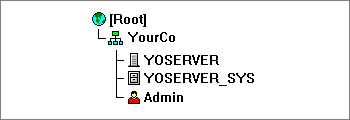
The picture below shows the default NDS tree for a small network. It has the required [Root] object, an Organization named after your company, a server (named YOSERVER in this example), a volume (named YOSERVER_SYS in this example), and a User object named Admin.
NOTE: Networks with only a Windows NT* server running NDS will have no Volume objects.
Users are added individually using NWAdmin, or in batches through a migration, upgrade, or import utility. The default NDS tree has a single container: an Organization object named after your company (YourCo in the example).
For small networks, this configuration is adequate; you can add new User objects, Application objects, printing-related objects, and other useful objects to the YourCo container.
You may want to plan new container objects in the upper levels of the tree for either or both of the reasons listed below.
After designing of the upper levels of the tree, you should plan workgroup containers and leaf objects.