

| |
Data compression reduces the amount of information transferred over a communications link by replacing previously observed data sequences with more compact sequences. This increases the apparent speed of the link, at the cost of some additional router CPU load. Enabling data compression allows negotiation by CCP of compression with the remote peer. Data compression is used if both the local and remote peers support a common compression technique.
This support for data compression allows more effective PPP link utilization when packets are routed between remote LANs. Figure 3 illustrates a simple network configuration showing NetWare Link/PPP operating over a 56-Kbps leased line to connect two Ethernet LANs operating at 10 Mbps. Note that data compression is necessary only over the PPP link connecting two LANs because this is the slowest portion of the end-to-end network traffic.
Figure 3
Two LANs over a 56-Kbps Leased Line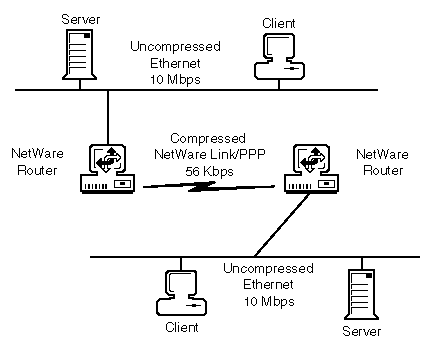
For more information about data compression, refer to:
Proper operation of most data compression algorithms requires that no data corruption be permitted on the communications link because each bit of the compressed data is much more significant than the uncompressed data. One incorrect bit can result in thousands of bytes of incorrect output.
NetWare Link/PPP is, by default, an unreliable or best effort data link that does not guarantee data delivery. Retransmission of lost or corrupted data is the responsibility of higher-level protocols. Therefore, to ensure data integrity of the compressed data exchange, the unreliable PPP data link is replaced with a reliable data-link protocol when data compression is negotiated successfully by CCP. This reliable data-link protocol is ITU Link Access Protocol-Balanced (LAPB) . LAPB significantly increases the reliability of the communications link when used in conjunction with error checking after the received data is uncompressed.
Data compression is performed on network data only. NetWare Link/PPP LCP and NCP data is passed uncompressed. LCP and NCP data exchanges are used for connection management and configuration negotiation. They are typically used only during the connection establishment and termination operations. These protocol exchanges have their own error recovery mechanisms and, as such, do not benefit from the LAPB reliable data-link services.
NetWare Link/PPP supports the Pattern Predictor and Stac LZS compression algorithms. The Pattern Predictor compression technique provides useful data compression over a wide range of line speeds, from 1,200 baud through E1 data rates. Future versions of NetWare Link/PPP might include additional compression algorithms tailored to provide higher compression at specific line speeds.
As currently implemented, the data compression capability permits a best case 8:1 compression ratio with highly compressible data. A realistic figure for a typical mix of graphic, text, and binary data is on the order of a 2:1 compression ratio. This increases the apparent throughput of a 56-Kbps link, for example, to almost 112 Kbps. Furthermore, the Predictor Type 2 algorithm surpasses the Predictor Type 1 algorithm by filling the PPP packets to the maximum transmission unit (MTU) size with the compressed payload data. This payload data can be from different types of Transport-layer packets, such as IP, IPX, or AppleTalk packets.
Generally, as the communications link speed increases, the ability of data compression to enhance throughput performance decreases. The reason is that on a higher-speed line, the output buffers are emptied faster and compression cannot keep up, whereas on a lower-speed line, the output buffers are emptied more slowly and the compression algorithm can keep the buffers full. Therefore, although data compression provides some benefit at speeds up to E1 (2.048 Mbps), the performance improvement is not as great as that on a lower-speed 56-Kbps link. Refer to On-Demand WAN Connections and PPP over ISDN for a comparison of typical compression improvements at 56 Kbps and 1.536 Mbps.
Actual results, of course, vary depending on a number of factors, including the type of data being transferred, the type of PC systems NetWare Link/PPP runs on, and the speed of the communications link.
NetWare Link/PPP data compression works best when a constant supply of transmit data is available at the interface. This allows the compression logic to maximize the replacement of data sequences with the more compact sequences. Therefore, when using IPX with NetWare Link/PPP data compression, the IPX Packet BurstTM protocol and the Large Internet Packet (LIP) protocol should also be used. The Packet Burst protocol enhances IPX by allowing larger data transactions, composed of multiple IPX packets, to be transmitted as a single burst (or logical operation). Acknowledgments are issued for the complete burst rather than for individual IPX packets. For best results, the Packet Burst protocol and the LIP protocol must be enabled on each client and server end node system. Although the LIP protocol is included in the Packet Burst software for NetWare servers, it must be enabled separately on the clients.
WARNING: The IPX client workstation Packet Burst protocol support provided by BNETX.COM is out of date and must not be used.
Packet Burst protocol support for NetWare 3.1x or NetWare 4 clients is provided by the Novell ClientTM files on the Novell Client CD-ROM. Alternately, for NetWare 3.11 clients, you can use the NetWare Client for DOS and Windows (VLMTM) files on the Novell Client CD-ROM. Packet Burst protocol support is provided for NetWare 3.11 servers by the PBURST.NLM included in the PBURST.EXE file. Search for the PBURT.EXE file at the following locations:
Actual compression ratio and effective throughput varies, depending on the amount and type of data being sent. For example, encrypted data does not compress at all (and might even increase the amount of data sent), whereas ASCII text documents might compress significantly.
Figure 4 is an example of compression statistics displayed by the Monitor utility.
Figure 4
Compression Statistics Displayed by Monitor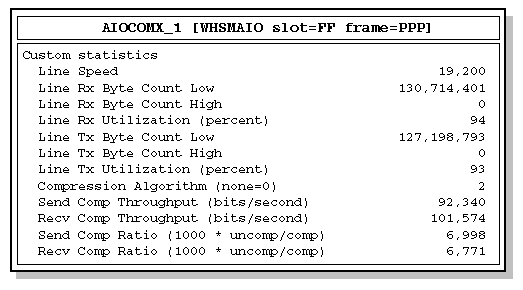
In the example shown in Figure 4, the send compression ratio is 6,998:1, meaning that for every 6,998 bytes of input data, 1,000 bytes of compressed data are sent over the link. The send compressed throughput figure shows the actual, real-time effective throughput of the line, expressed in bits per second. In the example, the link is capable of 19,200 bits per second, and with the compression enabled, you can see an effective throughput of 92,340 bits per second. The receive compressed throughput is 101,574 bits per second.
Data compression can significantly increase the apparent link speed of all protocols supported, including the IPX protocol. Data compression is of greater value if the link is already busy (for example, when many workstations are using a remote server).
Table 1 and Table 2 graph the performance of links, as tested with the PERFORM3, a network testing program (located on the NetWire(SM) electronic bulletin board), using AST* 486/33E servers and workstations. The test program was run using the following command:
PERFORM3 filename 12 128 4096 1024
Data is expressed as Kbps.
Table 1. Compression Performance for 56-Kbps Links
| Scenario | Performance (Kbps) |
|---|---|
One workstation, no compression |
49.60 |
One workstation, compression |
149.76 |
Five workstations, no compression |
41.28 |
Five workstations, compression |
176.32 |
Table 2. Compression Performance for T1 (1.5-Mbps) Links
| Scenario | Performance (Kbps) |
|---|---|
One workstation, no compression |
891.52 |
One workstation, compression |
1,252.08 |
Five workstations, no compression |
1,405.36 |
Five workstations, compression |
2,337.04 |
Each compression algorithm offers a slightly different advantage in either the compression ratio or the compression/decompression speed. Table 3, Table 4, and Table 5 show the benchmark values for all three algorithms. The benchmark tests used 1,024-byte blocks from a 3-MB file that consists of 20 smaller files of differing data types. Table 3 compares the compression ratios of the three algorithms. Table 4 compares the time in microseconds to compress data, and Table 5 compares the time in microseconds to decompress data. Note that the values listed in these three tables are numerator values where the denominator is one. A value of less than one indicates expansion. Expansion is caused by the compression of data that does not contain redundant sequences of characters. This condition causes the compression algorithm to produce more bytes than the original data size.
Table 3. Compression Ratio Comparisons
|
Novell Predictor |
Stac LZS |
Minimum ratio |
0.996 |
1.224 |
Maximum ratio |
4.266 |
6.243 |
Average ratio |
1.744 |
1.894 |
Expansion |
0.996 |
1.000 |
Table 4. Compression Time Comparisons
| Time in Microseconds | Novell Predictor | Stac LZS |
|---|---|---|
Minimum ratio |
3,332 |
20,306 |
Maximum ratio |
1,662 |
10,455 |
Average time |
2,632 |
18,620 |
Minimum time |
1,576 |
10,455 |
Maximum time |
3,332 |
23,574 |
Table 5. Decompression Time Comparisons
| Time in Microseconds | Novell Predictor | Stac LZS |
|---|---|---|
Minimum ratio |
2,824 |
17,110 |
Maximum ratio |
1,218 |
9,128 |
Average time |
2,249 |
14,419 |
Minimum time |
1,098 |
9,128 |
Maximum time |
2,833 |
17,110 |
| |