1.1 Understanding What Changed to Enable NSS AD Support in OES

1.1.1 Novell CIFS Access Changes

Figure 1-1 Novell CIFS Access Changes in OES 2015 SP1
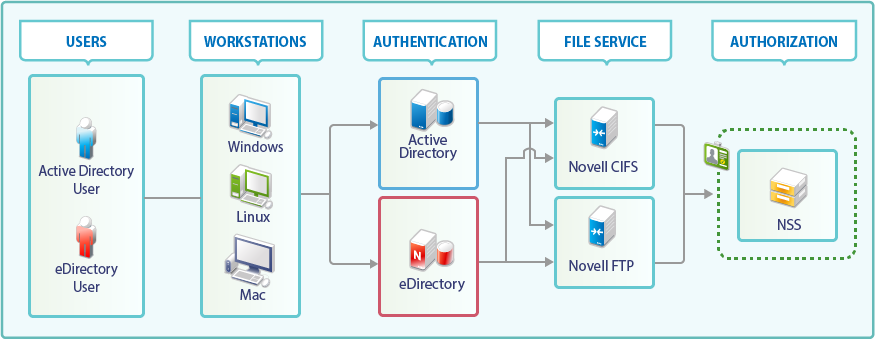
Table 1-1 Summary of Novell CIFS Access Changes

CIFS Access Component

OES 11 SP2 and Earlier

OES 2015 and Later

Users

eDirectory users access NSS using their eDirectory credentials.

eDirectory and Active Directory users can access NSS using their eDirectory and Active Directory credentials, respectively.

Workstations

Windows, Linux and Macintosh are supported.

No changes in platform support.

Authentication

Only eDirectory is supported as an identity source.

All file service access is controlled by eDirectory authentication through NMAS.

Both eDirectory and Active Directory are supported as identity sources.

For eDirectory users, NMAS authentication is still used.

For Active Directory users, Novell CIFS interacts with Active Directory and the Kerberos service is used to authenticate the Active Directory users.

File Service

Novell CIFS is among the many file services offered, which also include Novell AFP, NetStorage, NCP, Novell FTP, and iFolder.

Novell CIFS offers support for Active Directory users.

Beginning with OES 2015 SP1, Novell FTP offers support for Active directory users.

No other file services are enabled for AD user access at this point.

Authorization

Authorization to access NSS is handled by Novell CIFS working in cooperation with NSS.

Authorization to access NSS through Novell CIFS is handled by NSS alone. This increases both the efficiency and the reliability of the authorization process.

1.1.2 OES Service Changes For NSS AD

Table 1-2 OES 2015 or Later Changes

Service

OES 2015 or Later Changes and Information

Novell CIFS

You can grant AD users native CIFS access to NSS volumes with Novell trustee model.

  • Beginning with OES 2015 SP1, Active Directory and eDirectory users can perform salvage and purge operation through NFARM (OES File Access Rights Management) utility.

  • AD users can access NSS resources in a multi-forest environment.

Novell Cluster Services (NCS)

Cluster resources can now join to AD domains.

Distributed File Services (DFS)

DFS is supported in NSS AD environment.

Dynamic Storage Technology (DST)

DST is supported in NSS AD environment.

FTP Server

Beginning with OES 2015 SP1, FTP server is supported in NSS AD environment.

Novell Identity Translator (NIT)

NIT lets you ensure that eDirectory and AD users requiring NSS authorization have the required UIDs.

Beginning with OES 2015 SP1, it supports AD users in multi-forest environment.

NSS (Novell Storage Services)

AD users can now access NSS through CIFS.

Storage Management Services (SMS)

SMS now supports backing up AD trustee information in NSS AD environment.

NSS Auditing Client Logger (VLOG)

Audit all file operations for AD users.

Beginning with OES 2015 SP1, VLOG have been enhanced to filter based on user names and application names.

1.1.3 Multi-Forest Support for AD Users

Beginning with OES 2015 SP1, multi-forest support allows access to NSS resources from Active Directory users belonging to AD forests having bi-directional trust with OES joined forest or AD domains having bi-directional external trust with OES joined forest.

The following OES components supports multi-forest for AD users: NSS, CIFS, DFS, DST, Migration Tool, NIT, SMS, and VLOG.

1.1.4 Utility and Management Tool Changes

Table 1-3 OES 2015 or Later Utility Changes

Utility

Changes and Information

iManager Storage Plug-ins

The following capabilities have been added to the iManager Storage plug-in:

  • Pool Type: Creating NSS 64-bit pools and volumes and displaying pool type information.

  • AD media: Support for creating, upgrading, and enabling pools and volumes to support AD users.

For more information, see Managing NSS Pools in the OES 2015 SP1: NSS File System Administration Guide for Linux.

NFARM

NFARM shell extension lets AD administrators to manage NSS ACLs for AD users/groups.

Beginning with OES 2015 SP1, Active Directory and eDirectory users can perform salvage and purge operation.

For more information, see Section 6.5.8, Salvage and Purge.

nitconfig

Lets administrators configure the NIT configuration parameters contained in the nitd.conf file.

For more information, see nitconfig utility:.

novcifs

Lists the AD connections.

novell-ad-util

Lets the administrators join an OES 2015 (or later) server or a cluster resource to an Active Directory domain and manage the Kerberos keytabs.

For more information, see Section 6.3.1, novell-ad-util Command Line Utility.

nsschown

Options are added for changing file and directory ownership based on the owner’s Security Identifier (SID) or AD Username. There is also an option to change the ownership of extended attributes at the same time.

nsscon

Commands are enhanced for AD media upgrade commands and AD enabling the volume.

For more information, see NSS Media Upgrade Commands in the OES 2015 SP1: NSS File System Administration Guide for Linux.

nssmu

Utility is enhanced for media upgrading a pool to support AD users, AD enabling the volume, and joining the cluster pool to the AD domain.

For more information, see NSS Management Utility (NSSMU) Quick Reference in the OES 2015 SP1: NSS File System Administration Guide for Linux.

nssquota

Options are added for setting quotas for AD users and groups.

  • -a or –-activedirectory

NURM

NURM lets administrators create maps between eDirectory and Active Directory users and supports ACL migration from eDirectory to Active Directory.

Beginning with OES 2015 SP1, NURM provides the following enhancements and changes: Contextless login, Refreshing user maps, Two way synchronization of rights, Secure LDAP port to connect to the AD server, Map rights using multiple user maps, and Pagination and filtering.

For more information, see NURM (OES User Rights Management).

rights

Options are added for managing rights for AD users and groups.

  • -a or –-activedirectory