Classroom Workspace
INTRODUCTION: The classroom workspace is an out-of-the-box template workspace for use in your system. Basic landing page and folders are used to highlight the effectiveness of Teaming in an education environment. Teachers will find content easy to add, delete, and modify. Students will quickly be able to use this online classroom as a one stop shop for all their school needs. Even parents can make use of this Teaming workspace. Your children will never again keep a homework assignment from you.
|
Figure 1: Classroom Workspace 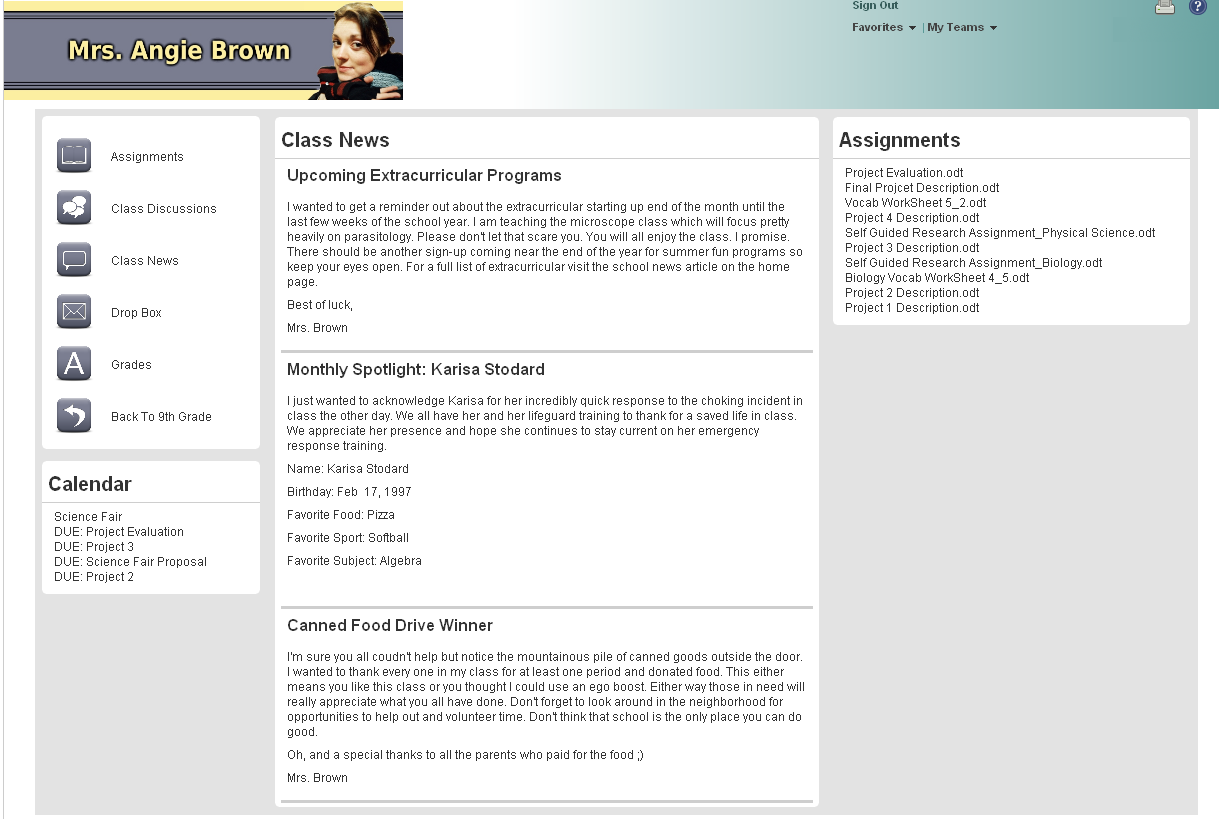
|
DESCRIPTION:
This workspace is the out-of-the-box version of a classroom workspace used in the Education Demo workspace. The workspace can be imported into your Teaming environment once for a classroom or many times for a school.
The Education Demo provided material for a number of downloadable content. This is an example of a simple landing page. Little has been done in the way of customization. As a result the workspace is easy to import and start using. The Workspace includes folders for:
- Assignments
- Calendar
- Class Discussion
- Class News
- Online Drop Box for Completed Assignments
Access Controls have not been set up. Instructions for getting started are in an entry displayed in the Class News portion of the landing page. The workspace does not contain any custom forms or workflows. A custom workflow would be useful to maintain privacy in the Drop Box.
Kablink also has an example of a classroom workspace here.
VERSION: Teaming 2.1
TIME TO DEPLOY: 15 min
Attachments
| File Name | Size | Last Updated |
|---|---|---|
| 200.2 KB | 05/3/2010 |
