4.2 Cluster Resources
As a cluster administrator, you need to create cluster resources for every resource or application you run on servers in your cluster. Cluster resources can include Web sites, e-mail servers, databases, file systems, virtual machines, and any other server-based applications or services you want to make available to users at all times.
4.2.1 Resource Management
Before you can use a resource in the cluster, it must be set up. For example, if you want to use an Apache server as a cluster resource, set up the Apache server first and complete the Apache configuration before starting the respective resource in your cluster.
If a resource has specific environment requirements, make sure they are present and identical on all cluster nodes. This kind of configuration is not managed by the High Availability Extension. You must do this yourself.
NOTE: Do Not Touch Services Managed by the Cluster
When managing a resource with the High Availability Extension, the same resource must not be started or stopped otherwise (outside of the cluster, for example manually or on boot or reboot). The High Availability Extension software is responsible for all service start or stop actions.
However, if you want to check if the service is configured properly, start it manually, but make sure that it is stopped again before High Availability takes over.
After having configured the resources in the cluster, use the cluster management tools to start, stop, clean up, remove or migrate any resources manually. For details how to do so, refer to Section 5.0, Configuring and Managing Cluster Resources (GUI) or to Section 6.0, Configuring and Managing Cluster Resources (Command Line).
4.2.2 Supported Resource Agent Classes
For each cluster resource you add, you need to define the standard that the resource agent conforms to. Resource agents abstract the services they provide and present an accurate status to the cluster, which allows the cluster to be non-committal about the resources it manages. The cluster relies on the resource agent to react appropriately when given a start, stop or monitor command.
Typically, resource agents come in the form of shell scripts. The High Availability Extension supports the following classes of resource agents:
- Legacy Heartbeat 1 Resource Agents
-
Heartbeat version 1 came with its own style of resource agents. As many people have written their own agents based on its conventions, these resource agents are still supported. However, it is recommended to migrate your configurations to High Availability OCF RAs if possible.
- Linux Standards Base (LSB) Scripts
-
LSB resource agents are generally provided by the operating system/distribution and are found in /etc/init.d. To be used with the cluster, they must conform to the LSB init script specification. For example, they must have several actions implemented, which are, at minimum, start, stop, restart, reload, force-reload, and status. For more information, see http://ldn.linuxfoundation.org/lsb/lsb4-resource-page%23Specification.
The configuration of those services is not standardized. If you intend to use an LSB script with High Availability, make sure that you understand how the relevant script is configured. Often you can find information about this in the documentation of the relevant package in /usr/share/doc/packages/PACKAGENAME.
- Open Cluster Framework (OCF) Resource Agents
-
OCF RA agents are best suited for use with High Availability, especially when you need master resources or special monitoring abilities. The agents are generally located in /usr/lib/ocf/resource.d/provider/. Their functionality is similar to that of LSB scripts. However, the configuration is always done with environmental variables which allow them to accept and process parameters easily. The OCF specification (as it relates to resource agents) can be found at http://www.opencf.org/cgi-bin/viewcvs.cgi/specs/ra/resource-agent-api.txt?rev=HEAD&content-type=text/vnd.viewcvs-markup. OCF specifications have strict definitions of which exit codes must be returned by actions, see Section 8.3, OCF Return Codes and Failure Recovery. The cluster follows these specifications exactly. For a detailed list of all available OCF RAs, refer to Section 19.0, HA OCF Agents.
All OCF Resource Agents are required to have at least the actions start, stop, status, monitor, and meta-data. The meta-data action retrieves information about how to configure the agent. For example, if you want to know more about the IPaddr agent by the provider heartbeat, use the following command:
OCF_ROOT=/usr/lib/ocf /usr/lib/ocf/resource.d/heartbeat/IPaddr meta-data
The output is information in XML format, including several sections (general description, available parameters, available actions for the agent).
- STONITH Resource Agents
-
This class is used exclusively for fencing related resources. For more information, see Section 9.0, Fencing and STONITH.
The agents supplied with the High Availability Extension are written to OCF specifications.
4.2.3 Types of Resources
The following types of resources can be created:
- Primitives
-
A primitive resource, the most basic type of a resource.
Learn how to create primitive resources with the GUI in Adding Primitive Resources. If you prefer the command line approach, see Section 6.3.1, Creating Cluster Resources.
- Groups
-
Groups contain a set of resources that need to be located together, started sequentially and stopped in the reverse order. For more information, refer to Groups.
- Clones
-
Clones are resources that can be active on multiple hosts. Any resource can be cloned, provided the respective resource agent supports it. For more information, refer to Stateful Clones.
- Masters
-
Masters are a special type of clone resources, they can have multiple modes. For more information, refer to Masters.
4.2.4 Advanced Resource Types
Whereas primitives are the simplest kind of resources and therefore easy to configure, you will probably also need more advanced resource types for cluster configuration, such as groups, clones or masters.
Groups
Some cluster resources are dependent on other components or resources, and require that each component or resource starts in a specific order and runs together on the same server. To simplify this configuration, you can use groups.
Example 4-1 Resource Group for a Web Server
An example of a resource group would be a Web server that requires an IP address and a file system. In this case, each component is a separate cluster resource that is combined into a cluster resource group. The resource group would then run on a server or servers, and in case of a software or hardware malfunction, fail over to another server in the cluster the same as an individual cluster resource.
Figure 4-1 Group Resource
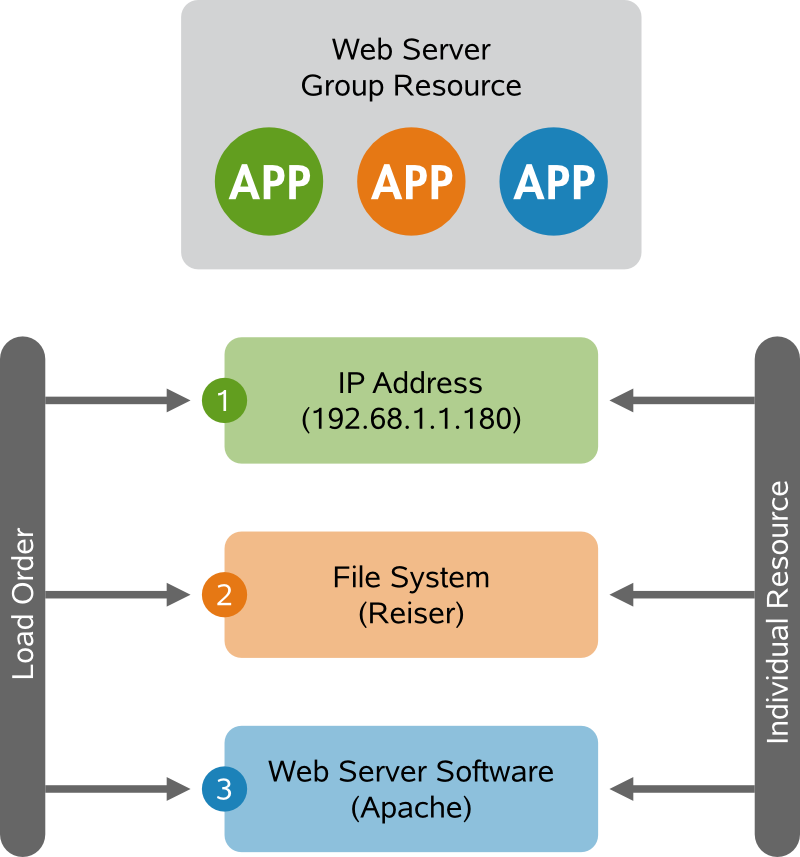
Groups have the following properties:
- Starting and Stopping
-
Resources are started in the order they appear in and stopped in the reverse order.
- Dependency
-
If a resource in the group cannot run anywhere, then none of the resources located after that resource in the group is allowed to run.
- Contents
-
Groups may only contain a collection of primitive cluster resources. Groups must contain at least one resource, otherwise the configuration is not valid. To refer to the child of a group resource, use the child’s ID instead of the group’s ID.
- Constraints
-
Although it is possible to reference the group’s children in constraints, it is usually preferable to use the group’s name instead.
- Stickiness
-
Stickiness is additive in groups. Every active member of the group will contribute its stickiness value to the group’s total. So if the default resource-stickiness is 100 and a group has seven members (five of which are active), then the group as a whole will prefer its current location with a score of 500.
- Resource Monitoring
-
To enable resource monitoring for a group, you must configure monitoring separately for each resource in the group that you want monitored.
Learn how to create groups with the GUI in Adding a Resource Group. If you prefer the command line approach, see Section 6.3.9, Configuring a Cluster Resource Group.
Clones
You may want certain resources to run simultaneously on multiple nodes in your cluster. To do this you must configure a resource as a clone. Examples of resources that might be configured as clones include STONITH and cluster file systems like OCFS2. You can clone any resource provided. This is supported by the resource’s Resource Agent. Clone resources may even be configured differently depending on which nodes they are hosted.
There are three types of resource clones:
- Anonymous Clones
-
These are the simplest type of clones. They behave identically anywhere they are running. Because of this, there can only be one instance of an anonymous clone active per machine.
- Globally Unique Clones
-
These resources are distinct entities. An instance of the clone running on one node is not equivalent to another instance on another node; nor would any two instances on the same node be equivalent.
- Stateful Clones
-
Active instances of these resources are divided into two states, active and passive. These are also sometimes referred to as primary and secondary, or master and slave. Stateful clones can be either anonymous or globally unique. See also Masters.
Clones must contain exactly one group or one regular resource.
When configuring resource monitoring or constraints, masters have different requirements than simple resources. For details, see Pacemaker 1.0—Configuration Explained, available from http://clusterlabs.org/wiki/Documentation. Refer to section Clones - Resources That Should be Active on Multiple Hosts.
Learn how to create clones with the GUI in Adding or Modifying Clones. If you prefer the command line approach, see Section 6.3.10, Configuring a Clone Resource.
Masters
Masters are a specialization of clones that allow the instances to be in one of two operating modes (master or slave). Masters must contain exactly one group or one regular resource.
When configuring resource monitoring or constraints, masters have different requirements than simple resources. For details, see Pacemaker 1.0—Configuration Explained, available from http://clusterlabs.org/wiki/Documentation. Refer to section Multi-state - Resources That Have Multiple Modes.
4.2.5 Resource Options (Meta Attributes)
For each resource you add, you can define options. Options are used by the cluster to decide how your resource should behave—they tell the CRM how to treat a specific resource. Resource options can be set with the crm_resource --meta command or with the GUI as described in Adding or Modifying Meta and Instance Attributes.
Table 4-1 Options for a Primitive Resource
|
Option |
Description |
|---|---|
|
priority |
If not all resources can be active, the cluster will stop lower priority resources in order to keep higher priority ones active. |
|
target-role |
In what state should the cluster attempt to keep this resource? Allowed values: stopped, started. |
|
is-managed |
Is the cluster allowed to start and stop the resource? Allowed values: true, false. |
|
resource-stickiness |
How much does the resource prefer to stay where it is? Defaults to the value of default- resource-stickiness. |
|
migration-threshold |
How many failures should occur for this resource on a node before making the node ineligible to host this resource? Default: none. |
|
multiple-active |
What should the cluster do if it ever finds the resource active on more than one node? Allowed values: block (mark the resource as unmanaged), stop_only, stop_start. |
|
failure-timeout |
How many seconds to wait before acting as if the failure had not occurred (and potentially allowing the resource back to the node on which it failed)? Default: never. |
|
allow-migrate |
Allow resource migration for resources which support migrate_to/migrate_from actions. |
4.2.6 Instance Attributes
The scripts of all resource classes can be given parameters which determine how they behave and which instance of a service they control. If your resource agent supports parameters, you can add them with the crm_resource command or with the GUI as described in Adding or Modifying Meta and Instance Attributes. In the crm command line utility, instance attributes are called params. The list of instance attributes supported by an OCF script can be found by executing the following command as root:
crm ra info [class:[provider:]]resource_agent
or, even shorter:
crm ra info resource_agent
The output lists all the supported attributes, their purpose and default values.
For example, the command
crm ra info Ipaddr
returns the following output:
Manages virtual IPv4 addresses (portable version) (ocf:heartbeat:IPaddr)

This script manages IP alias IP addresses
It can add an IP alias, or remove one.

Parameters (* denotes required, [] the default):

ip* (string): IPv4 address
The IPv4 address to be configured in dotted quad notation, for example
"192.168.1.1".

nic (string, [eth0]): Network interface
The base network interface on which the IP address will be brought
online.

If left empty, the script will try and determine this from the
routing table.

Do NOT specify an alias interface in the form eth0:1 or anything here;
rather, specify the base interface only.

cidr_netmask (string): Netmask
The netmask for the interface in CIDR format. (ie, 24), or in
dotted quad notation  255.255.255.0).

If unspecified, the script will also try to determine this from the
routing table.

broadcast (string): Broadcast address
Broadcast address associated with the IP. If left empty, the script will
determine this from the netmask.

iflabel (string): Interface label
You can specify an additional label for your IP address here.

lvs_support (boolean, [false]): Enable support for LVS DR
Enable support for LVS Direct Routing configurations. In case a IP
address is stopped, only move it to the loopback device to allow the
local node to continue to service requests, but no longer advertise it
on the network.

local_stop_script (string):
Script called when the IP is released

local_start_script (string):
Script called when the IP is added

ARP_INTERVAL_MS (integer, [500]): milliseconds between gratuitous ARPs
milliseconds between ARPs

ARP_REPEAT (integer, [10]): repeat count
How many gratuitous ARPs to send out when bringing up a new address

ARP_BACKGROUND (boolean, [yes]): run in background
run in background (no longer any reason to do this)

ARP_NETMASK (string, [ffffffffffff]): netmask for ARP
netmask for ARP - in nonstandard hexadecimal format.

Operations' defaults (advisory minimum):

start         timeout=90
stop          timeout=100
monitor_0     interval=5s timeout=20s
NOTE: Instance Attributes for Groups, Clones or Masters
Note that groups, clones and masters do not have instance attributes. However, any instance attributes set will be inherited by the group's, clone's or master's children.
4.2.7 Resource Operations
By default, the cluster will not ensure that your resources are still healthy. To instruct the cluster to do this, you need to add a monitor operation to the resource’s definition. Monitor operations can be added for all classes or resource agents. For more information, refer to Section 4.3, Resource Monitoring.
Table 4-2 Resource Operations
|
Operation |
Description |
|---|---|
|
id |
Your name for the action. Must be unique. (The ID is not shown). |
|
name |
The action to perform. Common values: monitor, start, stop. |
|
interval |
How frequently to perform the operation. Unit: seconds |
|
timeout |
How long to wait before declaring the action has failed. |
|
requires |
What conditions need to be satisfied before this action occurs. Allowed values: nothing, quorum, fencing. The default depends on whether fencing is enabled and if the resource’s class is stonith. For STONITH resources, the default is nothing. |
|
on-fail |
The action to take if this action ever fails. Allowed values:
|
|
enabled |
If false, the operation is treated as if it does not exist. Allowed values: true, false. |
|
role |
Run the operation only if the resource has this role. |
|
record-pending |
Can be set either globally or for individual resources. Makes the
CIB reflect the state of |
|
description |
Description of the operation. |