ZENworks Service Desk Version Currency Reference
This document explains the upgrading or migrating to the latest version of Service Desk.
ZENworks Service Desk is an ITIL-based solution and is available only as a virtual appliance that can be deployed to a supported virtual infrastructure. Service Desk Appliance is built on a customized SUSE Linux Enterprise Server (SLES), and comes pre-installed with Service Desk and thus helping save on operating system license costs. This document provides an in-depth step-by-step procedure that is required to deploy or upgrade the ZENworks Service Desk.
ZENworks Service Desk can be migrated from version 25.1 to version 25.2, allowing users to take advantage of the latest features and improvements. ZENworks Service Desk 25.2 is the latest available version.
ZENworks Service Desk 25.1 does not support fresh deployment of appliance.
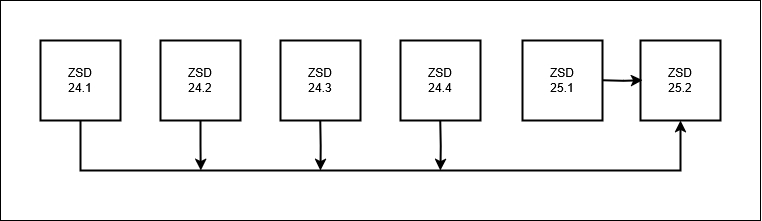
Upgrading to ZENworks Service Desk 25.2
Upgrade Preparedness
Before upgrading your ZENworks Service Desk, ensure that you review ZENworks Service Desk:
-
Pre-migration Tasks (To backup system customizations)
New Installation
ZENworks Service Desk 25.2 does not support fresh deployment of appliance. ZENworks Service Desk 25.2 can be downloaded from Software License and Download.
Updating to ZENworks Service Desk 25.2
ZENworks Service Desk 25.2 is the latest available version. ZENworks Service Desk can be migrated from version 25.1 to version 25.2, allowing users to take advantage of the latest features and improvements.
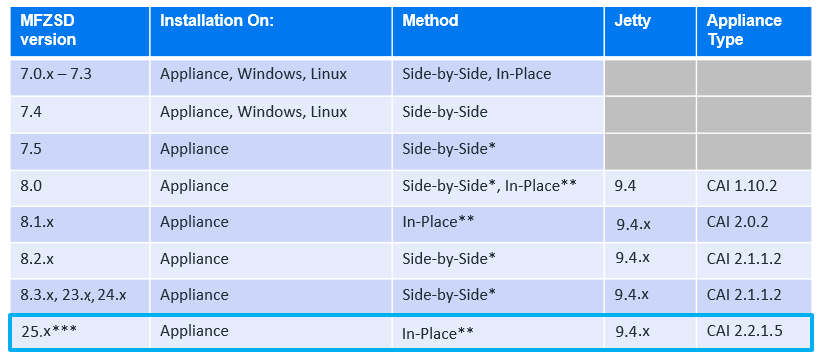
The following image depicts the method that can be used to update or migrate your existing ZENworks Service Desk:
-
ZSD v7.5(& higher) support the Appliance model only.
-
Each upgrade method (in-Place or Side-by-Side) accommodates internal (embedded) and ext. Databases.
-
*Note: Upgrading a v7.5 Appliance to v8.x Appliance requires an rpm script to be run before upgrading to prepare VAStorage drive.
-
**In-Place Upgrade method via Online Update tile in the Administration Console (9443) – See ZSD V23.4 Documentation.
-
***Release version format changed to <year>.<calendar quarter>
Post-migration Task
After updating, ensure that you restore any customizations by reviewing the Post-Migration Tasks and also register to the Online Update channel, which enables you to upgrade your appliance.
The same Appliance Online Update Channel registration key can be used for ZENworks Service Desk 8.3.x and 23.3. The registration key can be found in Software Licenses and Downloads.
ZENworks Service Desk 25.2 System Requirements
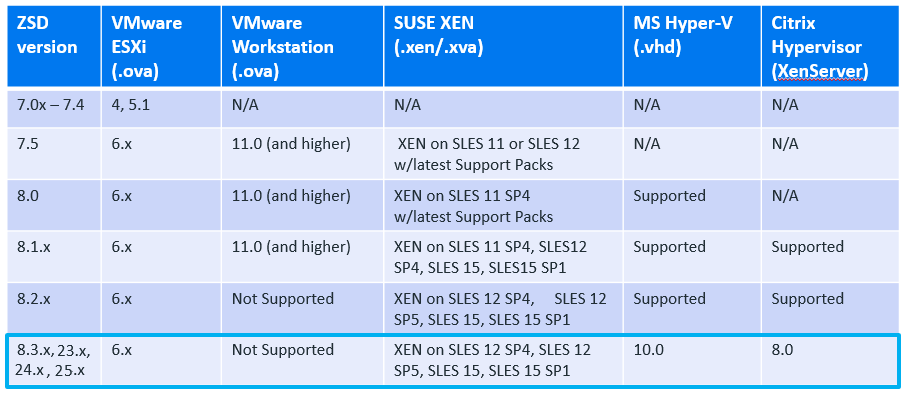
Virtual Hypervisor
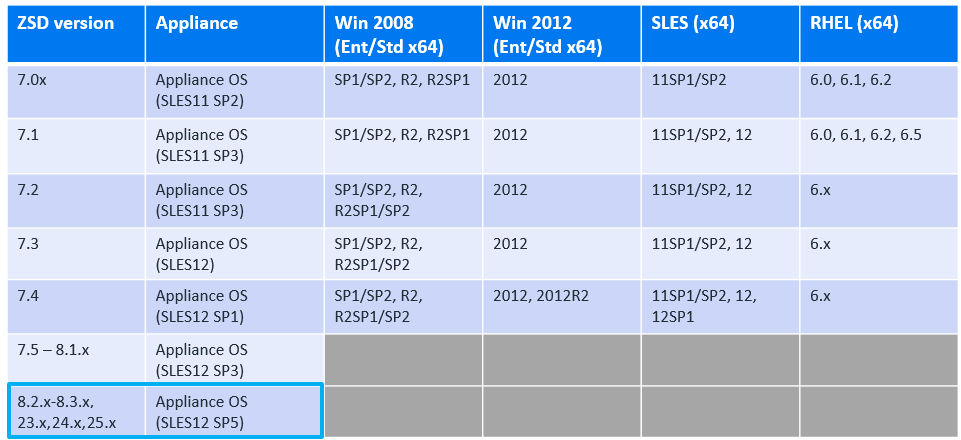
Server OS Requirements
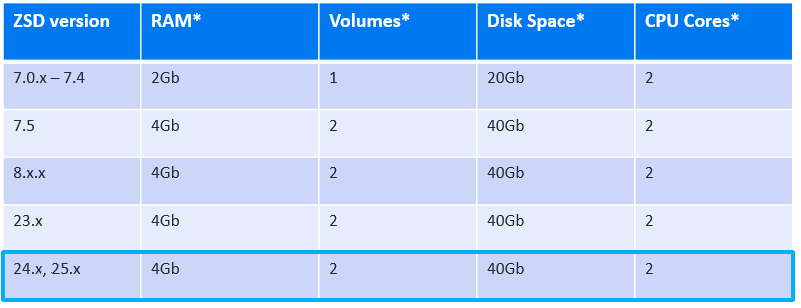
RAM, CPUs, and Disk Space
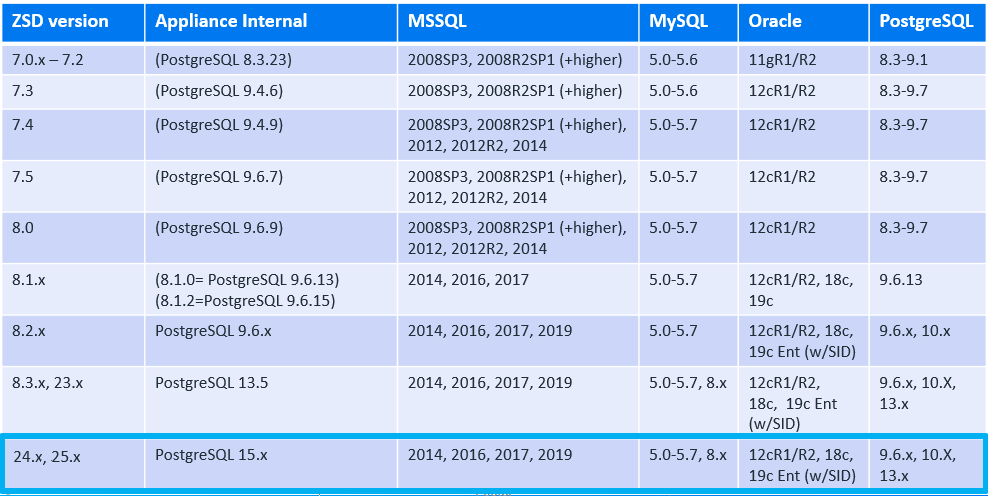
Database Requirements
Upgrading from ZENworks Service Desk 8.1.x/8.2.x to ZENworks Service Desk 8.3.x
Upgrade Path Chart
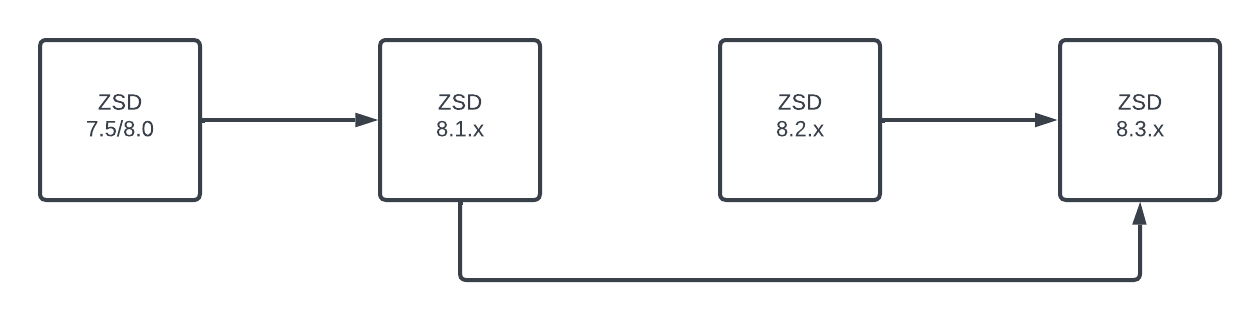
For more information, see Upgrading from ZENworks Service Desk 8.1.x/8.2.x to ZENworks Service Desk 8.3.x.
Upgrading from ZENworks Service Desk 7.5/8.0 to ZENworks Service Desk 8.1.x
Upgrade Path Chart
The following image depicts the ZENworks Service Desk upgrade path:
For more information, see Upgrading from ZENworks Service Desk 7.5/8.0 to ZENworks Service Desk 8.1.x.
Additional References
ZENworks Service Desk Documentation
Legal Notices
For information about legal notices, trademarks, disclaimers, warranties, export and other use restrictions, U.S. Government rights, patent policy, and FIPS compliance, see https://www.microfocus.com/en-us/legal.
© Copyright 2008 - 2025 Open Text.
The only warranties for products and services of Micro Focus and its affiliates and licensors (“Open Text”) are set forth in the express warranty statements accompanying such products and services. Nothing herein should be construed as constituting an additional warranty. Micro Focus shall not be liable for technical or editorial errors or omissions contained herein. The information contained herein is subject to change without notice.